Tcpdump Command Windows Server How To Quickly Fix Slui 4 Not Working In Windows Tcpdump Traffic Capture Analysis YouTube Windows 10 Tcpdump YouTube CheckPoint Firewall Troubleshooting Using TCPDump Command CheckPoint Tcpdump Command In Linux And Wireshark Packet Analysis For Network Sep 24 2014 nbsp 0183 32 You can use tcpdump i eth0 port 22 if you are connected via ssh which will eliminate all packets going to from the remote machine on port 22 this will however also drop
Aug 30 2015 nbsp 0183 32 If unspecified tcpdump searches the system interface list for the lowest numbered configured up interface excluding loop back which may turn out to be for example eth0 Jan 27 2020 nbsp 0183 32 You can then use the tcpdump utility to scan packets Example of tcpdump commands Scan on all interfaces i any any traffic that has source or desto as
Tcpdump Command In Linux And Wireshark Packet Analysis For Network Okeaction Blog TCPDUMP command line Sniffer analyzer For Windows 8 Powerful Linux Tools To Solve Your Network Woes Howtouselinux How To Use Traceroute Tracert On Windows Chris D Hicks Director Of IT MCSE MCP Internet Security Ppt Download Tcpdump Command Examples Tcpdump Reviews Features And Download Links AlternativeTo Ultimate List Of Cheat Sheet For System Administrator
Tcpdump Command Windows Server
 Tcpdump Command Windows Server
https://i.pinimg.com/originals/53/41/03/534103c5ae3824b6d7e382c70322dac6.jpg
Nov 16 2024 nbsp 0183 32 Although it looks ok I still can t see any packet using tcpdump No output at all besides the line saying quot listening on quot In wireshark my interface is detected but in the
Pre-crafted templates offer a time-saving option for developing a diverse series of files and files. These pre-designed formats and designs can be made use of for various individual and professional tasks, consisting of resumes, invitations, leaflets, newsletters, reports, discussions, and more, simplifying the material development process.
Tcpdump Command Windows Server

What Is Tcpdump Command In Linux Cyber Security Training For

Okeaction Blog

TCPDUMP command line Sniffer analyzer For Windows

8 Powerful Linux Tools To Solve Your Network Woes Howtouselinux

Chris D Hicks Director Of IT MCSE MCP Internet Security Ppt Download
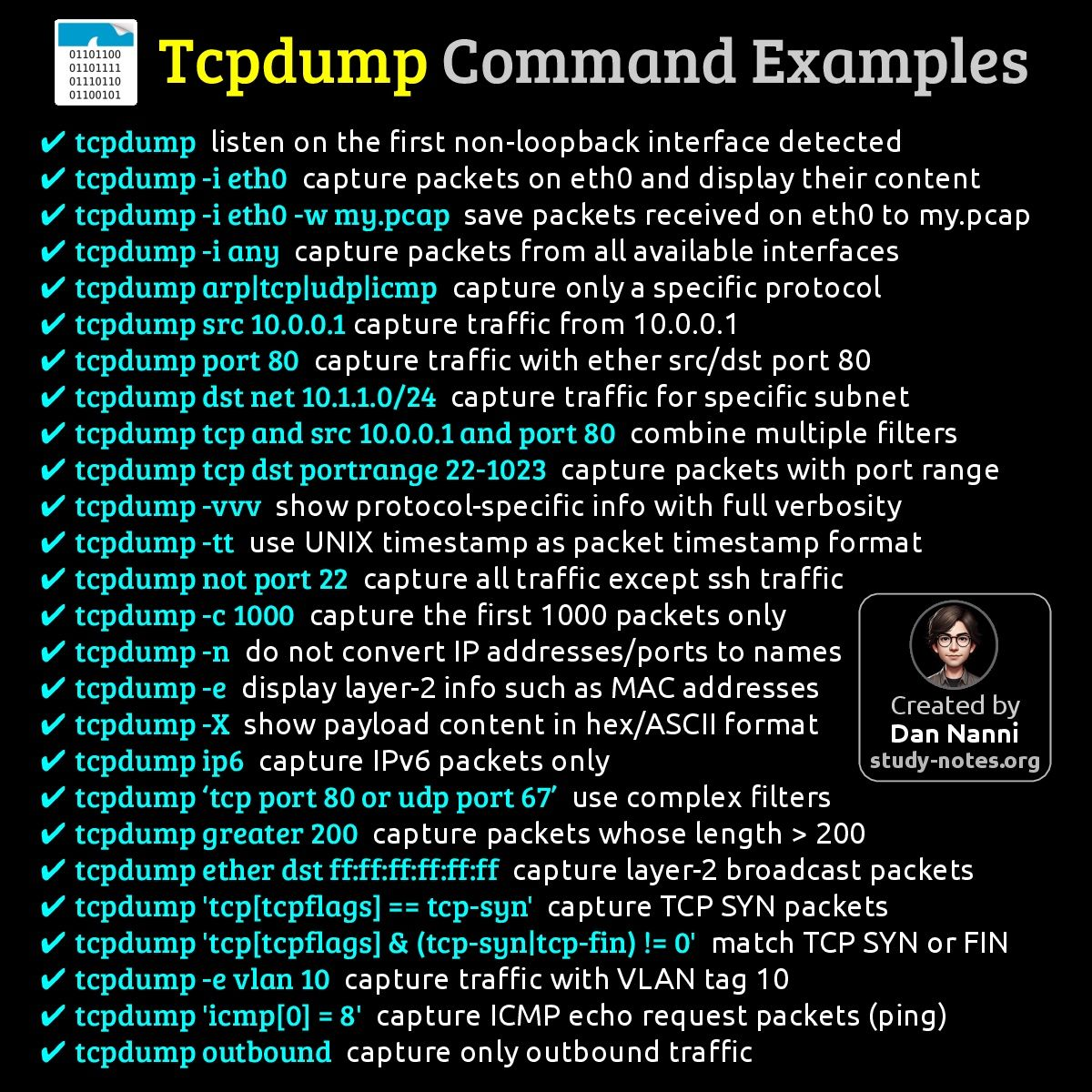
Tcpdump Command Examples

I am trying to troubleshoot an issue where I only have tcpdump available on an appliance I want to use tcpdump to filter web traffic and only display traffic containing certain strings I do the

When using G C and W together you can t use the strftime format in the filename and still get the cyclic outputs With your edit tcpdump will just continue writing out files non cyclically

I used IPTraf Iftop vnstat bwm ng ifconfig a None of them is helping me to find real time packets that are being sent received from my application in KB or MB format The reason is I

Apr 24 2013 nbsp 0183 32 While the question says display ip and port number but not hostname and protocol I doubt that it means display ip and port number but not any of the other

I ve searched quite extensively for this but cannot seem to come up with a working example My objective is to monitor TCP traffic on a specific port to see incoming connections and write
[desc-11] [desc-12]
[desc-13]