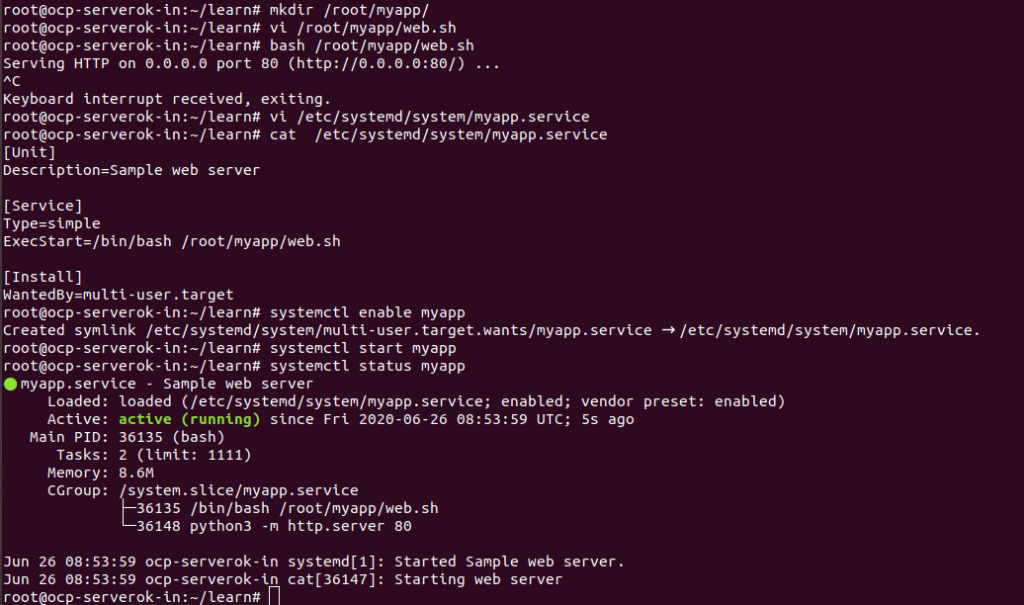
Systemd Service Enabled But Inactive Unix Linux Why Is My Systemd Unit Loaded But Inactive dead YouTube Systemd system Daemon Systemctl Journalctl LINUX NFS Start An Application Using Systemd ServerOK Unix Linux Systemd Timer Enabled But Status Is Inactive YouTube But before it shows as Inactive Dead despite being enabled 02 34 root arch system systemctl list unit files grep enabled ckb next daemon service enabled disabled getty service enabled enabled lm sensors service enabled disabled sddm service enabled disabled systemd fsck root service enabled runtime disabled systemd homed service
Inotifywait Systemd service is inactive dead but only after many weeks Stack Overflow Systemd service is inactive dead but only after many weeks Asked 4 years 6 months ago Modified 4 years 6 months ago Viewed 6k times 2 I have a custom systemd service that scans the filesystem with inotify and creates files upon certain events 1 1 2 Your output shows systemd running the app service successfully and completing what ever the task was That suggests there is nothing in the task to continue doing such as listening on a port and processing any input What happens if you take the command in the Execstart line and run it on the command line PonJar Nov 27 2022 at 8 26
Unix Linux Systemd Timer Enabled But Status Is Inactive YouTube NodeJS Systemd Service Is Inactive dead YouTube Dynamic Systemd Services Help NixOS Discourse Unix Linux Systemd Service Ends Up In inactive dead After Boot How To Write A Systemd Service That Depends On A Device Being Present How To Set SyslogIdentifier In SERVICE Section Of Systemd Service Feature Request Create Systemd Service For Autostarting Tdarr Linux How To Install Workato On premise Agent As A Linux Systemd Service Systemd Service Dashboard Grafana Labs
Systemd Service Enabled But Inactive
 Systemd Service Enabled But Inactive
https://i.ytimg.com/vi/bTv74akvuQ8/maxresdefault.jpg
8 I have two systemd services one is a flask app meant to proxy calls to a C backend While the flask app works the C program does not start at boot My service file looks like this Unit Description my backend After multi user target Service User root ExecStart home root camtool Type dbus BusName com camera Restart always RestartSec 10
Templates are pre-designed files or files that can be used for different purposes. They can save effort and time by supplying a ready-made format and layout for producing different sort of content. Templates can be utilized for individual or expert projects, such as resumes, invitations, leaflets, newsletters, reports, presentations, and more.
Systemd Service Enabled But Inactive

Unix Linux Systemd Why Is This Service Inactive dead 3

NodeJS Systemd Service Is Inactive dead YouTube

Dynamic Systemd Services Help NixOS Discourse

Unix Linux Systemd Service Ends Up In inactive dead After Boot

How To Set SyslogIdentifier In SERVICE Section Of Systemd Service
Feature Request Create Systemd Service For Autostarting Tdarr Linux

33 I am trying to write my own simple systemd service which does something simple Like writing numbers 1 to 10 to a file using the shell script My service file looks like below
1 Answer Sorted by 11 systemctl status tell us the unit is in status static systemctl status watchdog service watchdog service watchdog daemon Loaded loaded lib systemd system watchdog service static vendor preset enabled Active inactive dead From man systemctl
Systemctl shows inactive dead but service is running Ask Question Asked 4 years 10 months ago Modified 1 year ago Viewed 36k times 3 I would like to manage a TeamSpeak 3 server with systemd systemctl When I start stop restart the TeamSpeak 3 server using systemctl command systemctl is returning the correct status
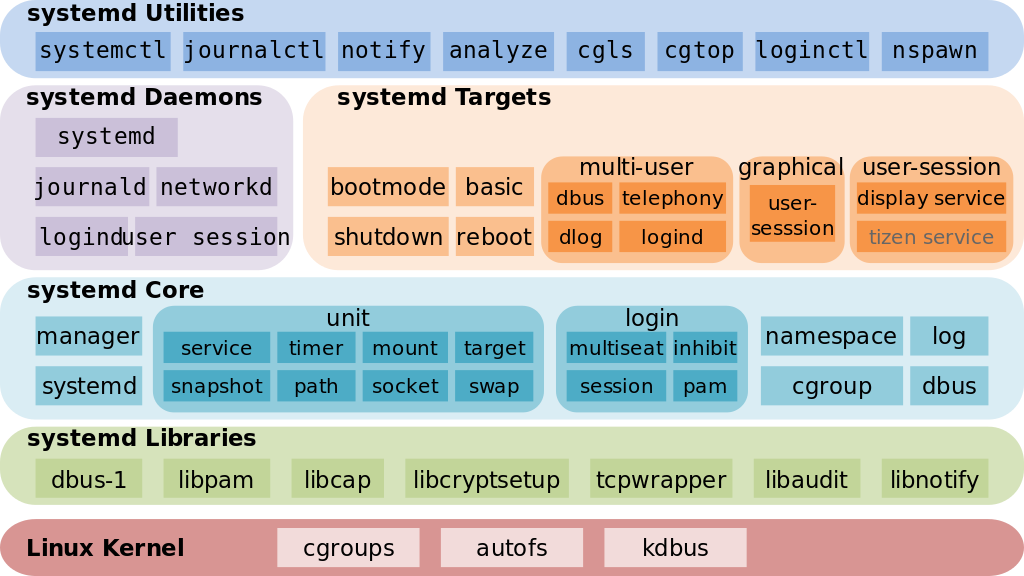
A Red Hat training course is available for RHEL 8 Chapter 14 Managing systemd As a system administrator you can manage critical aspects of your system with systemd Serving as a system and service manager for Linux operating systems systemd software suite provides tools and services for controlling reporting and system initialization

1 Answer Sorted by 1 I misunderstood the output of systemctl list unit files My service is running as per ss tlp output but it is not enabled by default at run time as shown by systemctl list unit files Running sudo systemctl enable ssh marks the service as enabled at start up and the output of systemcetl list unit files shows that Share
Systemd Service does not start on reboot Ask Question Asked 1 year 10 months ago Modified 13 days ago Viewed 8k times 0 I have the following systemd service called startupsh service placed in etc systemd system on my raspberry pi running rasbpian To check the status of a service on your system you can use the status command systemctl status application service This will provide you with the service state the cgroup hierarchy and the first few log lines For instance when checking the status of an Nginx server you may see output like this Output
After doing a lot of reading of the excellent man files and bisecting a duplicated version of the service which always mysteriously worked non mysteriously in retrospect I discovered there was an unmentioned Conficts systemd timesyncd service with vboxadd service service