Systemctl Restart Status Messages Displayed During Server Restart On Craiyon RESTART Realtime YouTube Live View Counter Livecounts io Discord Bot Status Display On Craiyon Network Status Check Icon On Craiyon Systemctl Status Network service And journalctl xe For Details WEB May 17 2022 nbsp 0183 32 Restart a service After editing the etc ssh sshd config file use the systemctl restart command to make the service pick up the new settings sudo systemctl restart sshd You can verify the service is running by using the status subcommand sudo systemctl status sshd
WEB Jan 24 2022 nbsp 0183 32 To check the status of a service on your system you can use the status command systemctl status application service This will provide you with the service state the cgroup hierarchy and the first few log lines WEB Oct 27 2020 nbsp 0183 32 Use start stop restart reload after editing configuration files Use enable disable to manage the default startup action Use status very early in the troubleshooting process Finally you don t have to memorize all of the available systemctl subcommands Simply enter the systemctl command and follow it with one space and
Systemctl Status Network service And journalctl xe For Details Image Illustrating Build Status Data On Craiyon Status Of Player s Build How To Restart NGINX On Ubuntu 20 04 Focal Fossa Linux Tutorials 100 Best Gifs 2022 Status WhatsApp Group Facebook Group Systemctl Status PATTERN Or PID Fig Sudo Systemctl Restart Docker Failed Issue 1 NVIDIA cloud native v10 Linux Unix Restart PHP Service Command NixCraft
Systemctl Restart Status
 Systemctl Restart Status
https://pics.craiyon.com/2023-10-18/549b72fe583c4c0b8b93e58897485116.webp
WEB Sep 4 2020 nbsp 0183 32 You can start a systemd service with the following systemctl command sudo systemctl start yourservice And stop a service via sudo systemctl stop yourservice If you need to perform a systemctl restart a or reload a service s configuration file you can enter sudo systemctl reload or restart yourservice
Templates are pre-designed documents or files that can be utilized for numerous functions. They can conserve time and effort by providing a ready-made format and layout for developing various kinds of content. Templates can be utilized for personal or professional tasks, such as resumes, invitations, leaflets, newsletters, reports, presentations, and more.
Systemctl Restart Status
Exiting Due To RUNTIME ENABLE Sudo Systemctl Restart Docker Process

Image Illustrating Build Status Data On Craiyon

Status Of Player s Build
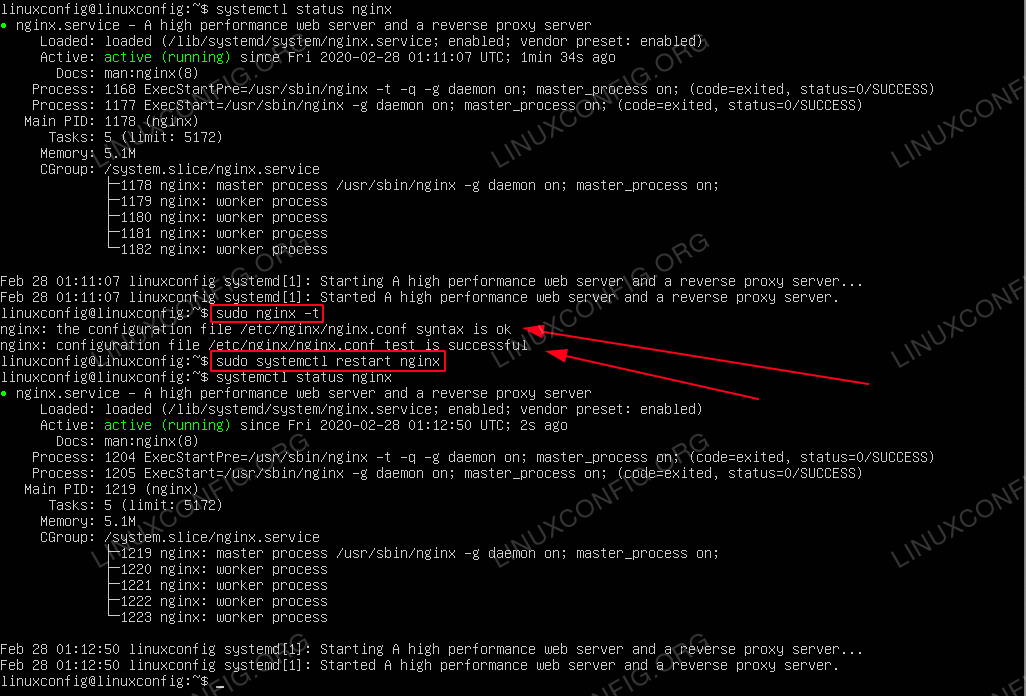
How To Restart NGINX On Ubuntu 20 04 Focal Fossa Linux Tutorials

Systemctl Status PATTERN Or PID Fig

Sudo Systemctl Restart Docker Failed Issue 1 NVIDIA cloud native

WEB Jun 5 2024 nbsp 0183 32 Use systemctl status lt service name gt to see if the service is running active recently stopped or inactive never started This reveals important information like memory usage and active connections

WEB Aug 27 2020 nbsp 0183 32 The syntax is as follows for the systemctl command systemctl status service name systemctl status unit name Please note that systemctl status service name command replaces the service service name status command used in earlier versions of Linux without systemd

WEB Feb 23 2017 nbsp 0183 32 Show runtime status information about the whole system or about one or more units followed by most recent log data from the journal If no positional arguments are specified and no unit filter is given with type state or failed shows the status of the whole system

WEB Mar 21 2018 nbsp 0183 32 Sample usage startstat systemd networkd If you want to wait a little bit before checking the status you can always add a sleep between Just nano bashrc scroll to the bottom or if you added things whichever line it s at and just add sleep seconds between systemctl start and systemctl status

WEB Jan 17 2024 nbsp 0183 32 There are multiple reasons why one would want to restart the service such it is not responding or you just want to apply the new configuration To restart the service all you have to do is use the restart flag as shown here sudo systemctl restart lt service name gt
WEB Mar 15 2024 nbsp 0183 32 Learn how to efficiently restart services in Linux using the systemctl command Our tutorial will show you how to start stop and restart services on any Linux distribution WEB Dec 21 2018 nbsp 0183 32 This allows the user noslenkwah to run sudo systemctl stop myservice service and sudo systemctl start myservice service without a password It defines a socalled command alias collection of commands named MYSERVICE and
WEB Jul 26 2018 nbsp 0183 32 When checking a service status via systemctl the output is something like Loaded loaded lib systemd system docker service enabled vendor preset enabled Active inactive dead Result exit code since Mon 2018 03 19 13 52 21 CST 4min 32s ago Docs https docs docker