Sudo Apt Get Install Bluetooth Bluez Bluez Tools Rfkill Ubuntu Install Bluetooth Or Bluez utils Packages Fails Using Bluez 5 Raspberry Pi Wii Yoshichi Use Wireshark On R Pi To Capture BLE Traffic resolvido Adaptador Bluetooth 4 0 N o Funciona No Kubuntu 18 04 Bluez Bluetooth Stopped Connecting Ask Ubuntu Sudo apt get install bluez sudo apt get install bluez utils Restart the bluetooth server to ensure your pc can communicate with a bluetooth device sudo etc init d bluetooth restart By default the BlueTooth notification icon appears although the service may not If the service is not running try the service command otherwise you can now
Step 1 Uninstall the Default BlueZ Version Before you proceed with installing a newer version of BlueZ you need to get rid of the current one first You can easily uninstall the default version of BlueZ using the APT package manager on Ubuntu Here s the command to uninstall BlueZ sudo apt autoremove bluez Teams Q A for work Connect and share knowledge within a single location that is structured and easy to search Learn more about Teams
Bluez Bluetooth Stopped Connecting Ask Ubuntu Test Sudo Apt Upgrade y Sudo Apt Update Sudo Apt Install Blueman wifi Darren X Linux PC Wifi wifi CSDN Home Assistant Bluetooth USB Do Terminali Wyse Fujitsu HP HeySmart Install Audiophile Linux V5 With UEFI GPT RYAN Be Yourself 3b python CSDN CSDN
Sudo Apt Get Install Bluetooth Bluez Bluez Tools Rfkill
 Sudo Apt Get Install Bluetooth Bluez Bluez Tools Rfkill
https://i.ytimg.com/vi/2LE0crbaXGg/maxresdefault.jpg
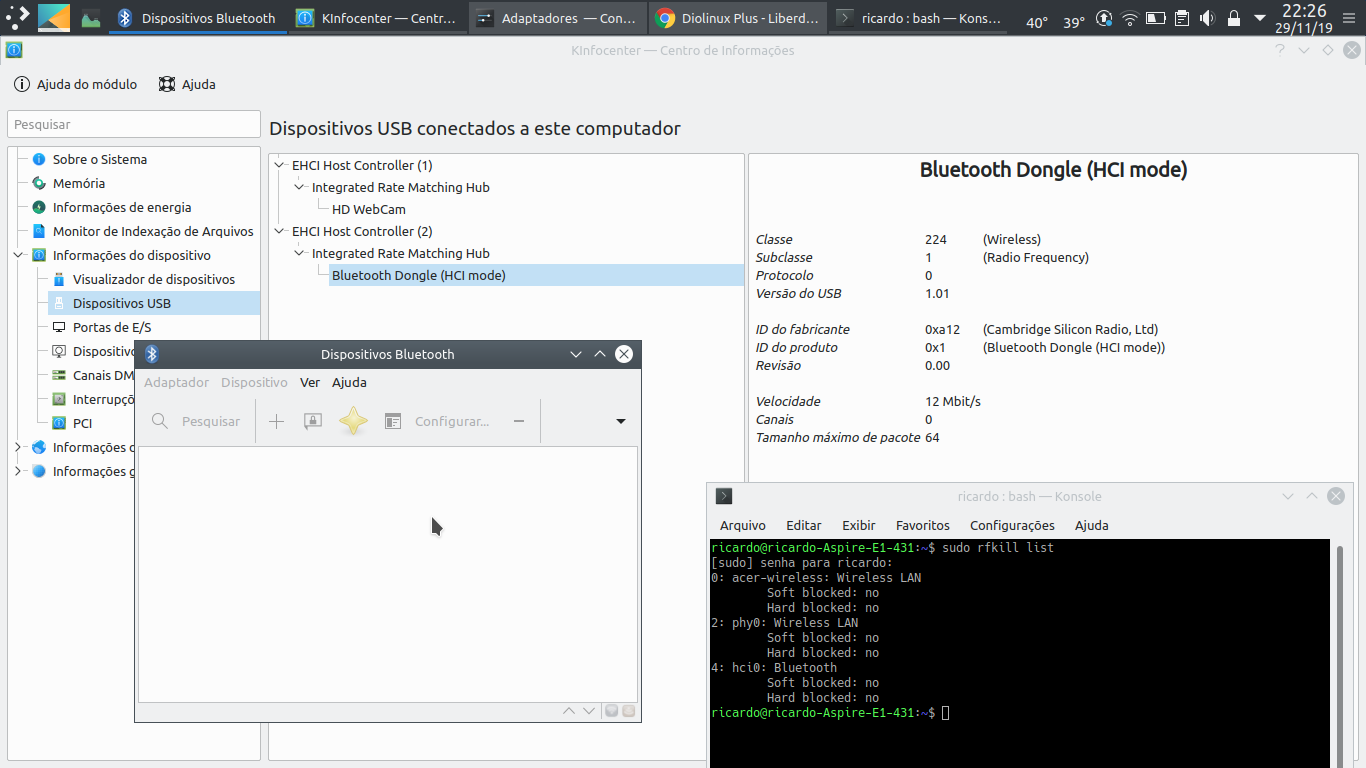
Sudo apt get install bluetooth bluez bluez tools rfkill y bluetooth commands Step 2 Next check that your Bluetooth device is not locked You can verify this using the rfkill utility as shown below sudo rfkill list Step 3 If your Bluetooth device is locked for any reason you can unlock it using the same command rfkill as shown below
Pre-crafted templates provide a time-saving solution for developing a diverse series of documents and files. These pre-designed formats and designs can be utilized for various personal and professional jobs, including resumes, invites, leaflets, newsletters, reports, presentations, and more, streamlining the content development procedure.
Sudo Apt Get Install Bluetooth Bluez Bluez Tools Rfkill

Enabling Bluetooth In Kali Linux Tonny Gitonga Medium

Test Sudo Apt Upgrade y Sudo Apt Update Sudo Apt Install Blueman

wifi Darren X
Linux PC
.jpg "Home Assistant Bluetooth USB Do Terminali Wyse Fujitsu HP HeySmart")
Home Assistant Bluetooth USB Do Terminali Wyse Fujitsu HP HeySmart

Install Audiophile Linux V5 With UEFI GPT RYAN Be Yourself

Sudo apt get install bluetooth bluez bluez tools rfkill rfcomm The next may be necessary for proper functioning of the bluetooth adapter you may want to replace firmware atheros package with the firmware package that matches your device like firmware realtek sudo apt get install bluez firmware firmware atheros

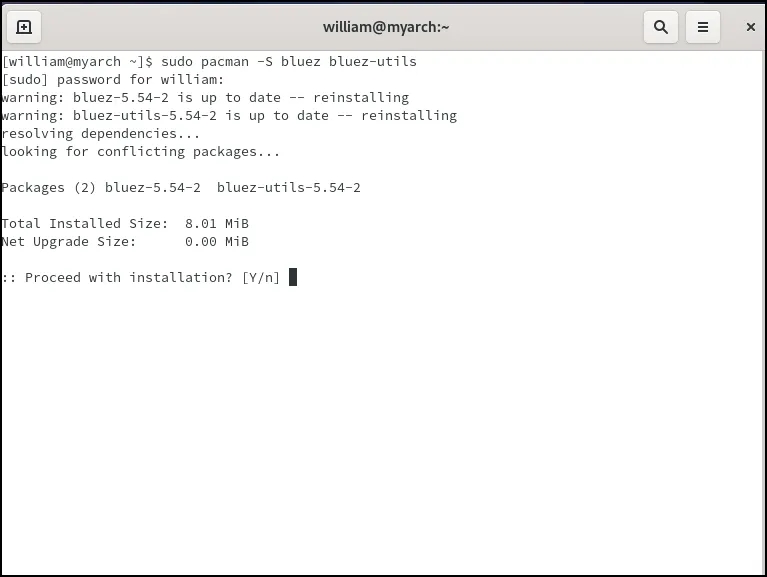
Done The following extra packages will be installed bluetooth bluez bluez alsa bluez gstreamer Suggested packages bluez hcidump The following NEW packages will be installed bluetooth bluez bluez alsa bluez gstreamer bluez utils 0 upgraded 5 newly installed 0 to remove and 18 not upgraded Need to get 0 B 777 kB of archives

This installation provides the bluetoothctl utility You need to add your account to the lp group if you wish to connect to a bluetooth tether sudo usermod aG lp USER newgrp lp The bluetooth device should be started and enabled
Download File Copy Code sudo systemctl enable bluetooth Now reboot the Pi and run the status command again to check the bluez bluetooth service is running If you ever want to disable the bluez service from automatically starting run the following command Download File Copy Code

Once the update is complete type the following command to install the Bluetooth packages sudo apt get install bluetooth bluez bluez tools This command will install the Bluetooth packages which include the Bluetooth driver the Bluetooth tools and the Bluetooth stack Once the installation is complete you can proceed to the next step
Install essential packages sudo apt install build essential libglib2 0 dev libdbus 1 dev libudev dev libical dev libreadline dev python3 docutils Download compile and install latest BlueZ BlueZ Download wget http www kernel pub linux bluetooth bluez 5 63 tar xz tar xvf bluez 5 63 tar xz cd bluez 5 63 configure make sudo make install Sudo apt get install bluetooth bluez bluez tools rfkill The bluetooth package provides the Bluetooth protocol stack bluez is the official Linux Bluetooth protocol stack bluez tools provides a set of tools to manage Bluetooth devices and rfkill is used to enable disable wireless devices Restarting the Bluetooth Service
Sudo apt get install bluetooth bluez bluez tools rfkill and then tried to serve BT sudo bt obex s NAS media ScanInbox bt obex obex service is not found Did you forget to run obexd The I called install sudo apt install obexd server and it installed numerous Unity and Gnome packages although my machine is headless and I probably dont need it