Sublime Text Remove All Lines Not Containing How To Remove All Lines Containing Specific Word Or String Copy All How Can I Remove All Lines Not Containing Email password In Notepad Sublime Text Remove All Comments Comments Remove In Sublime Text Sublime Text Tips Use Regex To Remove Lines Containing Word In Sublime Use this tool to remove lines containing or not containing a specific word phrase or string in a text It will automatically find all instances where the specified string appears Toggle on Match case to perform a case sensitive search Add Prefix Suffix Concatenate Text Split Text Extract Column Align Text Justify
1 Select the text to check 2 Ctrl Cmd Shift L selects all occurrences 3 Ctrl Cmd I will select the entire line 4 Delete or whichever other action you want to do with selected lines I hope this helped and I have saved you some time Using sed to modify the file in place sed i report t h o d your file This instructs sed to delete all lines not matching the pattern The pattern itself is start of line followed by either report or t followed by either h or o You should note that this is not actual in place modification sed creates a temporary backup copy and overwrites the original file with it
Use Regex To Remove Lines Containing Word In Sublime How To Add And Remove Repositories In Sublime Text 2 What Is Mark Down Add Copy append And Cut append To Notepad Super User Windows Grep Apovg Search From The Windows Command Prompt Aba Search Replace DOS Equivalent Of GREP Andy Madge Solved Delete All Lines Not Containing String In 9to5Answer Solved How To Delete Lines Not Containing In 9to5Answer Regex How Can I Find The Next Following Line Containing A Specific
Sublime Text Remove All Lines Not Containing
 Sublime Text Remove All Lines Not Containing
https://i.ytimg.com/vi/_Y-CF_KX_Rk/maxresdefault.jpg
In Windows press Ctrl F turn on regular expressions by pressing Alt R and then type Then press Alt Enter to select all the matches Finally press Ctrl Shift K to delete those lines 0 Likes
Templates are pre-designed files or files that can be utilized for numerous functions. They can conserve effort and time by providing a ready-made format and layout for creating various kinds of material. Templates can be utilized for individual or professional jobs, such as resumes, invites, flyers, newsletters, reports, presentations, and more.
Sublime Text Remove All Lines Not Containing

Sublime Text Remove Empty Lines ShellHacks

How To Add And Remove Repositories In Sublime Text 2 What Is Mark Down

Add Copy append And Cut append To Notepad Super User

Windows Grep Apovg

DOS Equivalent Of GREP Andy Madge

Solved Delete All Lines Not Containing String In 9to5Answer
1 Like jfcherng December 10 2017 1 40am 4 ronjeffries broomstick A regex broomstick would match lines which contain broomstick If you need word boundary checking you may use bbroomstick b And then you just have to click on the Find All button to select all matches 2 Likes ronjeffries December 10 2017 2 01am 5

4 Answers Sorted by 103 There is also a poor man s line filtering algorithm or is it lazy Select string of interest Hit Alt F3 to go into multi cursor mode on all occurrences Hit Control L to select entire line on every cursor line Copy paste selection to another buffer Share Improve this answer edited Jul 22 2015 at 6 50

Technical Support heaversm January 13 2016 7 52am 1 Hi I want to do a find in files operation to go through a list of hundreds of OBJ files to delete all of their faces leaving only the vertices Faces in an obj file look like this f 20824 20824 20668 20668 20667 20667 and vertices like this v 0 211181 0 436763 1 052000

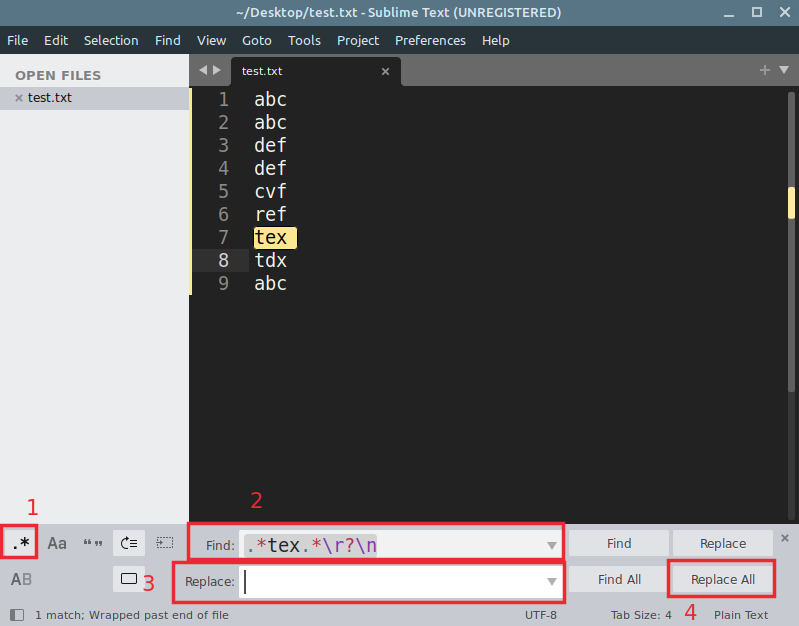
Open the Find and Replace panel ensure the Regular expression option is ticked Find What w n Replace With i e leave Replace With blank Replace All 4 Likes Hello I m trying delete specific lines but I ve trying so much tutorials but none has worked for me
Purpose Remove lines or delimited items containing not containing a specified text string with optional regex matching Instructions Load working text enter other delimiter if needed enter find string into this text field choose containing not containing and click Remove lines items button
In find and select is there a command to delete all the line starting with the string Thank you 0 Likes UltraInstinct05 August 27 2021 7 21am 2 Something like this perhaps 0 Likes GWB August 27 2021 9 47pm 3 It would be better to begin the find expression with which is the regex character for beginning of line Thus All you need to do is open the Find dialog Find Find search for date hit Find All to select all instances of your search pattern then select Selection Expand Selection to Line Hit Delete and you re all done Share Improve this answer Follow answered Jan 20 2015 at 2 49 MattDMo 101k 21 244 233 Add a comment 5
Removing Line Breaks To remove unnecessary line breaks use the Find and Replace function Press Ctrl H or Cmd Alt F on Mac enter the line break characters n or r n in the Find field and leave the Replace field empty This will remove all instances of the specified line break