Sublime Compare Two Files How To Compare Two CSS Files Side by Side In Sublime Text What Is Sublime Weasyl SUBLIME YouTube Download Sublime For Windows Deltadeco How To Use The Sublime Compare Plugin What Is Mark Down Web This package adds a simple side by side comparison tool to Sublime Text 2 and 3 Features Easily select two tabs or selections to compare Comparison results open in a new window Empty lines added so common code lines up Count number of lines changed Highlighting of changed lines Intra line diff highlighting Synchronized scrolling
Web Oct 30 2023 nbsp 0183 32 What are the best diff plugins for Sublime Text 5 Options Considered 150 User Recs Oct 30 2023 Last Updated Here s the Deal Ad The Best 1 of 5 Options Why See Full List 90 The Best Sublimerge My Rec ommendation for Sublimerge My Recommendation for Sublimerge Add Video or Image All 12 Experiences 2 Pros 5 Web Compare two files in Sublime Text with ease Our Sublime Text compare tool allows you to compare two files side by side and see the differences between them It s the perfect way to find errors in your code or to compare different versions of a file
How To Use The Sublime Compare Plugin What Is Mark Down Sublime Text Viewing Diff Files What Is Mark Down SUBLIME Sublime YouTube Sublime YouTube a cuszek Sublime Poz acany SUBLIME TANTALUM MAGAZINE Sublime Text 3 Othree Flickr Sublime YouTube
Sublime Compare Two Files
 Sublime Compare Two Files
https://cdn.whatismarkdown.com/how_do_i_compare_two_codes_in_sublime_text.jpg
Web Feb 20 2023 nbsp 0183 32 Locate package folder i e Linux home user config sublime text 3 Installed Packages Open Compare quot Side By Side sublime package quot with zip tool Extract sbs compare py Open sbs compare py in Sublime Text Add the following lines to file move view 1 to group 1 new window set view index new window active view 0 0
Templates are pre-designed documents or files that can be used for various functions. They can save effort and time by offering a ready-made format and design for producing various type of content. Templates can be utilized for personal or expert jobs, such as resumes, invites, leaflets, newsletters, reports, discussions, and more.
Sublime Compare Two Files
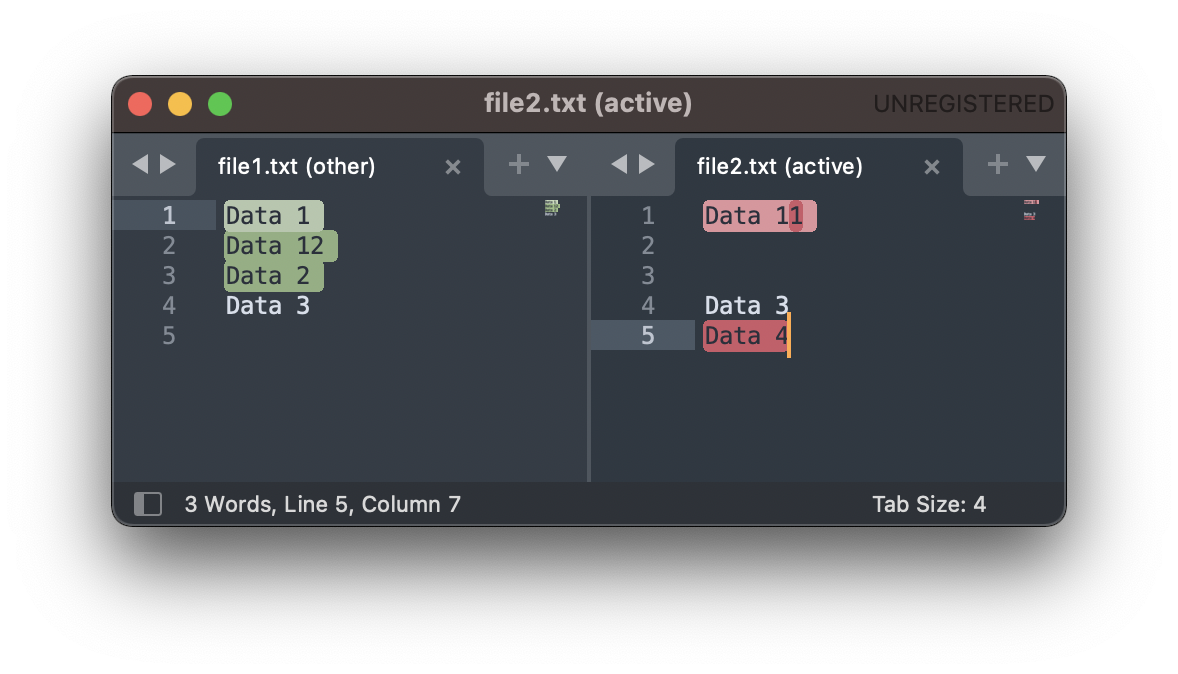
Steps To Compare Two Files In Sublime Text Side by Side Code2care

Sublime Text Viewing Diff Files What Is Mark Down

SUBLIME

Sublime YouTube

a cuszek Sublime Poz acany

SUBLIME TANTALUM MAGAZINE

Web Jun 29 2021 nbsp 0183 32 I have already read Comparing the contents of two files in Sublime Text but the answers either the native quot Folders gt Diff files quot feature or using FileDiffs show the differences between 2 files like with the diff tool which I don t want file1 py file2 py 1 21 1 19 import os import os sys import numpy as np print

Web Jun 18 2020 nbsp 0183 32 Sublime Text How to Compare Two Files We have all been in a situation where we need to compare the difference between code in two files Today we will take a look at the diff functionality available in Sublime Text to

Web Jul 24 2021 nbsp 0183 32 If you want to compare two files in Sublime Text Editor you will need to get a plugin installed Steps Open Sublime Text and Open Command Palatte to install the package Type Install Package to open Package Control and look for Compare Side By Side and get it installed Compare Side by Side plugin for Sublime Text
Web Jan 12 2018 nbsp 0183 32 I am not able to compare two files in sublime text 3 I have selected the two files I want to compare however there is no Diff File option when searching for option through right click Stack Overflow

Web Here are the steps to compare the files in the Sublime text editor Open Sublime text editor 2 or 3 versions Open the folder that contains files to compare using File Menu gt Open Folder option Files are shown in the sidebar view
Web Jan 5 2017 nbsp 0183 32 Select the two files to diff in the side bar by holding the ctrl key linux or command key Mac and selecting the files separately They should both be highlighted in the side bar although only one may be open in the window Right click on the highlighted files and you should see the option to diff the files Diff Files Web Jan 19 2023 nbsp 0183 32 Comparing two files in Sublime Text In today s adventure quest we re about to visit the deep lands of Text Diffing with our weapon being the Sublime Text Code Editor What is Incremental Diff in Sublime Text
Web Dec 26 2023 nbsp 0183 32 Diff is a command line utility that can compare two files and show you the differences between them In Sublime Text 4 you can use the diff tool to compare two files side by side or to see a unified diff that shows the changes in one file relative to the other