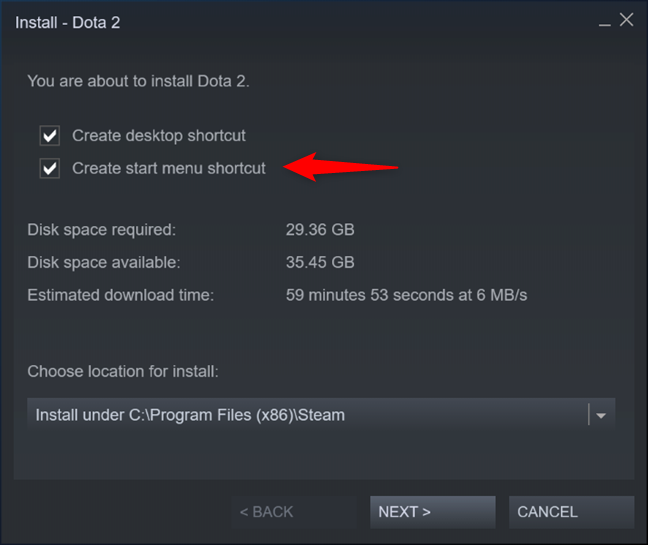
Start Menu Shortcut Steam How To Pin Steam Games To Start In Windows 10 Digital Citizen Steam Windows 10 My Road How To Pin Steam Games Shortcut To Start Menu Or Desktop Windows 10 How To Create Start Menu Shortcut For Steam Games On Windows 10 ByVM CodingTrabla Tutorials Install ERP CMS CRM LMS HRM On Windows Linux 1 First if it is not already opened open Steam by searching for it in the start menu After opening it go to the Library Home option 2 On the left panel you will see all your games Right click on the game of your choice and select the Manage Add desktop shortcut option
First you must launch the Steam client then navigate to the Library Right click on the game you want to pin then select Manage Browse local files Right away this should open the File 1 How to Pin Games in Steam If you have a huge collection of Steam games it s handy to pin games so that you can find and play them quickly The best way to do this within the Steam client is to use the favorites feature Open Steam and switch to the Library section A list of all your games appears on the left
CodingTrabla Tutorials Install ERP CMS CRM LMS HRM On Windows Linux How To Add Shortcut In Windows Start Menu YouTube How To Easily Add Game Shortcuts To Windows 10 Start Menu Steam YouTube Steam Microsoft Flight Simulator 2020 How to Add A Start Menu How To Add Steam Games To The Start Menu On Windows 10 Pin A Microsoft Edge Shortcut On The Start Menu Gambaran Steam Deck Tips Essential Shortcuts Including A Way To View The Whole How To Pin Steam Games To Taskbar including CS GO YouTube
Start Menu Shortcut Steam
 Start Menu Shortcut Steam
https://www.digitalcitizen.life/wp-content/uploads/2021/02/pin_steam-2.png
Step 2 Launch Outcome and it will ask you for your Origin credentials click the Remember my credentials checkbox so you don t have to enter them every time you launch the app Step 3 It will
Pre-crafted templates offer a time-saving service for producing a varied series of documents and files. These pre-designed formats and layouts can be used for numerous personal and professional projects, including resumes, invitations, leaflets, newsletters, reports, discussions, and more, streamlining the material development procedure.
Start Menu Shortcut Steam
Steam Does Not Create Desktop Shortcuts And Start Menu Shortcuts
How To Add Shortcut In Windows Start Menu YouTube

How To Easily Add Game Shortcuts To Windows 10 Start Menu Steam YouTube

Steam Microsoft Flight Simulator 2020 How to Add A Start Menu
Pin A Microsoft Edge Shortcut On The Start Menu Gambaran

Steam Deck Tips Essential Shortcuts Including A Way To View The Whole
Open File Explorer and navigate to this location C Users YourUserName AppData Roaming Microsoft Windows Start Menu Programs Steam Cut and paste the shortcut from the desktop to this folder The game will appear under the Steam folder in the Apps list

4 Answers Sorted by 29 From your Steam library right click on a game and select Create Desktop Shortcut You can then drag the shortcut onto your Start Menu If you just drop it here it will become pinned to the Start Menu and you can access it quickly

Step 1 Create a Start Menu shortcut for your Steam game in All apps 1 1 Create a shortcut while installing a Steam game 1 2 Create a shortcut for a Steam game already installed on your PC Step 2 Pin Steam games to Start in Windows 10 Bonus Resize your pinned Steam games to make room for more What Steam games did you pin to Start

2023 Google LLC Get Cheaper Games From G2A https www g2a n techademicsToday you will learn how to pin and group your steam games to the start menu in Windows 11 P

Properties Select the Shortcut tab In the Target field add the launch options which you would like to use after the steam exe location make sure to separate all launch options with a space For example launchoption1 launchoption2 Click Apply and then OK to close the Properties window Options to Use
Video Tutorial How to create start menu shortcut for Steam games on Windows 10 Steam Shortcut Generator Automatically generate shortcuts for all installed Steam games UGC Hi all I just wrote a Python tool to automatically generate shortcuts url shortcuts to all of your installed Steam games
I like using windows 10 start menu but steam games do not allow pin to start In this video I show on how to pin my steam game shortcuts to stat menu wind