Special Characters Remove In Excel How To Remove Some Special Characters From String In Excel How To Remove Some Special Characters From String In Excel How To Remove Some Special Characters From String In Excel Remove Unwanted Characters Excel Formula Exceljet Removing Characters In Excel How To Remove Unwanted Characters Earn Web How to Use Choose your version of the formula from above Change the cell reference to the cell that needs to have characters removed in your worksheet Watch the Video above to learn everything about the formula and replacing special characters in Excel
Web Sep 26 2023 nbsp 0183 32 1 Remove Specific Characters with Find and Replace Feature 2 Delete Specific Characters with SUBSTITUTE Function 3 Extract Only a Particular Instance of a Specific Character in a String 4 Remove Multiple Specific Characters with Nested SUBSTITUTE Function 5 Erase Any Special Characters with CLEAN Function 6 Web Jun 30 2023 nbsp 0183 32 To remove special characters in Excel follow these step by step instructions Select the range of cells or columns that you want to clean Click on the Data tab in the Excel ribbon Click on the Text to Columns button in the Data Tools group In the Convert Text to Columns Wizard dialog box choose the Delimited option and click
Removing Characters In Excel How To Remove Unwanted Characters Earn Text Overlay Error Directing Help Tips Episode Forums Remove Special Characters Online Find Remove Delete From Text How To Handle Errors With Grace Failing Silently Is Not An Option How To Remove Special Characters In Excel Free Excel Tutorial How To Remove Special Characters From Excel Data With LAMBDA Function How To Remove Formula In Excel Column Riset PowerShell Remove Special Characters From A String Using Regular How To Remove Time From Date In Microsoft Excel Ben Waters
Special Characters Remove In Excel
 Special Characters Remove In Excel
https://www.extendoffice.com/images/stories/doc-excel/remove-special-characters/doc-remove-special-characters-7.png
Web Removing only a Particular Instance of a Specific Character in a String Removing any Special Character with the CLEAN Function Removing Leading or Trailing Space Characters with the TRIM Function Removing a Specific Invisible Character from a String using SUBSTITUTE CHAR and CODE Functions
Pre-crafted templates provide a time-saving option for developing a varied variety of files and files. These pre-designed formats and layouts can be utilized for numerous personal and professional tasks, consisting of resumes, invites, flyers, newsletters, reports, discussions, and more, simplifying the content creation procedure.
Special Characters Remove In Excel
Remove Special Characters Excel Off The Grid

Text Overlay Error Directing Help Tips Episode Forums

Remove Special Characters Online Find Remove Delete From Text
How To Handle Errors With Grace Failing Silently Is Not An Option

How To Remove Special Characters From Excel Data With LAMBDA Function
How To Remove Formula In Excel Column Riset
Web Oct 30 2023 nbsp 0183 32 1 Using Excel Functions to Remove Special Characters 1 1 Applying SUBSTITUTE Function 1 2 Combining RIGHT and LEN Functions to Delete Special Characters 1 3 Utilizing LEFT LEN Functions 2 Implementing Flash Fill Feature to Remove Special Characters 3 Applying Find amp Replace Feature 4
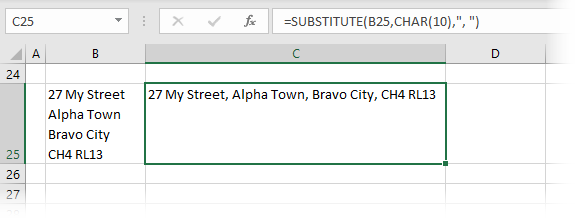
Web To remove specific unwanted characters in Excel you can use a formula based on the SUBSTITUTE function In the example shown the formula in C4 is SUBSTITUTE B4 CHAR 202 quot quot Which removes a series of 4 invisible characters at the start of each cell in column B

Web Mar 10 2023 nbsp 0183 32 Special tools to remove characters or text in Excel How to remove specific character in Excel If your goal is to eradicate a certain character from Excel cells there are two easy ways to do it the Find amp Replace tool and a formula Remove character from multiple cells using Find and Replace

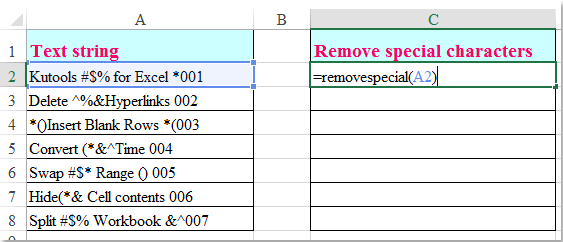
Web May 31 2023 nbsp 0183 32 You can use the following formula to remove special characters from a cell in Excel SUBSTITUTE SUBSTITUTE SUBSTITUTE SUBSTITUTE SUBSTITUTE SUBSTITUTE SUBSTITUTE SUBSTITUTE SUBSTITUTE SUBSTITUTE A2 quot quot quot quot quot quot quot quot quot quot quot quot quot quot quot quot quot quot quot quot quot quot quot quot quot amp quot quot quot quot quot quot quot quot quot quot quot quot quot quot quot

Web Feb 8 2023 nbsp 0183 32 If you want to remove only one special character you can use the SUBSTITUTE function see more in this article Remove Unwanted Characters If you do want to use a single formula to remove special characters you will need to use a User Defined Function UDF like RemoveSpecChar
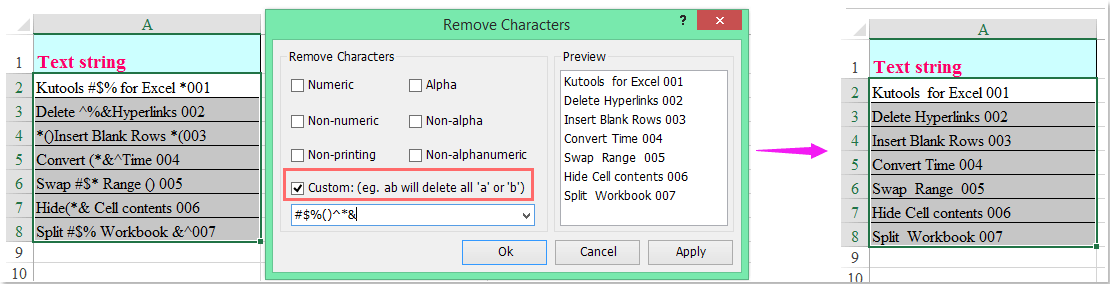
Web Select the text strings that you want to remove some special characters 2 Click Kutools gt Text gt Remove Characters see screenshot 3 In the Remove Characters dialog box check Custom option under the Remove Characters section and enter the special characters that you want to remove see screenshot 4 Web Remove Special Characters amp in Excel In this tutorial I am going to explain how to remove special characters amp from a text string This method uses Power Query if you are using Excel 2013 you will need to download and install the Power Query add in using this link https www microsoft en gb download details aspx id 39379
Web This article describes the formula syntax and usage of the CLEAN function in Microsoft Excel Description Removes all nonprintable characters from text Use CLEAN on text imported from other applications that contains characters that may not print with your operating system