Shutdown Vm Azure Powershell Windows Powershell Vs Command Prompt What s The Difference Anyway How Start Or Shutdown Multiple VM s With Powershell In Particular Order Resize An Azure Virtual Machine With Powershell Sysops Hot Sex Picture Properly Shutdown Azure VM To Save Money Build5Nines Windows Azure Active Directory Module For Windows PowerShell Azure 6 Answers Sorted by 1 Definitively you should use Azure Automation to run on schedule a PowerShell Script to shutdown or start your VM in Azure It is already well documented on Microsoft Web site Here are 3 links that explains step by step how to do this
Once you ve got Microsoft Azure PowerShell installed and a publish settings file downloaded and imported for your Azure subscription open a PowerShell prompt and select the Azure To shut down a Microsoft Azure VM use the following command with the name of the resource group and the name of the VM Stop AzVM ResourceGroupName avd Name avdvm3 How to Set Azure Default Resource Group With PowerShell February 25 2022 How to Get Azure Virtual Machine Tags with PowerShell July 30 2023
Windows Azure Active Directory Module For Windows PowerShell Azure Find Your Windows Azure PowerShell Cmdlets Version Max Trinidad Azure PowerShell Scripting Tutorial Tips To Memorize The Commands How Start Or Shutdown Multiple VM s With Powershell In Particular Order How To Use Azure PowerShell V1 0 x To Capture Your Own Custom Virtual How To Setup Azure Data Science Virtual Machine DSVM Endtoend ai Copy Files To Azure VM Using PowerShell Remoting Thomas Maurer Azure PowerShell Az List And Set Azure Subscription Build5Nines Azure VM Updates Want To Reduce Software Licensing Costs Without
Shutdown Vm Azure Powershell
 Shutdown Vm Azure Powershell
https://i.ytimg.com/vi/H0gwnFV_SFs/maxresdefault.jpg
You can also use the portal to configure automatic startup and automatic shutdown schedules and policies for lab VMs When you want to script or automate start or stop for lab VMs use PowerShell or Azure CLI commands For example you can use start or stop commands to Test a three tier application where the tiers need to start in a sequence
Pre-crafted templates use a time-saving service for producing a diverse variety of files and files. These pre-designed formats and layouts can be utilized for various individual and expert tasks, consisting of resumes, invites, leaflets, newsletters, reports, discussions, and more, enhancing the content creation process.
Shutdown Vm Azure Powershell

Monitorizar En Windows Azure Apuntes T cnicos

Find Your Windows Azure PowerShell Cmdlets Version Max Trinidad

Azure PowerShell Scripting Tutorial Tips To Memorize The Commands

How Start Or Shutdown Multiple VM s With Powershell In Particular Order

How To Setup Azure Data Science Virtual Machine DSVM Endtoend ai
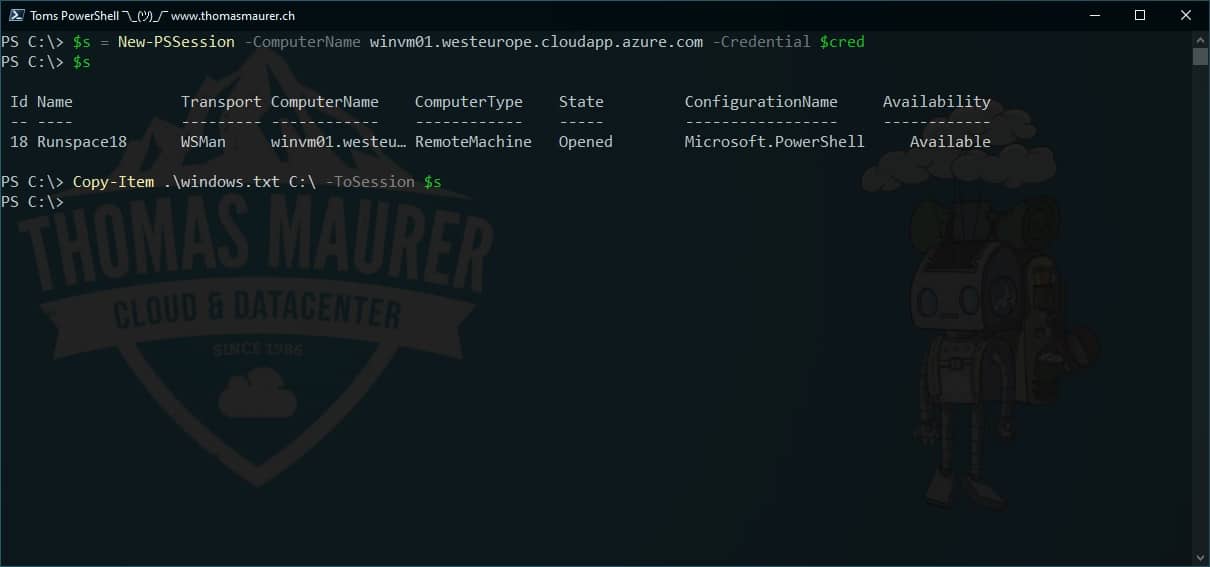
Copy Files To Azure VM Using PowerShell Remoting Thomas Maurer

The auto shutdown feature for Azure VMs can help reduce costs by shutting down the VMs during off hours when they aren t needed and automatically restarting them when they re needed again Configure auto shutdown for a virtual machine Portal Azure CLI Sign in to the Azure portal

Description The Stop AzureVM cmdlet shuts down a virtual machine Examples Example 1 Shut down a virtual machine PowerShell PS C Stop AzureVM ServiceName ContosoService01 Name MyVM This command shuts down a virtual machine that the specified service contains Example 2 Shut down a virtual machine by using a virtual machine object

If you do have several virtual machines to work with you could design a small PowerShell script that can help you shut down the VMs and a second PowerShell script to start the VMs according to specific schedules Script to Stop Azure Virtual Machines The PowerShell script below performs a stop operation for the VMs specified in the C
3 Answers Sorted by 3 As long as you are not sending the force parameter Azure will attempt to gracefully shutdown the guest OS before stopping If that doesn t work the force parameter is akin to pulling the plug Share Improve this answer Follow answered Nov 14 2018 at 21 41 Ken W Zero Networks 3 603 1 13 19 Add a comment

Example 2 PowerShell PS C Stop VM Name VM1 Force Shuts down virtual machine TestVM through the guest operating system regardless of any unsaved application data Hyper V gives the guest five minutes to save data then forces a shutdown This shutdown can result in loss of unsaved data
Auto Shutdown and Auto Start an Azure VM IT Ops Talk Apr 4 2021 In this video we are going to have a look at how you can automatically start and stop an Azure VM using automation tasks With automation tasks Azure offers a simple way to manage a specific resource or resource group using automation task templates Stop AzVM ResourceGroupName String Name String Force NoWait Hibernate AsJob n DefaultProfile IAzureContextContainer WhatIf Confirm
The first thing you will need to do is setup an Automation Account From the Azure portal click more actions and search for Automation By clicking the star to the right of Automation Accounts you can add it to your favorites blade Next select Automations Accounts and click Create Automation Account