Shutdown Command In Cmd With Timer How To Shutdown Restart Schedule Windows 10 With CMD TechWiser Shutdown Commands How To Shut Down Windows Via CMD IONOS CMD Shutdown Timer Command Windows 10 YouTube Cara Mematikan PC Shutdown Otomatis Dengan CMD Teknozone ID How To Auto Shutdown Or Cancel Auto Shutdown Command Windows 10 With Verkko 21 syysk 2023 nbsp 0183 32 Open the Run window by pressing the Windows Key R keys type quot cmd quot in the box and then select the quot OK quot button to open the Command Prompt Once in the Command Prompt type the actual
Verkko 4 elok 2023 nbsp 0183 32 7 Double click the shutdown timer bat file to schedule a shutdown A blank command prompt screen should appear You will Verkko In the PowerShell or Command Prompt window execute the below auto shutdown command Replace timeInSeconds with the number of seconds shutdown s t timeInSeconds For example if you want to
How To Auto Shutdown Or Cancel Auto Shutdown Command Windows 10 With How To Automatically Shutdown Your PC After Certain Time Using CMD Windows Shutdown Timer Command Corehety Cmd For Shutdown Timer Windows 10 Hybridvsera How To Restart Shutdown Using CMD How To Set Automatic Shutdown In CMD YouTube Set Timer To Shut Down Your PC With CMD Shutdown PC Using CMD How Put A Shutdown Timer On Your Windows Desktop Using Command Prompt In How To Shutdown Ubuntu Server Ubuntu Shutdown Command
Shutdown Command In Cmd With Timer
 Shutdown Command In Cmd With Timer
https://techwiser.com/wp-content/uploads/2021/07/How-to-Shutdown-Restart-Schedule-Windows-10-with-CMD.jpg
Verkko 7 syysk 2023 nbsp 0183 32 Just type cmd in Run Command Win R box or Search box and press Enter After opening the CMD window type and execute the following command
Pre-crafted templates use a time-saving service for developing a diverse range of documents and files. These pre-designed formats and layouts can be used for numerous personal and expert projects, consisting of resumes, invitations, leaflets, newsletters, reports, presentations, and more, improving the content creation process.
Shutdown Command In Cmd With Timer

Shutdown A Computer Using Run Command How To Shutdown Computer Using
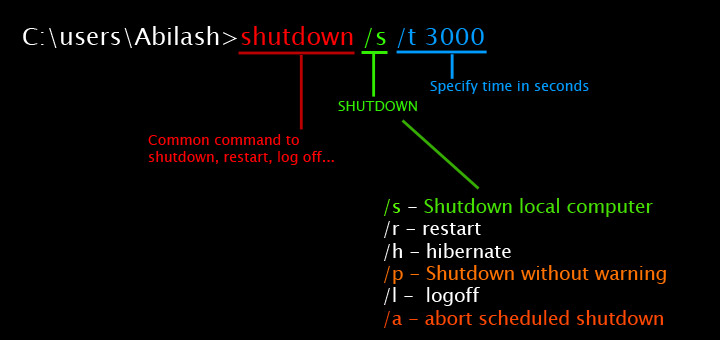
How To Automatically Shutdown Your PC After Certain Time Using CMD

Windows Shutdown Timer Command Corehety
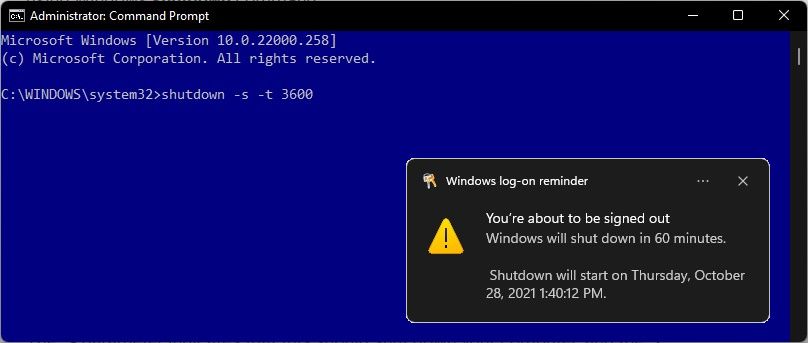
Cmd For Shutdown Timer Windows 10 Hybridvsera

How To Set Automatic Shutdown In CMD YouTube

Set Timer To Shut Down Your PC With CMD Shutdown PC Using CMD How

Verkko 3 maalisk 2017 nbsp 0183 32 To create a shutdown timer manually open Command Prompt and type the command shutdown s t XXXX The quot XXXX quot should be the time in seconds you want to elapse before the
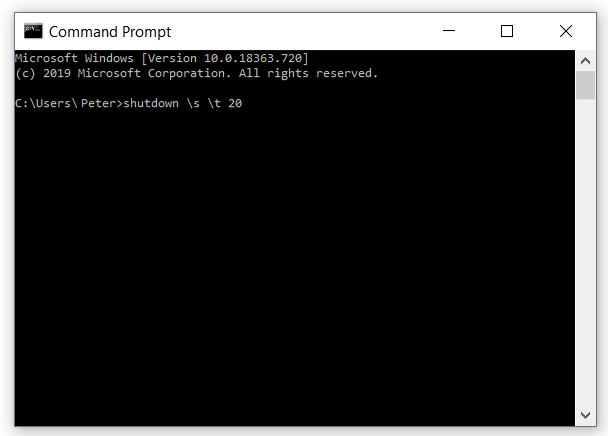
Verkko 11 hein 228 k 2021 nbsp 0183 32 With the Command Prompt you can shut down or restart your Windows 10 PC with a timer or by displaying a custom message Here s how 1 Open the Start menu and type in Command

Verkko 12 huhtik 2021 nbsp 0183 32 To get started with the basic method pull up a regular Command Prompt and type in the following shutdown s t seconds Obviously you ll want to replace the seconds bit with however many

Verkko 14 jouluk 2022 nbsp 0183 32 Type the following command to shut down the device after a specific time and press Enter shutdown s t TIME In the command replace TIME for the

Verkko 29 kes 228 k 2023 nbsp 0183 32 How to set the shutdown timer for your PC using Command Prompt Step 1 The Windows shortcut Windows R opens the Run menu Use the CMD command cmd and confirm with the
Verkko 16 syysk 2020 nbsp 0183 32 Shutdown via CMD entry this is how the command lines work The most important commands for shutdowns via CMD Example Restart the local PC Verkko 5 lokak 2023 nbsp 0183 32 If you want to shut down more than one computer at a time you can call shutdown for each computer by using a script or you can use shutdown i to display
Verkko The user types 5 and presses enter The batch file then force closes all open programs and shuts down after 300 seconds 5 mins Additionally can the batch file have some