Show Blank Rows In Excel Pivot Table Pivot Table In Excel Maximizing Your Data Analysis Efficiency List writerow Is Writing Into Alternate Rows In Excel Csv Format How To Delete Blank Rows In Excel The Right Way 2021 Riset Pivot Table Week Session 1 What Are Pivot Tables How To Excel At Excel How To Remove blank Values In Your Excel Pivot Table MPUG METHOD 1 Simply press CTRL Z if you have recently inserted a blank row METHOD 2 Go to Design Blank Row dropdown Select Remove Blank Line After Each Item This will remove the blank rows after each item Using the Design Tab you can easily insert blank row in pivot table or remove it Further Learning
To change the layout of a PivotTable you can change the PivotTable form and the way that fields columns rows subtotals empty cells and lines are displayed To change the format of the PivotTable you can apply a predefined style banded rows and conditional formatting Windows Web Mac Changing the layout form of a PivotTable How to Deal with Blank Cells in a Pivot Table We may have blank cells in our Pivot table from time to time In this tutorial we will explore how we will deal with pivot table blanks Figure 1 Showing zero in pivot blank cells Setting up the Data First we will create our sample worksheet
How To Remove blank Values In Your Excel Pivot Table MPUG How To Insert New Column In Excel Pivot Table Printable Forms Free Online Excel Fill Blank Rows Or Blank Cells In Inactive Pivot Table Pivot Table Excel Try2Master Spreadsheet Tutorials Real Excel Skills 304 Removing Blank Rows In Pivot Tables YouTube How To Build A Pivot Table In Excel Excel Me How To Display More Than 1000 Rows In Excel For Power BI Datasets Pivot How To Insert A Blank Row In Excel Pivot Table MyExcelOnline How To Insert A Blank Row In Excel Pivot Table MyExcelOnline
Show Blank Rows In Excel Pivot Table
 Show Blank Rows In Excel Pivot Table
https://kajabi-storefronts-production.kajabi-cdn.com/kajabi-storefronts-production/file-uploads/sites/163003/images/f64c43-06b-5af5-6ae3-345a431a6e3_Pivot_Table_in_Excel.jpg
Format your data as an Excel table select anywhere in your data and then select Insert Table from the ribbon If you have complicated or nested data use Power Query to transform it for example to unpivot your data so it s organized in columns with a single header row Need more help
Templates are pre-designed documents or files that can be utilized for various purposes. They can save time and effort by offering a ready-made format and layout for developing different type of material. Templates can be used for personal or expert tasks, such as resumes, invites, flyers, newsletters, reports, presentations, and more.
Show Blank Rows In Excel Pivot Table

How To Use Columns In Pivot Table Printable Forms Free Online
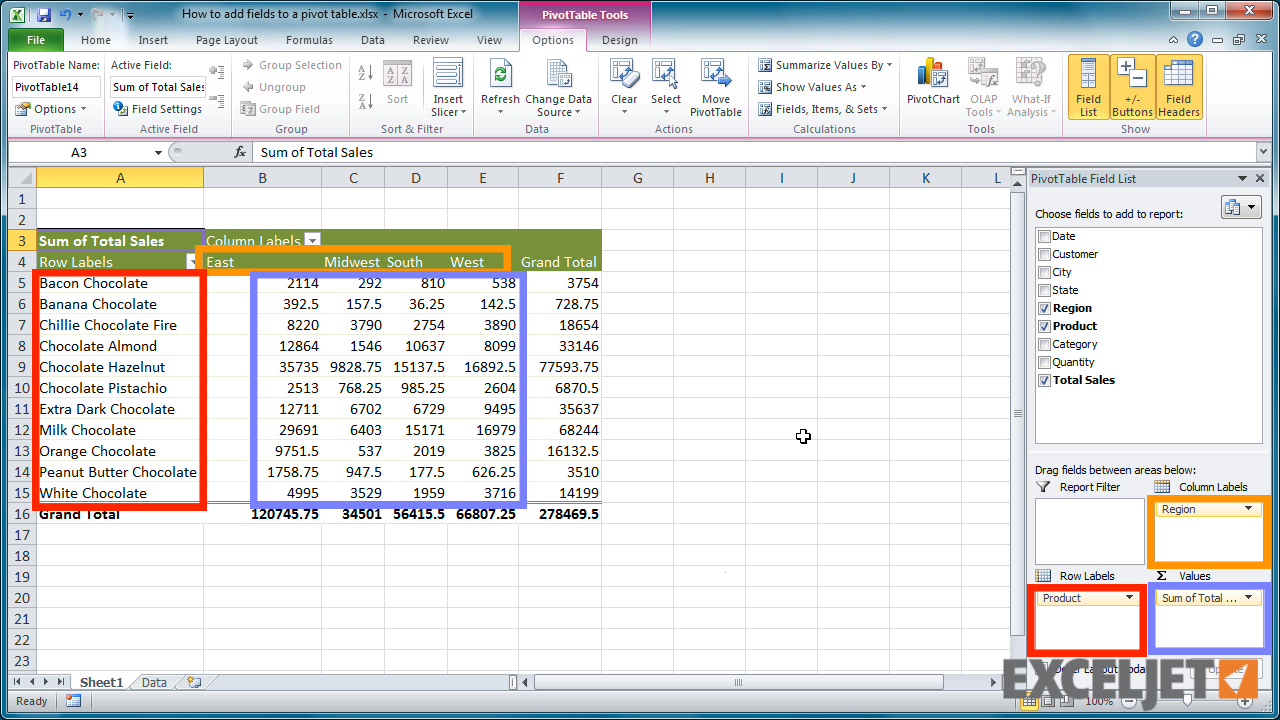
How To Insert New Column In Excel Pivot Table Printable Forms Free Online

Excel Fill Blank Rows Or Blank Cells In Inactive Pivot Table

Pivot Table Excel Try2Master Spreadsheet Tutorials

How To Build A Pivot Table In Excel Excel Me

How To Display More Than 1000 Rows In Excel For Power BI Datasets Pivot

4 I have created a pivot from data which had many empty cells After creating the pivot all those cells are displayed as blanks I want it to remain empty

How to get rid of blank appearing in pivot table This usually indicates that you ve got something in the underlying data that should either be in the existing categories or that you need to introduce a new category for that currently blank category

To remove blanks in pivot tables you can set pivot table options to display data in empty cells filter to remove blanks apply conditional formatting find and replace blanks change pivot table design settings or clean up the source data

Select the cells that you want to conditionally format have a blank value you could select the entire column or even the table too if you want to do multiple columns even if they do not have blank values 2 On the Home Tab of the Ribbon Select Conditional Formatting from the Drop down list select New Rule 3
1 Regarding I have selected the pivot table options to show items with no data in columns and rows Do you right click the pivot table and select PivotTable Options in Display tab check Show items with no data on rows and Show items with no data on columns 2 1 Please share a screenshot about the issue symptom from your side
In Excel 2010 go to the Formulas tab and select Name Manager Create a New range call it something like all data spaces aren t allowed in the name In the Refers to box use the following formula adapted for your own data OFFSET Source A 1 0 0 COUNTA Source A A 1 To break this down Select a cell in the pivot table and on the Ribbon click the Design tab In the Layout group click Blank Rows and then click Insert Blank Line After Each Item Format the Row To highlight the blank rows you can manually add a fill color Click at the left of one of the blank rows to select all the blanks for that field
I can t edit the cell and delete the space and it hasn t modified my source data in any way Sep 10 2021 11 27 AM You can t remove value here but you may type blank instead of space Good morning all How can I remove the blank entry showing up in the Beds column of the pivot table If there is no data in those cells