Selenium Webdriver Find Multiple Elements State Of Selenium Webdriver In PHP Selenium Webdriver Methods Selenium Webdriver Appium Complete Tutorial Selenium Webdriver Using Javascript ProxyBoys Selenium WebDriver Tutorial With Examples A Comprehensive Guide Cascading Failures Part 2 Troubleshooting WebDriver Find elements using Selenium WebDriver Why do we need to find a web element in Selenium How to find elements in Selenium What is By class in Selenium Difference between find Element and find Elements in Selenium Find elements using Selenium WebDriver
The majority of most people s Selenium code involves working with web elements File Upload Locator strategies Ways to identify one or more specific elements in the DOM Finding web elements Locating the elements based on the provided locator values Interacting with web elements A high level instruction set for manipulating form controls Returns the first matching web element if multiple web elements are discovered by the locator Returns a list of matching web elements Find Elements in Selenium WebDriver Locating elements in an array of elements Example div id pt1 r1 0 rt 1 r2 0 dynamicRegion1 0 AP1 findByContentItemQueryResultId ATp ciTblR1 db table
Cascading Failures Part 2 Troubleshooting WebDriver How To Fetch Multiple Data In Selenium Webdriver Find Multiple Data Selenium Liv Bio Pharma Architecture Of Selenium WebDriver BrowserStack Selenium Grid Setup How To Setup Selenium Grid What s New In Selenium 4 Key Features BrowserStack Selenium The JetBrains Academy Blog The JetBrains Blog Selenium Is A Lightweight Pc Software Screening Structure For Internet Selenium WebDriver Tutorial WebDriver s Most Popular Commands Abode QA
Selenium Webdriver Find Multiple Elements
 Selenium Webdriver Find Multiple Elements
https://davertmik.github.io/selenium-php-codeception/images/selenium.jpg
Selenium provides the following method to locate elements in a page find element To find multiple elements these methods will return a list find elements Example usage from selenium webdrivermon by import By driver find element By XPATH button text Some text driver find elements By XPATH button
Pre-crafted templates offer a time-saving solution for developing a diverse variety of documents and files. These pre-designed formats and layouts can be made use of for different individual and expert projects, including resumes, invites, flyers, newsletters, reports, presentations, and more, streamlining the content creation process.
Selenium Webdriver Find Multiple Elements

Exploring Various Exceptions In Selenium WebDriver And Effective

How To Fetch Multiple Data In Selenium Webdriver Find Multiple Data

Selenium Liv Bio Pharma
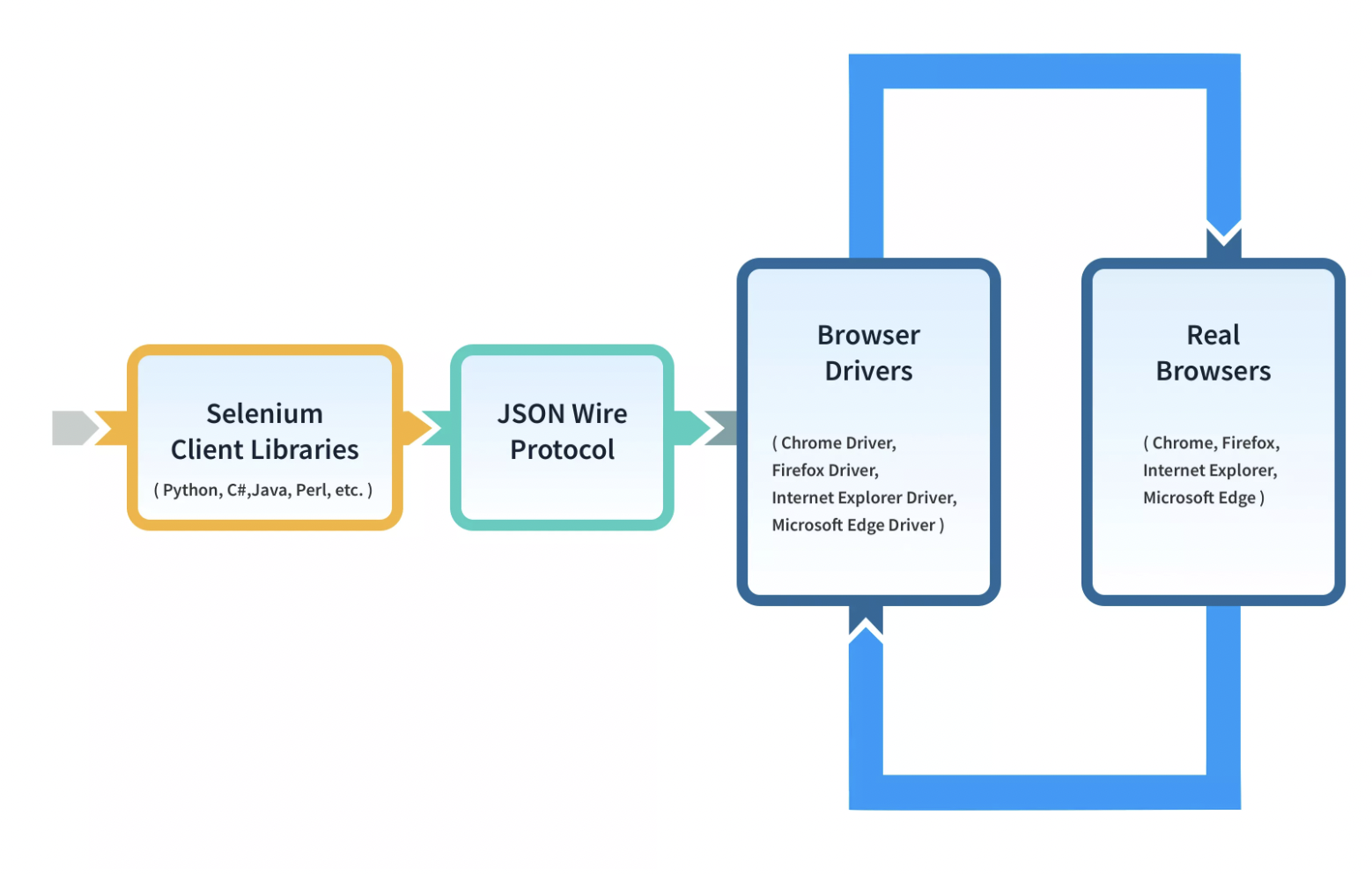
Architecture Of Selenium WebDriver BrowserStack

What s New In Selenium 4 Key Features BrowserStack

Selenium The JetBrains Academy Blog The JetBrains Blog
Using multiple criteria to find a WebElement in Selenium Ask Question Asked 8 years 8 months ago Modified 2 years 5 months ago Viewed 42k times 16 I am using Selenium to test a website does this work if I find and element by more than one criteria for example driverChrome findElements By tagName input id id Start or

Locators Strategies in Selenium Python are methods that are used to locate single or multiple elements from the page and perform operations on the same Selenium s Python Module is built to perform automated testing with Python Selenium Python bindings provide a simple API to write functional acceptance tests using Selenium WebDriver

Selenium provides support for these 8 traditional location strategies in WebDriver Creating Locators To work on a web element using Selenium we need to first locate it on the web page Selenium provides us above mentioned ways using which we can locate element on the page To understand and create locator we will use the following HTML snippet

The syntax for identifying multiple elements by Tagname is as follows driver find elements by tag name value of tagname Let us see the html code of a webelement which is as follows The value of the tagname highlighted in the above image is h4 Let us try to count the number of webelements having tagname as h4 Code Implementation

Selenium defines two methods for identifying web elements findElement A command to uniquely identify a web element within the web page findElements A command to identify a list of web elements within the web page Let s understand the difference between these two methods in greater detail Read More Selenium WebElement Commands
I Right click on the web element Navigate to inspect in Fire Path ii If the right click is disabled then open the Fire Path by clicking on the FireBug icon LOCATORS Locators are used to locate the web element on the basis of HTML tags attributes and HTML texts There are 8 types of locators in Selenium WebDriver Selenium Tutorial 4 Find Multiple Elements in Selenium Webdriver Basic Selenium API Krishna Sakinala 16K subscribers Subscribe 32 2 3K views 3 years ago Selenium Tutorial For Beginners
7 Answers Sorted by 23 Element with id I1 or element with id I2 xpath E1 id I1 E2 id I2 css css E1 I1 E2 I2 driver findElement By xpath E1 id I1 E2 id I2 driver findElement By cssSelector E1 I1 E2 I2 don t forget about fluentWait mechanism