Selenium Findelement By Id Not Working Selenium FindElement And FindElements Chapter 4 Selenium Tutorial Part 3 Locate Shadow DOM Using Selenium FindElement Video 182 Selenium WebElement Locators Selenium03 Locators findElement By XPath FAQ Selenium FindElement Stack Overflow Selenium web driver finds element unable to find input field on the web page I tried this each and every option XPath by CSS by name the testing site on the local environment HTML input class form control ng pristine ng untouched ng valid ng empty ng model email placeholder Username aria describedby username type text xpath
Here is the Answer to your Question I don t see any errors in your code block But you may consider to use elementToBeClickable method instead of visibilityOfElementLocated while you induce ExplicitWait Additionally instead of locating the li element with id as menu item 33 you can consider to locate the a tag of the element Finally the a tag will receive the normal Java click and you won Kotlin WebElement vegetable driver findElement By className tomatoes Evaluating a subset of the DOM Rather than finding a unique locator in the entire DOM it is often useful to narrow the search to the scope of another located element
Selenium FindElement Stack Overflow Find Element In Selenium And Find Elements In Selenium Webdriver 2022 Selenium WebDriver FindElements findElement Difference Between FindElement And FindElements Command With Examples Difference Between FindElement And FindElements Command With Examples FindElement And FindElements In Selenium Differences Selenium FindElement By Id Not Working In A For Loop Stack Overflow FindElement And FindElements In Selenium Differences By Ria Dayal Selenium Automation FindElement By YouTube
Selenium Findelement By Id Not Working
 Selenium Findelement By Id Not Working
https://i.ytimg.com/vi/v3Tpnj1fz9I/maxresdefault.jpg
Stack Overflow Public questions answers Stack Overflow for Teams Where developers technologists share private knowledge with coworkers Talent Build your employer brand Advertising Reach developers technologists worldwide Labs The future of collective knowledge sharing About the company
Templates are pre-designed documents or files that can be used for different functions. They can conserve time and effort by offering a ready-made format and layout for producing different type of content. Templates can be used for personal or professional projects, such as resumes, invitations, leaflets, newsletters, reports, presentations, and more.
Selenium Findelement By Id Not Working

Element Not Found When Executing FindElement In Selenium Javahelp
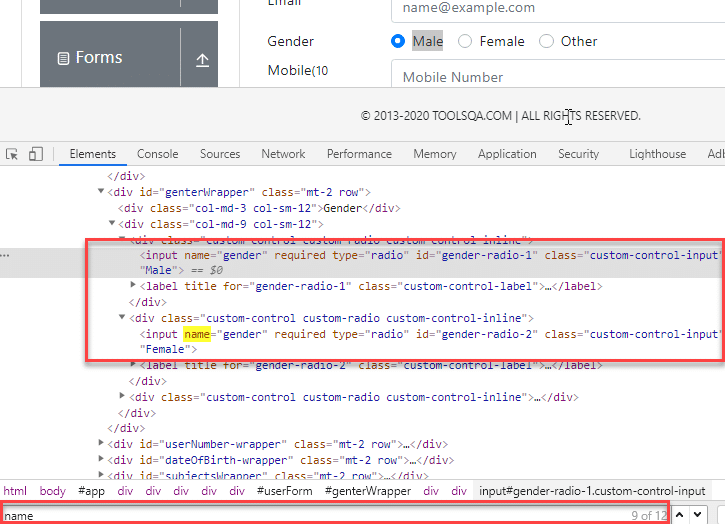
Find Element In Selenium And Find Elements In Selenium Webdriver 2022
Selenium WebDriver FindElements findElement

Difference Between FindElement And FindElements Command With Examples
FindElement And FindElements In Selenium Differences

Selenium FindElement By Id Not Working In A For Loop Stack Overflow

FindElement By Id not working Ask Question Asked 12 years 1 month ago Modified 11 years 2 months ago Viewed 3k times 0 This is my first attempt at using Selenium and I am having trouble with the FindElement By Id My script uses several By Name methods and they work fine Here s my code

3 Answers Sorted by 1 Based on the page link you provided it looks like your locator strategy is correct here If you are getting an error most likely NoSuchElementException I am assuming it might have something to do with waiting for the page to load before attempting to find the element

1 This question has been asked many times but none of the answers seem to work I am trying to simply locate the search bar on the google front page https google If looking at the inspector you can clearly see that the name of the search bar is q However I get the exception

Stack Overflow Public questions answers Stack Overflow for Teams Where developers technologists share private knowledge with coworkers Talent Build your employer brand Advertising Reach developers technologists worldwide Labs The future of collective knowledge sharing About the company

As you haven t provided any HTML to work with or a reprex I can t give an answer specific to your use case However the solution is likely to be that you need to use Selenium s expected conditions from selenium import webdriver from selenium webdrivermon by import By from selenium webdriver support ui import WebDriverWait from selenium webdriver support import expected conditions as
Here is the method to find the missing date input public void setDateField String date WebDriverWait wait new WebDriverWait this driver 130 wait until ExpectedConditions visibilityOfElementLocated By cssSelector span dateOnlyInput input this driver findElement By cssSelector span dateOnlyInput input sendKeys date FindElement A command to uniquely identify a web element within the web page findElements A command to identify a list of web elements within the web page Let s understand the difference between these two methods in greater detail Read More Selenium WebElement Commands Difference between findElement vs findElements in Selenium
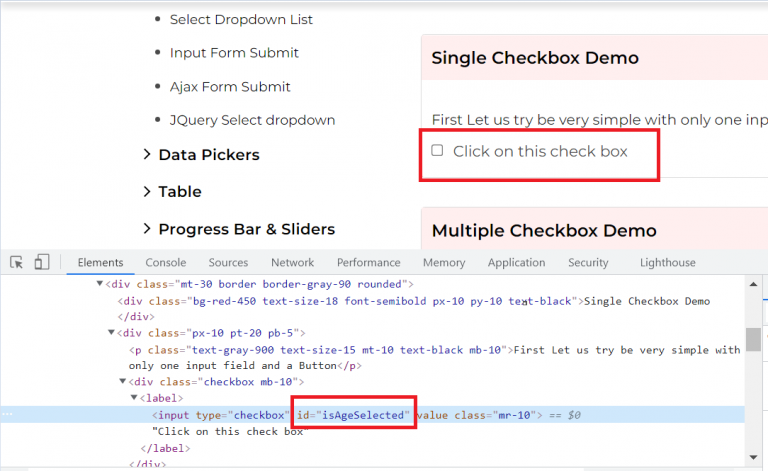
You must have the element id which you can get with developer tools You can also use id or css to select a webpage element Related course Selenium Web Automation Course Examples find element selenium find element by id The selenium code uses find element by id to select the search box Then it types a message in the search box