Restart Vsphere Services Command Line How To Start Stop Restart VCenter Services 2 Ways Command Line Arguments Command Line Arguments Create discord bot Build A Command Line Interface In Rust Command Prompt Interface On Craiyon WEB Jul 24 2019 nbsp 0183 32 Beginning in vCenter Server 6 0 it is recommended to use the vSphere Web Client or Service Control command line tool to stop start or restart vCenter Server and or Platform Services Controller services
WEB Sometimes it may be necessary to stop and restart all services installed on this particular vCSA based on the installed roles such as vCenter external PSC or an embedded vCenter server You can stop all services with this command service control stop all Stop all VMware vCSA services WEB Sep 18 2021 nbsp 0183 32 This is a quick post on how to Start Stop Restart services on VMware vSphere ESXi server via PowerCLI or using PowerShell The service you will need to start or stop simultaneously on multiple servers is likely to be the SSH TSM SSH service
Command Prompt Interface On Craiyon Threat Command Configuration Best Practices Currency Command For Server Management On Craiyon Command Center For Android Download Server Start Command Code Snippet Image Of Command enabled Creative Servers Image Of An Integrated Security Command Centre On Craiyon Text Color In Command Interface On Craiyon VSphere Command Line Interface Concepts And Examples
Restart Vsphere Services Command Line
 Restart Vsphere Services Command Line
https://www.ubackup.com/screenshot/en/acbn/others/restart-vcenter-services/vcenter-restart-services.png
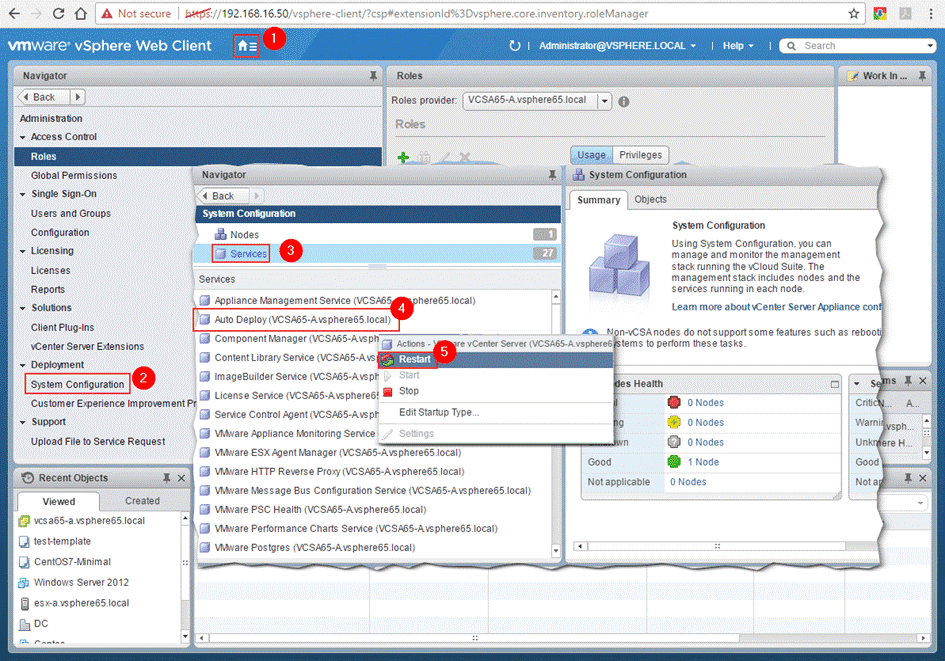
WEB Jun 17 2024 nbsp 0183 32 This article covers 2 ways to restart vCenter services You are able to restart all vCenter services in vSphere Web Client and if you are familiar with command line it s also easy to start stop restart vCenter services
Pre-crafted templates use a time-saving option for producing a varied range of files and files. These pre-designed formats and layouts can be made use of for different individual and professional projects, consisting of resumes, invitations, leaflets, newsletters, reports, discussions, and more, simplifying the content production process.
Restart Vsphere Services Command Line
Create Empty File At Windows Command Line

Threat Command Configuration Best Practices

Currency Command For Server Management On Craiyon

Command Center For Android Download

Image Of Command enabled Creative Servers

Image Of An Integrated Security Command Centre On Craiyon
WEB Aug 2 2021 nbsp 0183 32 Select a service and click SET STARTUP TYPE to configure either Manual or Automatic start of a service Select a service and click START to start a service Select a service and clilck STOP to stop or RESTART to restart a service then click OK

WEB Jun 14 2017 nbsp 0183 32 Learn the 3 best methods to stop start or restart vCenter Server services using the service control command line tool and the vSphere Web Client

WEB Jan 22 2021 nbsp 0183 32 In VMware vCenter Server 6 0 and later VMware recommends to use the vSphere Web Client or Service Control command line tool to stop start or restart vCenter Server Appliance services This process is different from previous versions of the vCenter Server Appliance

WEB Jul 25 2019 nbsp 0183 32 Beginning in vCenter Server 6 0 it is recommended to use the vSphere Web Client or Service Control command line tool to stop start or restart vCenter Server and or Platform Services Controller services

WEB In the vSphere Web Client you can start stop and restart services that are running on vCenter Server You can restart services upon a configuration change or in case of suspected functional or performance issues
WEB In VMware vCenter Server 6 x VMware recommends to use the vSphere Web Client or Service Control command line tool to stop start or restart vCenter Server and or Platform Services Controller services WEB Jun 1 2023 nbsp 0183 32 Restart the hostd and vpxa services management agents with the commands etc init d hostd restart etc init d vpxa restart Use this command as an alternative to restart all management agents on the ESXi host services sh restart amp tail f var log jumpstart stdout log The progress of the VMware agents restart is displayed in
WEB May 31 2019 nbsp 0183 32 You can use the vCenter Server Appliance Management Interface to restart or power off the virtual machine running