Reset User Password Terminal Mac How To Reset Your Mac Password Using Terminal DeviceMAG Reset Mac Password Terminal Crowdgeser Get Out Of Reset Mac Password Terminal Jzaabc Red Hat Linux Change User Password RHEL NixCraft Reset Password Osx Terminal Http jxtz over blog Web Sep 15 2020 nbsp 0183 32 Next we ll reset the password by typing in the following command dscl passwd Users username You ll be prompted to enter a new password follow the on screen prompts to complete the
Web Dec 14 2023 nbsp 0183 32 If you forgot the password to log in to your Mac user account or the password isn t accepted choose a reset option from the login window These steps are for macOS Catalina or later The steps for macOS Mojave or earlier are different Web Jul 8 2023 nbsp 0183 32 Open the Terminal app on your Mac and type the below command dscl passwd Users userName new password Example dscl passwd Users c2c dj 3dg5C Note you will see a message quot Permission denied Please enter the user s old password quot Once you enter your old password correctly the password of the user will be changed
Reset Password Osx Terminal Http jxtz over blog How To Reset Your Forgotten Linux Password Systran Box Reset Mac Password Recovery Mode Lasopahard Reset Mac Password On Computer Lasopadotcom Forget Mac Password How To Reset A Password On MacOS OS X 9 Steps To Reset Admin Password On Mac via Terminal Reset User Password Cloudsnap How To Reset Admin And Standard User Passwords In OSX 10 11 OSX 10 10 OSX 10 9 OSX 10 8 By Reset Password Terminal Coolqfil
Reset User Password Terminal Mac
 Reset User Password Terminal Mac
https://www.devicemag.com/wp-content/uploads/2022/12/reset-mac-password-terminal-1-1.jpg
Web Dec 14 2023 nbsp 0183 32 Choose Apple menu gt Restart Password reset is now complete You don t need to take additional steps If you re asked for your recovery key Enter your FileVault recovery key You received it when you turned on FileVault and chose to create a recovery key instead of allowing your iCloud account Apple ID to unlock your disk
Templates are pre-designed documents or files that can be utilized for numerous purposes. They can conserve time and effort by providing a ready-made format and design for producing various kinds of material. Templates can be utilized for personal or professional projects, such as resumes, invites, leaflets, newsletters, reports, discussions, and more.
Reset User Password Terminal Mac

Virtual City Playground Diamonds Hack Mac Wizardheavenly

How To Reset Your Forgotten Linux Password Systran Box

Reset Mac Password Recovery Mode Lasopahard
Reset Mac Password On Computer Lasopadotcom

9 Steps To Reset Admin Password On Mac via Terminal
Reset User Password Cloudsnap
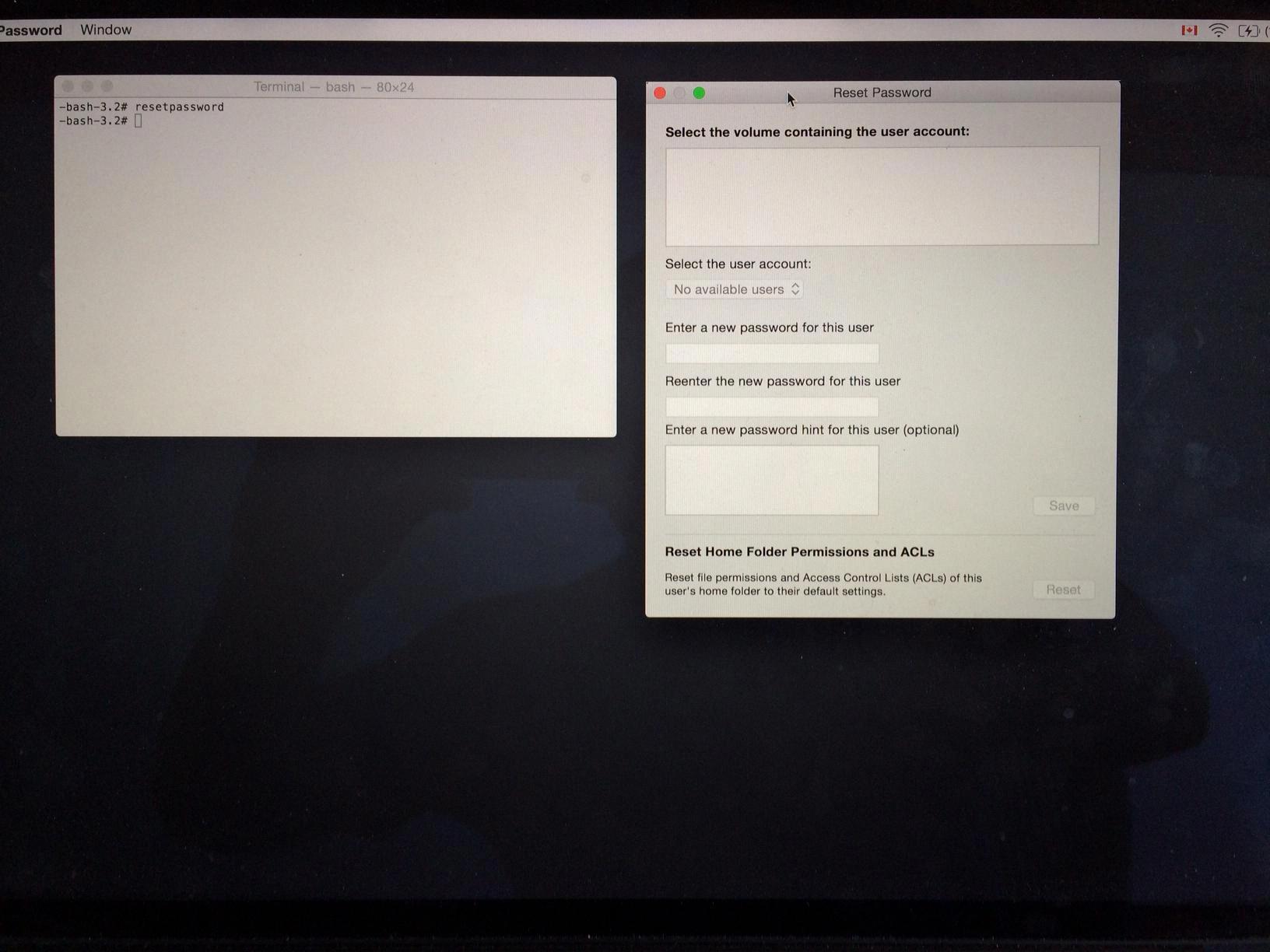
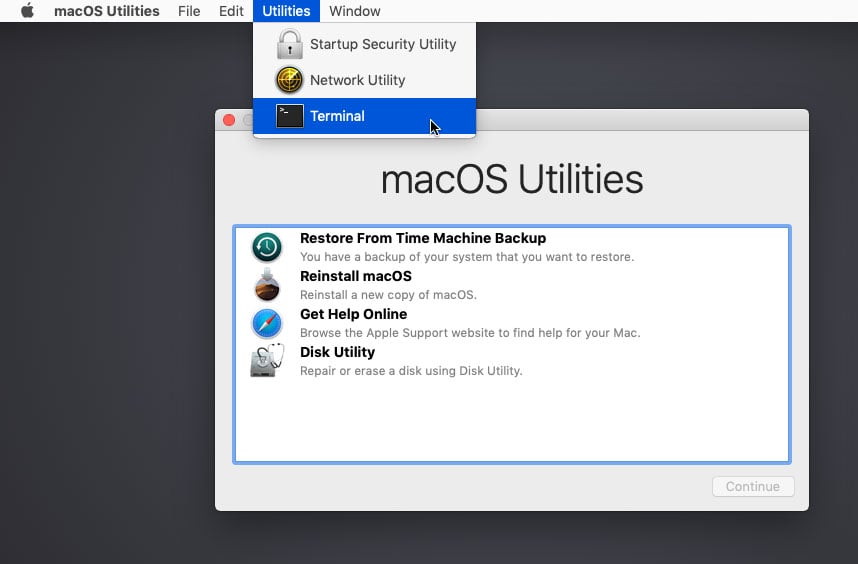
Web Apr 28 2023 nbsp 0183 32 1 Restart your Mac When your Mac begins its startup process hold down the quot Command quot and quot R quot keys 2 Open Terminal Click quot Utilities quot in the menu bar Select quot Terminal quot 3 Type quot reset password quot into Terminal and hit quot Enter quot This will result in a reset password tool popping up 4 Select your computer s hard drive

Web Jun 10 2022 nbsp 0183 32 Fortunately this is far from the only way to reset your Mac password While none of these are very convenient Apple has provided a few tools to make changing your Mac password possible These include the following Use a different admin account to reset your account s password Reset your Mac password using your Apple ID

Web Sep 13 2019 nbsp 0183 32 You ll have to reboot the Mac in recovery mode open a terminal the issue the command quot resetpassword quot You will have to reset the password for every account on the system or it won t let you proceed

Web Jul 27 2015 nbsp 0183 32 sudo security set keychain password o oldpassword p newpassword Users username Library Keychains login keychain Substitute in the actual user s username for username the actual user s old password for oldpassword and the actual user s new password for newpassword

Web When a password is required in the Terminal window you see a password prompt and the cursor changes to a key Open Terminal for me In the Terminal app on your Mac type your administrator account password at the prompt then press Return
Web Jan 25 2023 nbsp 0183 32 Type resetpassword in the terminal window Don t use any space in between the words Then hit Enter This will open the Reset Password Assistant screen Type your password and a hint Web Jul 22 2020 nbsp 0183 32 1 Navigate to System Preferences and select the Users and Groups tab 2 In the bottom left corner click the lock icon and enter the admin password for your second account 3 Select the admin user whose password you need to reset
Web Nov 28 2022 nbsp 0183 32 dscl passwd Users user short name password When I hit enter it still asks the existing password to change with the new one and this script also need to existing old password to reset username 1 oldpwd 2 newpwd 3 dscl passwd Users quot username quot oldpwd newpwd security set keychain password o oldpwd p