Reset Password Windows Server 2012 Reset Password Windows Server 2012 V Windows Server 2016 Final Blade Reset Password Windows Server 2012 R2 Sekedar Catatan Reset Password Windows Server 2012 V Windows Server 2016 Final Blade Reset Password Windows Server 2012 V Windows Server 2016 Final Blade How To Reset Windows Server 2012 Local Domain Administrator Password Restart your computer On the login screen tap Shift key five times and you ll see a command prompt screen in administrator mode OK type net user UserName NewPassword replace the UserName and UserPassword with the one you need and press Enter key The user password will be replaced with new one
Step 1 Put your server into Recovery Mode Step 2 Log in after enabling the recovery mode 3 Mount the Windows Device 5 Unlock the Account 6 Unmount the Windows Device 7 Exit recovery mode and reboot 8 Login and Set a Strong Password Conclusion Recover password on Windows Server 2019 2016 2012 R2 Support Windows Server 2012 R2 Forgot Administrator Password How to Reset Recover YouTube Learn how to reset forgotten Windows server 2012 R2 local or domain administrator password
How To Reset Windows Server 2012 Local Domain Administrator Password How To Guide For Windows Servers How To Reset Windows Server 2008 Password I Forgot My Microsoft Account Password In Windows 8 Admin Password 2 Ways To Reset Windows Server 2012 Password Reset Password Windows Server 2018 D ch V Gi i Ph p CNTT How To Reset Forgotten Administrator Password On Windows Server 2016 Password Recovery Ways Tips Change Domain Administrator Password How To Change Administrator User Password On Windows Server 2012 STH How To Reset Windows Server 2012 R2 Administrator Password YouTube
Reset Password Windows Server 2012
 Reset Password Windows Server 2012
https://it.itsystems.vn/wp-content/uploads/2021/05/0.jpg
Use the following command replace password with a temporary password to reset the Administrator password net user Administrator password Login using the temporary password Reset the password from the Windows Server environment Replace the sethc exe with the backed up version
Templates are pre-designed files or files that can be used for numerous functions. They can conserve effort and time by supplying a ready-made format and design for producing various type of material. Templates can be utilized for individual or professional projects, such as resumes, invitations, leaflets, newsletters, reports, discussions, and more.
Reset Password Windows Server 2012
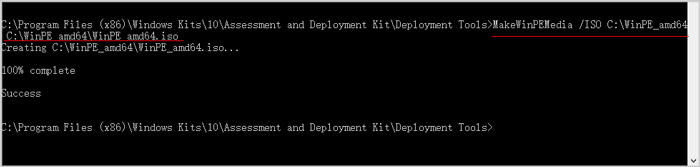
Top 3 Ways To Reset Password Windows Server 2012 After Forgot

How To Guide For Windows Servers How To Reset Windows Server 2008 Password

I Forgot My Microsoft Account Password In Windows 8 Admin Password
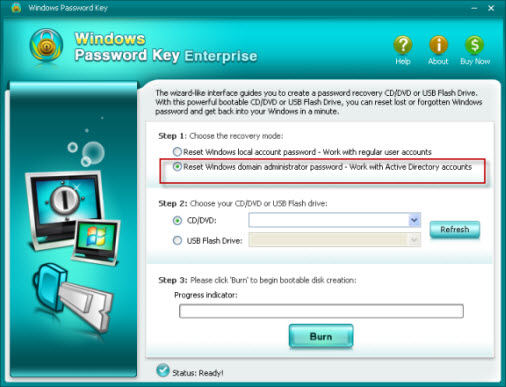
2 Ways To Reset Windows Server 2012 Password

How To Reset Forgotten Administrator Password On Windows Server 2016

Password Recovery Ways Tips Change Domain Administrator Password

Step 1 Create a Windows Server 2012 installation media in an accessible computer 1 First you have to get a Windows Server 2012 ISO file on the current PC 2 Download and install Windows USB DVD Download Tool 3 Follow the wizard to finish creating the installation media Otherwise you can refer to this post Windows Server 2012 also works

Reset the user s password Click Users in the left hand pane Right click the appropriate user in the list and click Set Password Enter the new password confirm it and then select the desired options related to password expiration and change requirements Click OK to save the changes

If you have forgotten the administrator password on your Windows Server 2012 R2 you can reset it by following the steps below 1 Boot your server from the Windows Server 2012 R2 installation media 2 On the Install Windows page click Repair your computer 3 On the System Recovery Options page click Command Prompt 4

How to Reset Forgotten Windows Server 2012 Domain Administrator Password IT Security Spiceworks Home Security General IT Security How tos Forgetting a Windows password can be frustrating especially if it is your domain administrator password for your server With a few simple steps you can

Changing Your Windows Server 2012 Password Through Windows Control Panel To change your password via the Windows Control Panel please refer to the following steps Press the Windows key X while logged into the server Select Control Panel Select Change account type Select the account you d like to modify Select Change the password
Option 1 Reset Server 2012 password with installation CD Losing password in Windows Server 2012 R2 seems scary at first but luckily there s a quick fix that will solve your problem If you have a server 2012 Installation disk you can easily reset administrator password on server computer What to do when you forgot the password for your Windows Server 2012 How to reset Windows Server 2012 password If you are just one of the crowds who lost their password look no further here we provide the guide of resetting Windows Server 2012 password for you
Step 1 Log in with RDP into Windows Server 2012 Connect to your server with the login credentials which you can find in your client area Step 2 Changing the password Click the Windows button in the lower left corner Then look for the square Control Panel