Replace Blank In Excel Pivot Table Pivot Table Template The 5 Best Excel Pivot Table Shortcuts You Need To Know How To Remove Blanks In A Pivot Table In Excel 6 Ways Avantix Learning How To Remove Blanks From A Pivot Table In Excel Techwalla Pivot Table Week Session 1 What Are Pivot Tables How To Excel At Excel Web Mar 7 2013 nbsp 0183 32 5 Answers Sorted by 4 Rather than using the entire worksheet as the source of the pivot table data use a dynamic range This will expand and contract as you add and remove data You will just need to refresh your pivot table each time you change the data
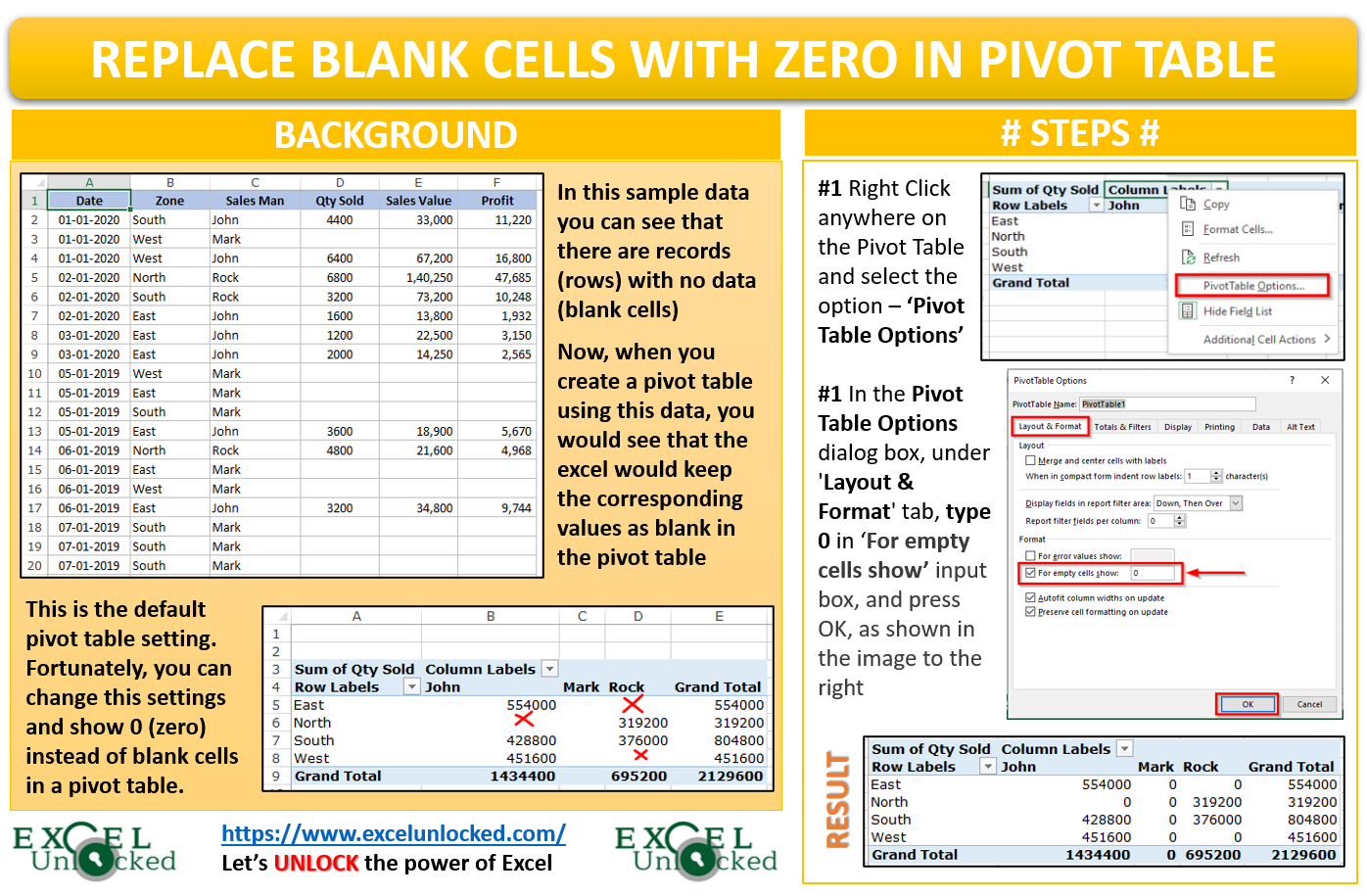
Web Jan 13 2024 nbsp 0183 32 Use PivotTable Options to Remove Blank Cells from Excel Pivot Table Remove Blank Rows After Each Item in Excel Pivot Table Use Conditional Formatting to Remove Blank Cells in Excel Pivot Table Remove Blank Cells from the Source Data in Excel Filter Out Blank Cells in Excel Pivot Table Conclusion Frequently Asked Web Dec 5 2022 nbsp 0183 32 1 Right click any cell in the pivot table and choose Pivot Table Options 2 In the PivotTable Options dialog select the Layout amp Format tab You can either uncheck quot For Empty Cells Show quot or fill in a 0 in the For Empty Cells Show text box Click OK Figure 847 Add a zero to the For Empty Cells Show text box
Pivot Table Week Session 1 What Are Pivot Tables How To Excel At Excel Excel Replace Blank In Pivot Table Brokeasshome How To Master Excel Pivot Tables Quickly Artofit How To Remove Data In Pivot Table Brokeasshome Multiple Excel Pivot Tables Free Microsoft Excel Tutorials Web Can Pivot Tables Have Blank Cells In Excel Sheets Brokeasshome Review Of How To Summarize Data In Excel Without Pivot Table Ideas Pivot Table Limited To 1000 Rows Per Page Brokeasshome How To Remove A Blank In Pivot Table Brokeasshome
Replace Blank In Excel Pivot Table
 Replace Blank In Excel Pivot Table
https://i2.wp.com/www.techyuga.com/wp-content/uploads/2021/07/clipboard-image-2-1797x2048.jpg
Web Dec 19 2020 nbsp 0183 32 Replace blank cells in Excel Pivot tables with zero or other text PIVOT TABLE PLAYLIST https www youtube watch v RufENOZErg8 amp list PLgl7Zr5nCpaYNddYZ
Pre-crafted templates offer a time-saving service for producing a varied range of files and files. These pre-designed formats and layouts can be made use of for various individual and expert projects, including resumes, invites, leaflets, newsletters, reports, discussions, and more, streamlining the content creation procedure.
Replace Blank In Excel Pivot Table
Replace Blank Cells With Zeros In Excel Pivot Table Excel Unlocked

Excel Replace Blank In Pivot Table Brokeasshome

How To Master Excel Pivot Tables Quickly Artofit
How To Remove Data In Pivot Table Brokeasshome
Can Pivot Tables Have Blank Cells In Excel Sheets Brokeasshome

Review Of How To Summarize Data In Excel Without Pivot Table Ideas

Web Jun 9 2023 nbsp 0183 32 how to get rid of quot blank quot appearing in pivot table This usually indicates that you ve got something in the underlying data that should either be in the existing categories or that you need to introduce a new category for that currently blank category

Web Jul 5 2018 nbsp 0183 32 1 Select one cell in your pivot table that displays quot blank quot Manually change the cell s value to contain only a single space by pressing the space bar and then Enter Now all cells in that field that previously displayed as quot blank quot should appear visually blank If you want the quot blank quot cells to contain something other than quot blank
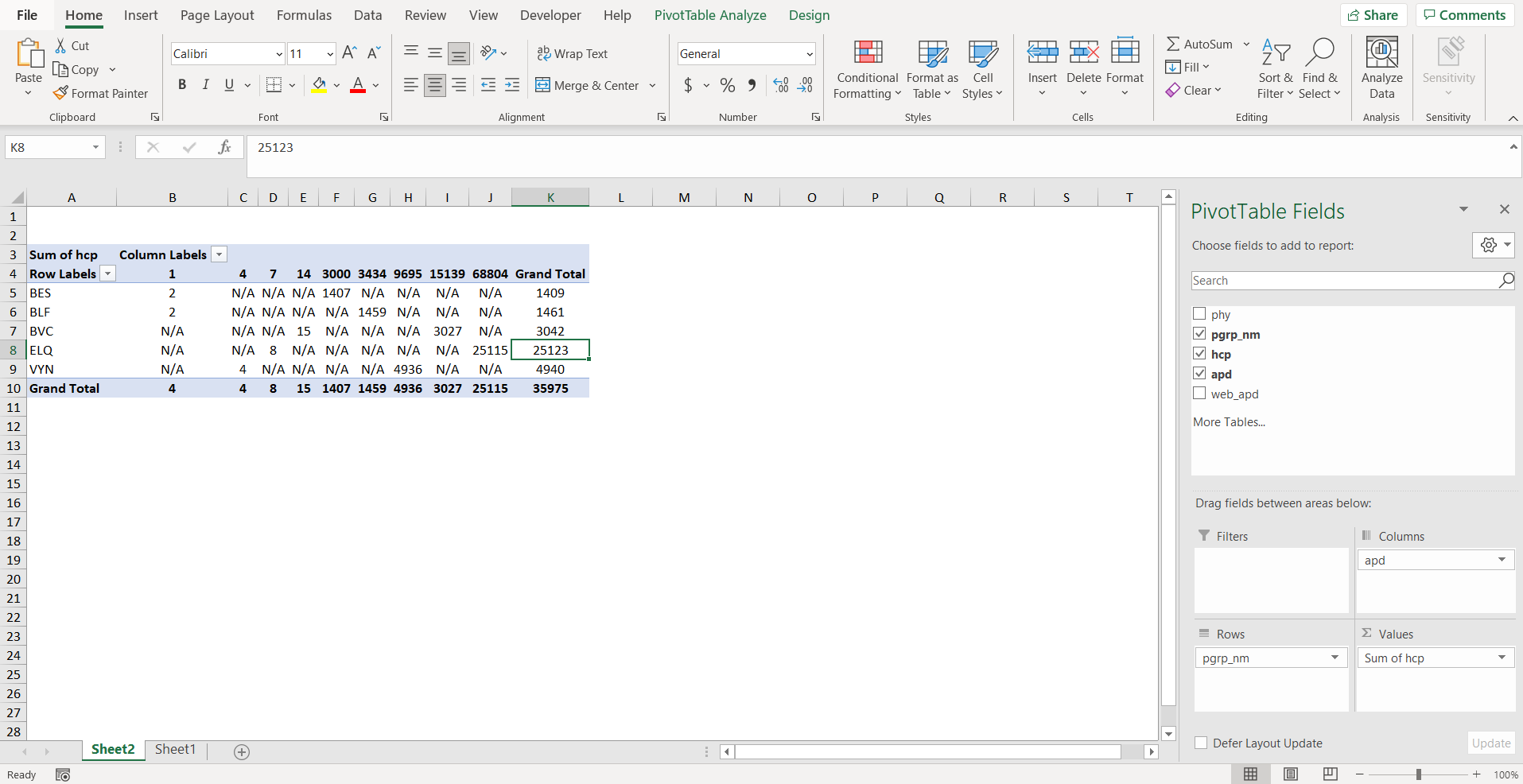
Web Dec 11 2008 nbsp 0183 32 You can type any text to replace the Blank entry even a space character but you can t clear the cell and leave it empty Select one of the Row or Column Labels that contains the text blank Type N A in the cell and then press the Enter key
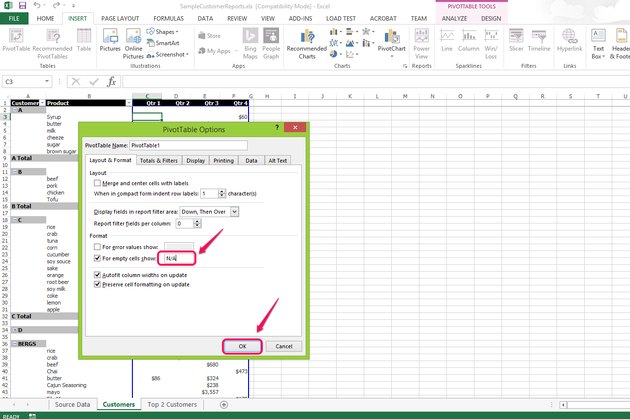
Web Select the cells you want to remove that show blank text It could be a single cell a column a row a full sheet or a pivot table On the Home tab go on Conditional Formatting and click on New rule

Web May 4 2024 nbsp 0183 32 Step 1 Right click the pivot table Select PivotTable Options Step 2 Choose Layout amp Format In For empty cells show enter 0 Click OK All blank cells will display 0 Method 2 Applying Conditional Formatting to Remove Blank Rows in an Excel Pivot Table Step 1 Select a range or group of cells
Web By Vaishvi Desai Are blank rows in your Excel pivot table causing frustration and clutter Do you want to learn a simple technique to clean up your pivot table and improve its efficiency In this easy guide we will show you how to remove blank rows in your Excel pivot table ensuring that your data is clean and concise Web To replace empty cells in pivot table in Excel 2016 you will need to do the following steps First identify the empty cells in the pivot table This will help you determine what value to use as the replacement for the empty cell In the example below we have order 10251 that does not have a quantity value row 5 in spreadsheet
Web Jan 2 2021 nbsp 0183 32 STEP 1 Click on any cell in the Pivot Table STEP 2 Go to PivotTable Analyze Tab gt Options STEP 3 In the PivotTable Options dialog box set For empty cells show with your preferred value Let s say you change pivot table empty cells to 0 See alsoInsert Subtotals to a Pivot Table All of your blank values are now replaced