Remove Windows Pin Cmd Gtknj Do Not Remove Credits Tumblr Pics How To Disable The PIN In Windows 11 WindowsChimp Remove Contact Solids From Display Option Unable To Remove Windows Update Clean up In Temporary Files Windows 11 How To Remove Windows Hello PIN Sign In Windows 10 PC YouTube Web May 13 2018 nbsp 0183 32 Log on cancel the PIN prompt as in the OP Then when you re at the desktop click the Windows Defender Security Centre icon on the tray Under quot Account Protection quot it should say quot Set up Windows
Web May 25 2020 nbsp 0183 32 1 These kinds of settings are usually done in the GUI on windows e g netplwiz but Microsoft has a command line utility called autologon for this Download it Web Oct 23 2019 nbsp 0183 32 Click on the quot Accounts quot tile in the following window The quot Accounts quot section opens to Your Info by default Click the Sign In Options entry on the menu followed by
How To Remove Windows Hello PIN Sign In Windows 10 PC YouTube How To Remove Your Pin From Windows 10 Riset How To Remove Windows 7 And Install Windows 8 1 Windows 8 1 Upgrade Cleaning Liquid 500ml 6702419050 For Cleaning Eco Sol TrueVIS EJ How To Disable Windows 10 Pin Remove Windows Hello Pin And Password Forgot Your Windows 10 PIN Here s How To Remove And Reset It How To Remove PIN In Windows 10 YouTube Windows 10 11 PIN How To Remove Highlight From Pdf On Windows Riset
Remove Windows Pin Cmd
 Remove Windows Pin Cmd
https://64.media.tumblr.com/0bc418d60b61ca7ebf5a875181a5c5ac/tumblr_nrxbmwGB3j1tx7szbo1_1280.jpg
Web Sep 5 2022 nbsp 0183 32 To fix Windows Hello PIN when you can t use change remove or add a PIN to your account use these steps Open Start Search for Command Prompt right
Pre-crafted templates use a time-saving option for developing a diverse series of documents and files. These pre-designed formats and layouts can be utilized for numerous individual and professional projects, consisting of resumes, invitations, flyers, newsletters, reports, presentations, and more, simplifying the material creation procedure.
Remove Windows Pin Cmd
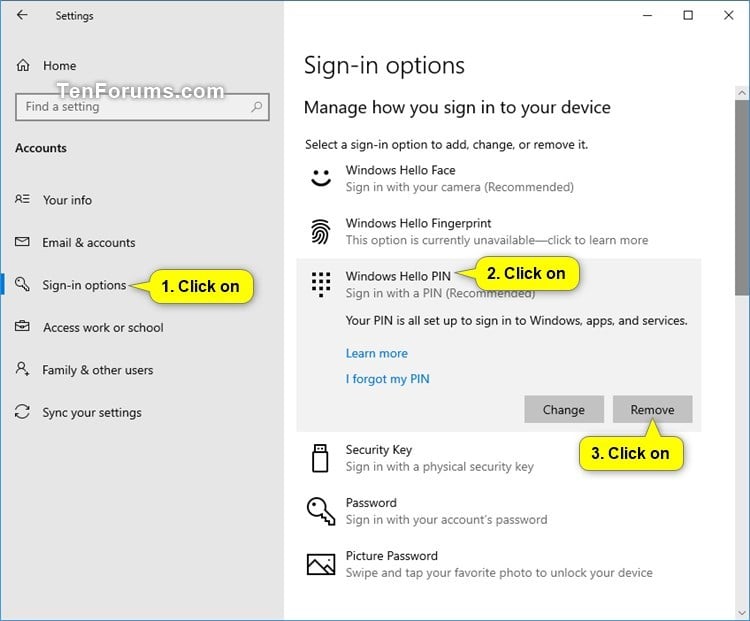
Fix Can T Remove Pin In Windows 11 Solved Youtube Mobile Legends

How To Remove Your Pin From Windows 10 Riset

How To Remove Windows 7 And Install Windows 8 1 Windows 8 1 Upgrade
Cleaning Liquid 500ml 6702419050 For Cleaning Eco Sol TrueVIS EJ
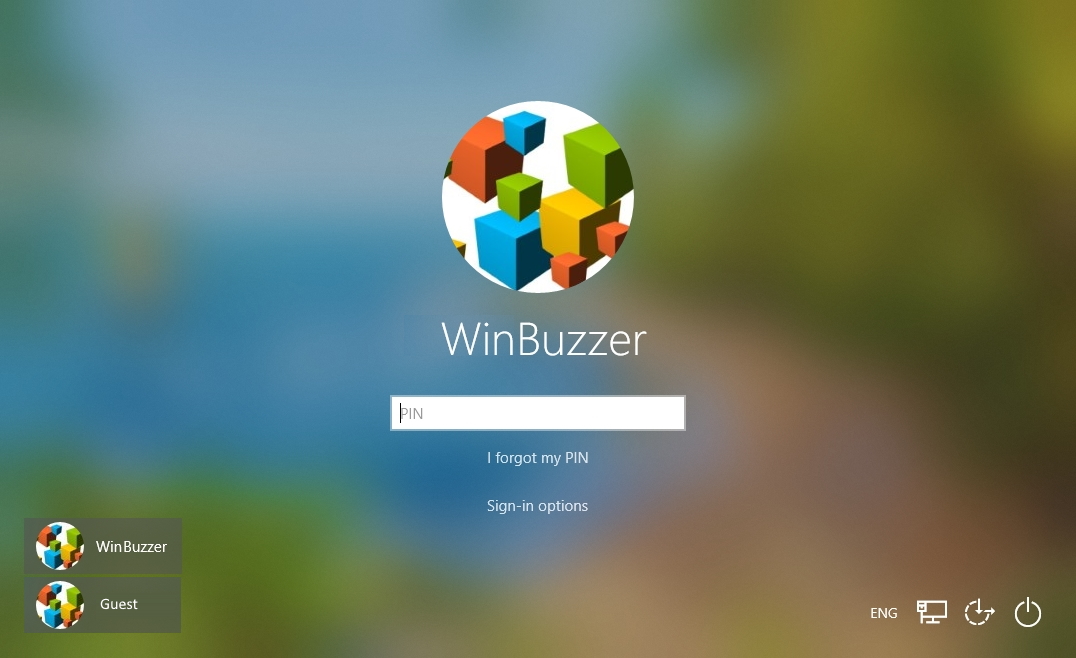
Forgot Your Windows 10 PIN Here s How To Remove And Reset It

How To Remove PIN In Windows 10 YouTube

Web Mar 22 2021 nbsp 0183 32 In order to remove all locally stored PINs and possibly even Finger Prints you must delete all contents of
Web 20 Sep 2020 How to Remove PIN from your Account in Windows 10 Windows Hello in Windows 10 enables users to sign in to their device using a PIN Personal Identification Number You can use this PIN to

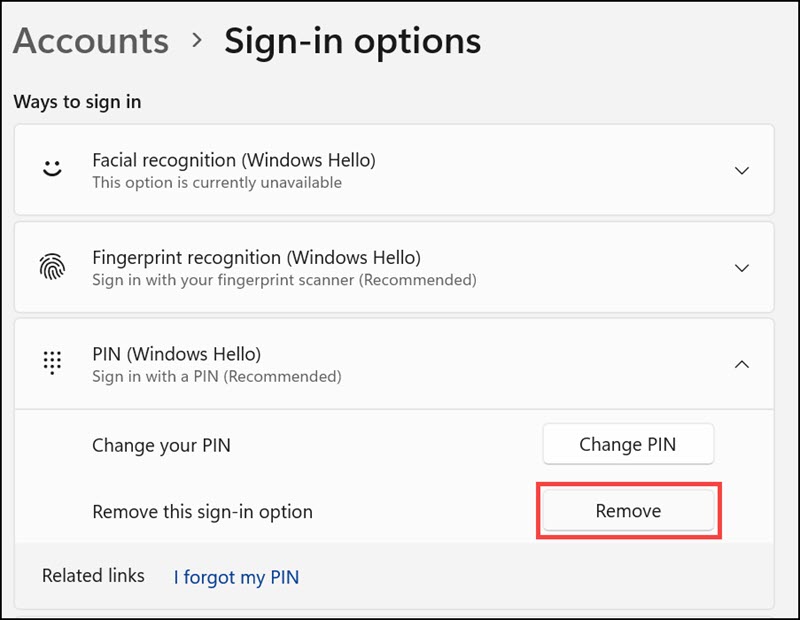
Web Dec 10 2021 Staff This tutorial will show you how to remove the Windows Hello PIN sign in option from your account in Windows 11 Windows Hello is a more personal more

Web Oct 10 2021 nbsp 0183 32 So the procedure to remove PIN login in Windows 11 is as follows Right click on the Start button and select Settings In the Settings window go to the accounts tab on the list on the left hand side

Web Oct 17 2023 nbsp 0183 32 Go to Start gt Settings gt Accounts gt Sign in options gt Windows Hello PIN gt Remove gt Remove Once the PIN is gone consider protecting your account by other means like a password This article
Web Feb 28 2023 nbsp 0183 32 On the left panel click Sign in options On the right panel choose Remove under PIN section After that you have successfully removed PIN from your computer If Web Oct 27 2023 nbsp 0183 32 Select Sign in options from the left pane Under PIN click the Remove button Confirm that you want to remove the PIN by selecting Yes when prompted
Web Aug 5 2023 nbsp 0183 32 Use the Windows 11 keyboard shortcut Windows I to open Settings 2 Move to the Accounts section in the left menu 3 Scroll down and click on Sign in