Remove User Profile Windows 10 Registry Free To Use Clip Art Images Vector Illustrations Mr stag Windows 10 How To Delete A User Profile From The Registry And System Properties User How To Recreate A Corrupted User Profile In Windows 10 8 7 Alizune How To Delete User Profiles In Windows 10 Quick Fix How To Delete User Profile Accounts Windows 10 Web Jun 3 2017 nbsp 0183 32 Option One To Delete User Profile of an Account in Advanced System Properties Option Two To Delete User Profile of an Account in File Explorer and Registry Editor
Web Press the Windows Key R type in SystemPropertiesAdvanced and press Enter The System Properties window should appear Click on Settings in the User Profiles section Click the account name you d like to remove then click on Delete That s it 2 Delete a User Profile With Registry Editor Web Sep 21 2017 nbsp 0183 32 Press Win R hotkeys on the keyboard The Run dialog will appear on the screen Type the following into the text box and press Enter SystemPropertiesAdvanced Advanced System Properties will open There click on the Settings button in the User Profiles section
Quick Fix How To Delete User Profile Accounts Windows 10 How To Delete User Profile To Fix Account Problems On Windows 10 Pureinfotech How To Delete User Profiles In Windows 10 New Information And News About Technology And Hacking Remove User Profile Correctly In Windows 10 How To Delete Or Remove User Profile In Windows 10 8 7 ISeePassword Blog How To Remove A Windows 10 Local User Account ComputerSluggish How To Remove User Profile On Windows 10 Fully How To Delete A User Profile In Windows 10 Delete User From Registry Deletejullld
Remove User Profile Windows 10 Registry
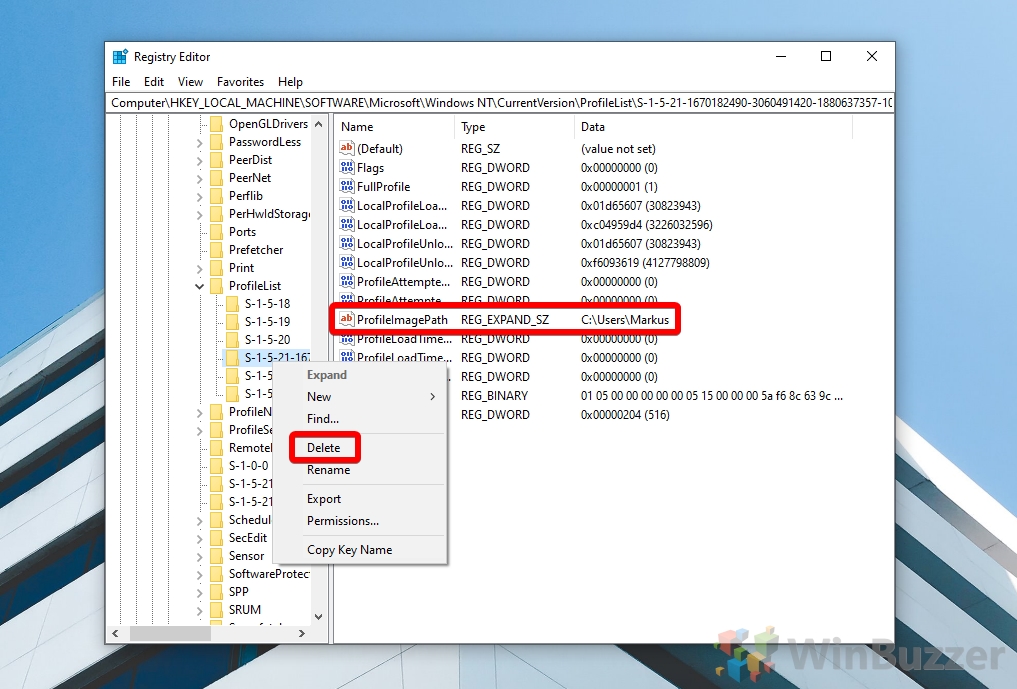 Remove User Profile Windows 10 Registry
https://winbuzzer.com/wp-content/uploads/2020/07/02.6-Windows-10-Regedit-User-Profile-Delete.jpg
Web Jul 6 2020 nbsp 0183 32 So it is better to back up the registry keys in Windows 10 in advance See how to delete Windows 10 user profile Step 1 Open File Explorer go to C users to look for the username folder you want to delete and remove it Step 2 Open the Run box type regedit and click OK
Templates are pre-designed documents or files that can be used for numerous purposes. They can conserve effort and time by providing a ready-made format and layout for producing different kinds of material. Templates can be utilized for individual or expert tasks, such as resumes, invites, flyers, newsletters, reports, discussions, and more.
Remove User Profile Windows 10 Registry

How To Delete Or Remove User Profile In Windows 10 8 7 ISeePassword Blog

How To Delete User Profile To Fix Account Problems On Windows 10 Pureinfotech

How To Delete User Profiles In Windows 10
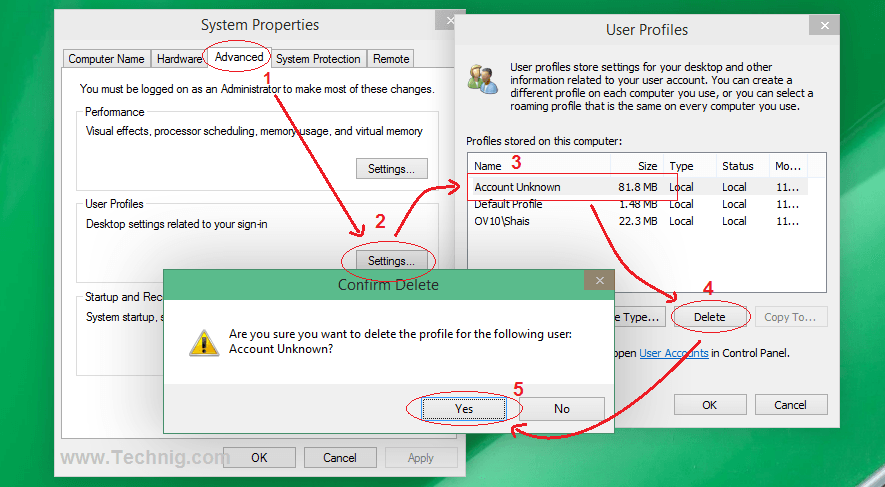
New Information And News About Technology And Hacking Remove User Profile Correctly In Windows 10

How To Remove A Windows 10 Local User Account ComputerSluggish

How To Remove User Profile On Windows 10 Fully

Web Jul 10 2020 nbsp 0183 32 How to Delete a User Profile via Windows 11 Windows 10 System Properties Open the Windows 11 Windows 10 user profile settings In the Advanced tab look for the User Profiles heading and Confirm the Windows 11 Windows 10 delete user profile action Microsoft will then make sure you

Web Feb 6 2023 nbsp 0183 32 Delete User Profile using Advanced System Properties Delete the User Profile via Registry Editor Lets us see this in more detail 1 Delete User Profile using Advanced System

Web Use Registry Editor to remove the appropriate User name keys from the following registry key HKEY LOCAL MACHINE SOFTWARE Microsoft Windowsnt CurrentVersion ProfileList When you are done quit Registry Editor Use My Computer or Windows Explorer to
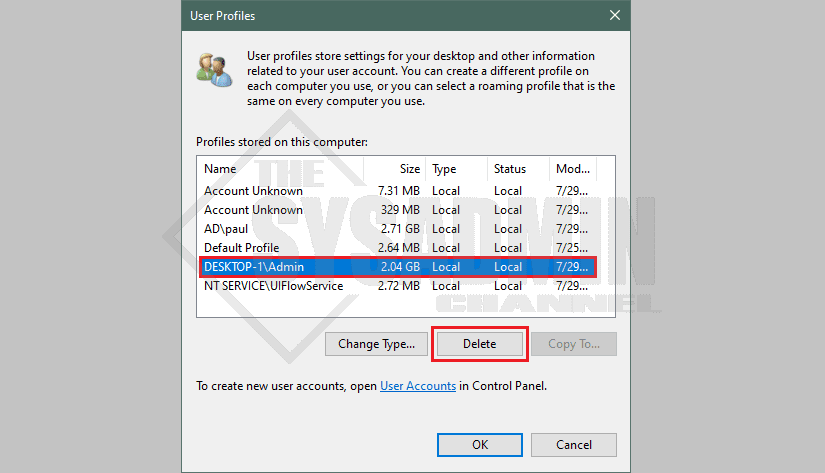
Web 2 Manually Remove User Profile in Windows 10 Another way to remove User Profile in Window 10 is to manually delete the User Profile Folder located at path C Users Username and also delete Registry Entries belonging to the User 2 1 Delete User Profile Folder
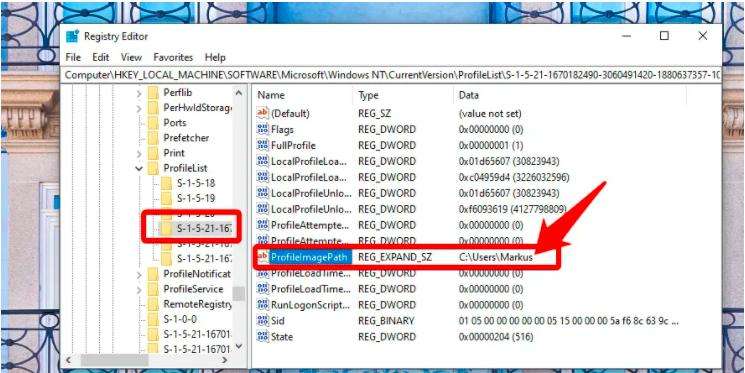
Web Oct 26 2018 nbsp 0183 32 The usual way to completely delete Windows profiles is Delete the user s profile folder from C Users manually or scripted Using regedit either manually or scripted remove the user s registry key from
Web Nov 16 2022 nbsp 0183 32 Next go to System gt About Under Device specifications press Advanced system settings Navigate to the User Profiles section and tap the Settings button Now the User Profiles window should pop up Here select your target profile and hit Delete Finally press the Yes button to confirm the profile deletion Web In the registry expand HKLM Software Microsoft WindowsNT CurrentVersion ProfileGuid and find the key named with the GUID of the desired user Right click on the folder and deleted the key Now when you login as that user Windows should automatically create the local profile Facebook
Web Hollis Johnson To delete a user from your Windows 10 computer go to your Accounts menu You should delete a user profile if you want to remove the owner s access to your computer You ll need to