Remove Symbols From Excel Column Excel Symbols In Font Column Roomscribe How To Extract First Middle And Last Names In Microsoft Excel CLOUD C mo Eliminar Valores De Las Celdas Pero Mantener Sus F rmulas En Creo Illustrate Publishing Option Remove Symbols PTC Community Solved Remove Symbols From Text In Notepad 9to5Answer Web Apr 26 2023 nbsp 0183 32 In this tutorial we will learn how to remove the symbol from the Price column using two different methods by following the steps below but let s have a look at the dataset shown above Method 1 Find amp Select Method
Web Feb 8 2023 nbsp 0183 32 If you want to remove only one special character you can use the SUBSTITUTE function see more in this article Remove Unwanted Characters If you do want to use a single formula to remove special characters you will need to use a User Defined Function UDF like RemoveSpecChar Web Mar 13 2023 nbsp 0183 32 On the Ablebits Data tab in the Text group click Remove gt Remove Characters On the add in s pane select the source range choose the Remove character sets option and pick either Text characters or Numeric characters in the drop down list Hit Remove and enjoy the result
Solved Remove Symbols From Text In Notepad 9to5Answer How To Remove Formula But Not Data In EXCEL EXCEL WORLD YouTube How To Turn Off Paragraph Symbols In Word 2010 SibettaX How To Delete A Drop Down List In Excel YouTube A Designer Who Helped Roll Out FNB s First Logo Still Thinks The AK 47 How To Hide Formula But Display The Result Without Protecting Worksheet Flutter Dart Merge Duplicate Rows In Excel While Keeping All Text Grupolew How To Insert Or Delete Rows And Columns From Excel Table ExcelDemy
Remove Symbols From Excel Column
 Remove Symbols From Excel Column
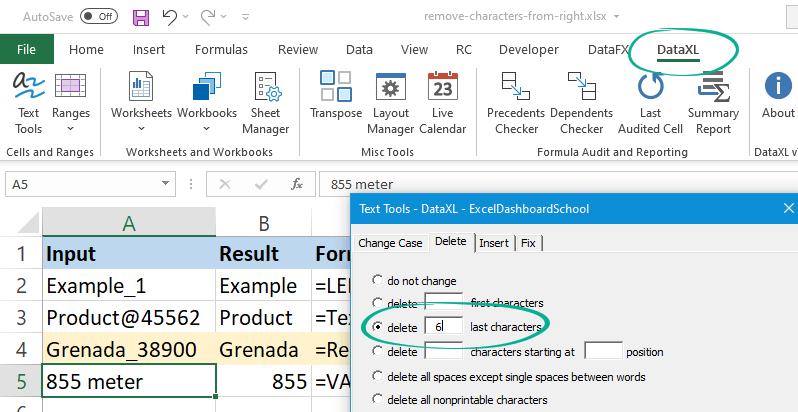
https://exceldashboardschool.com/wp-content/uploads/2020/02/Delete-the-last-nth-characters-from-right-using-an-add-in.png
Web Feb 10 2020 nbsp 0183 32 1 Click anywhere in the data and execute CTRL T to format as Table 2 In the Data tab click on From Table Range 3 In the Power Query Editor click on Split Column by Positions
Pre-crafted templates offer a time-saving option for creating a diverse variety of files and files. These pre-designed formats and layouts can be used for various individual and expert tasks, including resumes, invitations, flyers, newsletters, reports, discussions, and more, improving the material development procedure.
Remove Symbols From Excel Column

How To Remove All Asterisk Characters From Cells In Excel
How To Remove Formula But Not Data In EXCEL EXCEL WORLD YouTube
How To Turn Off Paragraph Symbols In Word 2010 SibettaX
How To Delete A Drop Down List In Excel YouTube
How To Hide Formula But Display The Result Without Protecting Worksheet
Flutter Dart

Web Mar 10 2023 nbsp 0183 32 Press Ctrl H to open the Find and Replace dialog In the Find what box type the character Leave the Replace with box empty Click Replace all As an example here s how you can delete the symbol from cells A2 through A6

Web Apr 12 2023 nbsp 0183 32 Remove special character from Excel cell To delete a specific character from a cell replace it with an empty string by using the SUBSTITUTE function in its simplest form SUBSTITUTE cell char quot quot For example to eradicate a question mark from A2 the formula in B2 is SUBSTITUTE A2 quot quot quot quot

Web Summary To remove specific unwanted characters in Excel you can use a formula based on the SUBSTITUTE function In the example shown the formula in C4 is SUBSTITUTE B4 CHAR 202 quot quot Which removes a series of 4

Web Oct 30 2023 nbsp 0183 32 1 Using Excel Functions to Remove Special Characters 1 1 Applying SUBSTITUTE Function 1 2 Combining RIGHT and LEN Functions to Delete Special Characters 1 3 Utilizing LEFT LEN Functions 2 Implementing Flash Fill Feature to Remove Special Characters 3 Applying Find amp Replace Feature 4

Web Sep 26 2023 nbsp 0183 32 1 Remove Specific Characters with Find and Replace Feature 2 Delete Specific Characters with SUBSTITUTE Function 3 Extract Only a Particular Instance of a Specific Character in a String 4 Remove Multiple Specific Characters with Nested SUBSTITUTE Function 5 Erase Any Special Characters with CLEAN Function 6
Web Mar 13 2023 nbsp 0183 32 For example to remove the first character from cell A2 the formulas go as follows REPLACE A2 1 1 quot quot RIGHT A2 LEN A2 1 Remove characters from left To remove leading characters from the left side of a string you also use the REPLACE or RIGHT and LEN functions but specify how many characters you want to delete every time Web Jul 5 2017 nbsp 0183 32 Barb Henderson 31 7K subscribers 2 3K 673K views 6 years ago working with Data How to remove Characters from fields in Excel remove characters from the middle of cells of data How to
Web When you wish to remove the character by using its code This can help you in removing case sensitive character Just use the char code in place of remove char To know the code of the character uses the function shown below