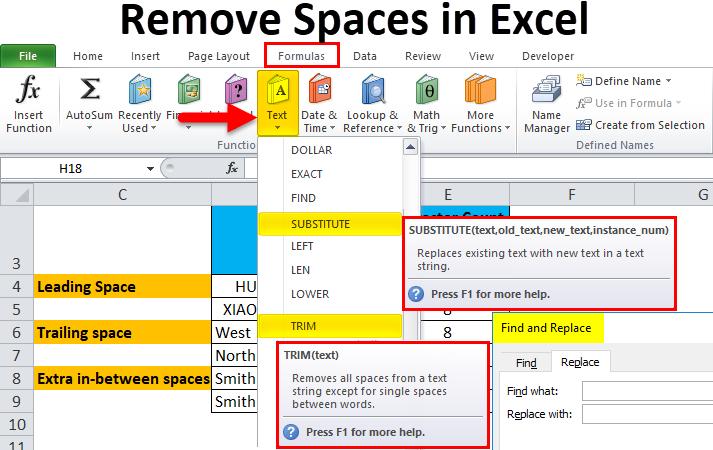
Remove Space Before Text In Excel Excel Formula Remove All Characters After A Certain One Printable 20 Excel Find And Replace Formula Background Formulas How To Remove Space In Excel In Between Numbers How To Remove Space Before Text In Excel 4 Methods ExcelDemy How To Remove Space Before Text In Excel Murrill Hickis Riset Web Nov 30 2021 nbsp 0183 32 Ways to Delete Whitespace in Excel In Excel to remove the leading trailing and extra spaces between words in a particular string use the TRIM function This function deletes all spaces except for single spaces between words To remove all spaces including the ones between words use Excel s Replace feature
Web May 24 2021 nbsp 0183 32 To do a Find and Replace press Ctrl H This will open the Find and Replace dialog box Click into the Find what box and then press your Spacebar once to add a space into the text box Replace it with nothing by leaving the Replace with text box empty and then select Replace All Web If you need to strip leading and trailing spaces from text in one or more cells you can use the TRIM function In the example show the formula in cell C3 is TRIM B3 Once you ve removed extra spaces you can copy the cells with formulas and paste special elsewhere as quot values quot to get the final text Video How to clean text with TRIM and CLEAN
How To Remove Space Before Text In Excel Murrill Hickis Riset How To Remove Space Before Text In Excel 5 Easy Ways How To Remove Spaces Between Words In Microsoft Word Leatherlassa How To Remove Space Before Text In Excel 4 Methods ExcelDemy How To Write Arabic Number In Excel 2007 How To Remove Space Before Text In Excel 4 Methods ExcelDemy How To Remove Space Before Text In Excel 4 Methods ExcelDemy How To Remove Space Before Text In Excel 4 Methods ExcelDemy How To Remove Space Before Text In Excel 4 Methods ExcelDemy
Remove Space Before Text In Excel
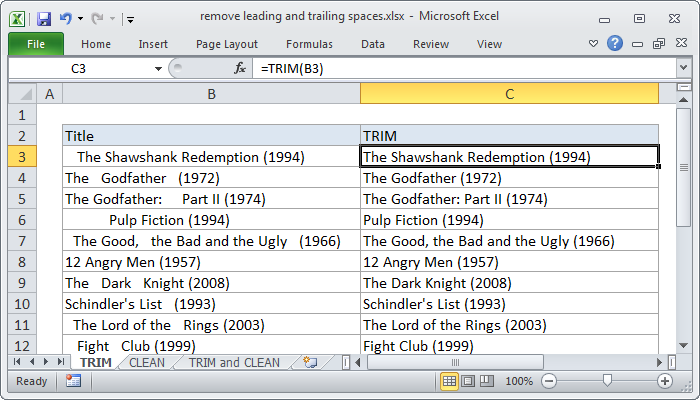 Remove Space Before Text In Excel
https://exceljet.net/sites/default/files/images/formulas/remove leading and trailing spaces.png
Web 1 The TRIM function below removes 2 leading spaces 3 extra spaces and 2 trailing spaces Note the TRIM function does not remove single spaces between words 2 To get the length of a string use the LEN function Explanation the LEN function counts 2 spaces 2 characters 4 spaces 3 characters and 2 spaces 3
Pre-crafted templates offer a time-saving service for developing a diverse series of documents and files. These pre-designed formats and designs can be used for numerous individual and professional jobs, including resumes, invitations, leaflets, newsletters, reports, presentations, and more, improving the content creation procedure.
Remove Space Before Text In Excel

How To Remove Space Before Text In Excel 4 Methods ExcelDemy

How To Remove Space Before Text In Excel 5 Easy Ways
How To Remove Spaces Between Words In Microsoft Word Leatherlassa
How To Remove Space Before Text In Excel 4 Methods ExcelDemy

How To Remove Space Before Text In Excel 4 Methods ExcelDemy

How To Remove Space Before Text In Excel 4 Methods ExcelDemy
Web Click on the Format option Select the Trim option from the drop down menu Doing this would instantly remove the spaces before and after the text

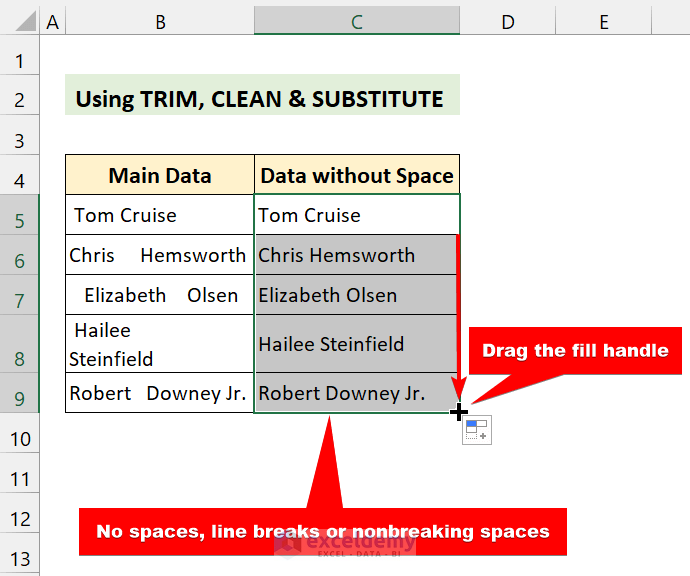
Web Method 1 Using the TRIM Function We can use the TRIM function to remove leading spaces in Excel The TRIM function deletes all spaces from a text string leaving only the single spaces between words Let s consider the following dataset with the names of ten lakes in the USA Notice that all the names have leading spaces

Web Mar 20 2023 nbsp 0183 32 by Svetlana Cheusheva updated on March 20 2023 The tutorial explains how to remove blank spaces in Excel using formulas and the Text Toolkit tool You will learn how to delete leading and trailing spaces in a cell eliminate extra spaces between words get rid of non breaking white space and non printing characters

Web May 20 2023 nbsp 0183 32 Yes the CONCATENATE function can remove spaces before text in Excel Instead of manually removing spaces you can use CONCATENATE to join text and remove any unwanted spaces Do I need to use a formula to remove spaces before text No there are different methods you can use to remove spaces before text
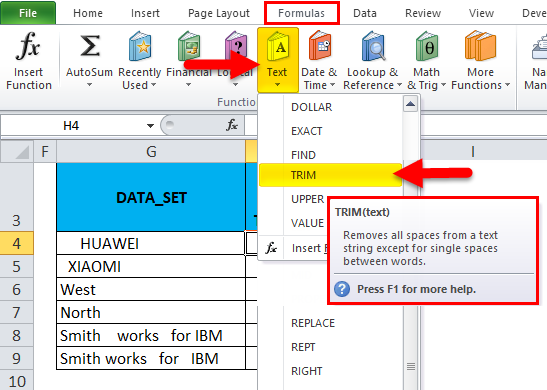
Web The TRIM function removes all spaces from text except for single spaces between words Use TRIM on text that you have received from another application that may have irregular spacing
Web Feb 22 2021 nbsp 0183 32 The TRIM function in Excel removes unnecessary white spaces from text strings leaving only a single space between words to clean up your data Here s how to use it How To Geek Web Mar 20 2023 nbsp 0183 32 See how to use TRIM in Excel to remove extra spaces leading trailing and excess spaces between words Learn why Excel TRIM function cannot remove non breaking white space and what solution to use Ablebits blog
Web Sep 28 2021 nbsp 0183 32 After highlighting the cells that you want to search through go to the Home tab Then open the Find amp Select dropdown menu Select the Replace option The keyboard shortcut for this is Ctrl H That will bring up the Find and Replace window On the Replace tab place one blank space in the Find what field