Remove Space Before Character In Excel Excel Remove Spaces Before And After Text Youtube Riset How To Remove delete All Spaces After The Last Character In Excel Print A String Until The First Newline Character C Programming How To Remove Text Or Character From Cell In Excel Riset How To Remove Spaces Between Characters And Numbers In Excel Web The TRIM function removes all spaces from text except for single spaces between words Use TRIM on text that you have received from another application that may have irregular spacing
Web May 20 2023 nbsp 0183 32 Method 1 Trim Function The Trim function in Excel removes leading and trailing spaces from a text string Here s how to use it Select the cell or range of cells you want to fix Type TRIM A1 in an empty cell adjacent to the selected cell where A1 is the first cell you want to remove spaces Web Mar 10 2023 nbsp 0183 32 Trim spaces before and after text Special tools to remove characters or text in Excel How to remove specific character in Excel If your goal is to eradicate a certain character from Excel cells there are two easy ways to do it the Find amp Replace tool and a formula Remove character from multiple cells using Find and Replace
How To Remove Spaces Between Characters And Numbers In Excel How To Extract Text Before Character In Excel WPS Office Academy Extract Text Before Character In Excel 4 Quick Ways ExcelDemy Remove space before bibliography latex Vardkachi Extract Text Before Character In Excel 4 Quick Ways ExcelDemy How To Remove Space Before after between Paragraphs In Word Document How To Remove Last Character In Excel A Shout Extract Text Before Character In Excel 4 Quick Ways ExcelDemy How To Use The LEFT And RIGHT Functions To Remove Characters Before A
Remove Space Before Character In Excel
 Remove Space Before Character In Excel
https://i.ytimg.com/vi/PMgKR3iQXbM/maxresdefault.jpg
Web 1 The TRIM function below removes 2 leading spaces 3 extra spaces and 2 trailing spaces Note the TRIM function does not remove single spaces between words 2 To get the length of a string use the LEN function Explanation the LEN function counts 2 spaces 2 characters 4 spaces 3 characters and 2 spaces 3
Templates are pre-designed documents or files that can be utilized for numerous purposes. They can conserve effort and time by providing a ready-made format and design for producing various kinds of content. Templates can be used for personal or professional tasks, such as resumes, invites, leaflets, newsletters, reports, presentations, and more.
Remove Space Before Character In Excel

How To Extract Text Before Character In Excel WPS Office Academy

How To Extract Text Before Character In Excel WPS Office Academy

Extract Text Before Character In Excel 4 Quick Ways ExcelDemy

Remove space before bibliography latex Vardkachi
How To Remove Space Before after between Paragraphs In Word Document
How To Remove Last Character In Excel A Shout
Web Sep 27 2023 nbsp 0183 32 How to Remove Space Before Text in Excel 4 Easy Ways 1 Use of the TRIM and Other Functions to Remove Space Before Text Now we are using the TRIM function to remove spaces 2 Find amp Replace Command to Delete Space Before Text in Excel Now this method is useful if you want to remove

Web Mar 20 2023 nbsp 0183 32 Whenever you want to remove blank spaces in your Excel sheets perform these 4 quick steps Select the cells range entire column or row where you want to delete extra spaces Click the Trim Spaces button on the Ablebits Data tab Choose one or several options Remove leading and trailing
Web Mar 13 2023 nbsp 0183 32 To have it done select your source data run the Remove by Position tool and configure it like shown below Select the All characters before text or All characters after text option and type the key text or character in the Depending on whether uppercase and lowercase letters should be

Web Click on the Format option Select the Trim option from the drop down menu Doing this would instantly remove the spaces before and after the text

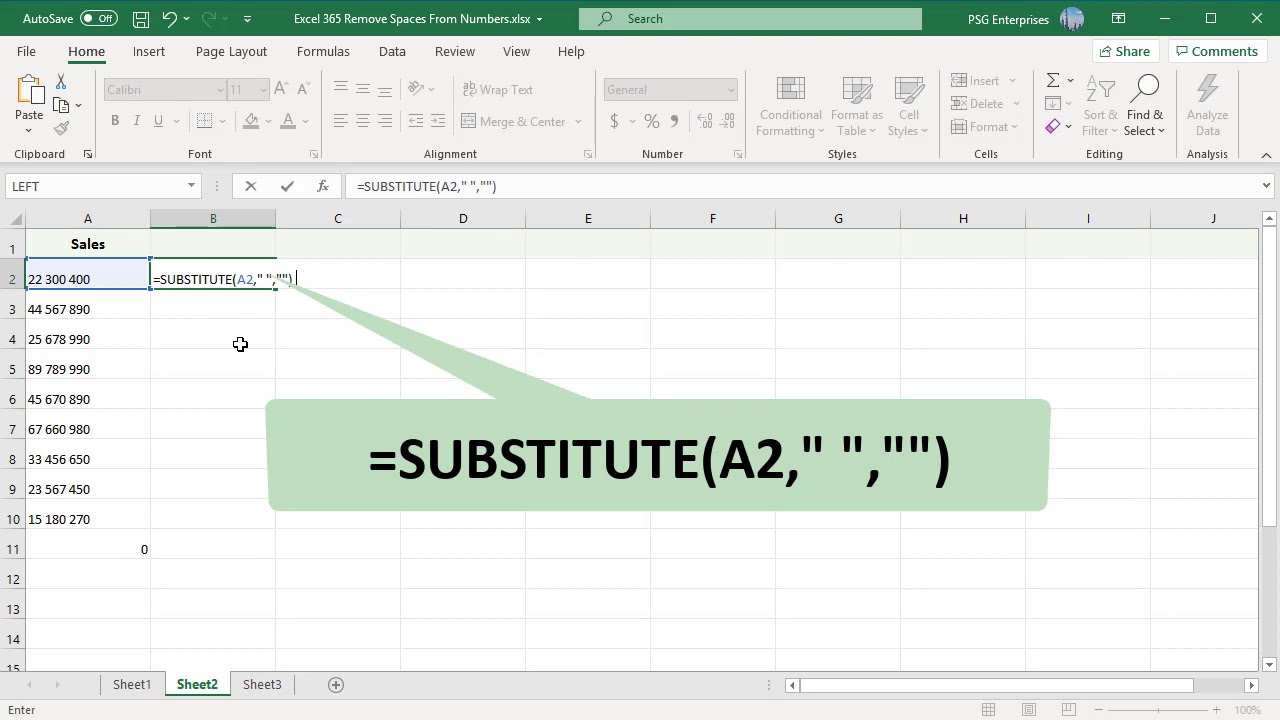
Web Nov 30 2021 nbsp 0183 32 In Excel to remove the leading trailing and extra spaces between words in a particular string use the TRIM function This function deletes all spaces except for single spaces between words To remove all spaces including the ones between words use Excel s Replace feature
Web Below are the steps to do this Copy and Paste the data from column A to column B this is to keep the original data as well With the cells in Column B selected click on the Home tab In the Editing group click on the Find amp Select option In the options that appear in the drop down click on the Replace option Web Remove text before the first specific character such as space comma To remove the text before the first specific character from text strings the RIGHT LEN and FIND functions can help you the generic syntax is RIGHT cell LEN cell FIND quot char quot cell cell The cell reference or text string that you want to remove text from
Web Aug 1 2022 nbsp 0183 32 1 Select the cells you want to clean 2 Press Ctrl H to open the quot Find and Replace quot dialog box excel remove leading spaces find 3 In the quot Find what quot field enter a single space character by pressing the spacebar once and leaving the quot Replace with quot field blank 4 Click on quot Options quot and then check the quot Match entire cell contents quot box