Remove Formatting Shortcut Copy Formatting Shortcut Mac Lasopalogic Female Hemoglobin And Hematocrit Levels Lawpcstudy Google Docs Copy Formatting Shortcut Comicsvlero Instrumental Love Music Hmpassl Clear All Formatting Excel Shortcut Candylikos Web Dec 13 2021 nbsp 0183 32 On the spreadsheet screen press Ctrl A Windows or Command A Mac to select your entire worksheet While your worksheet is selected in Excel s ribbon at the top click the quot Home quot tab In the quot Home quot tab from the quot Editing quot section select the quot Clear quot option In the quot Clear quot menu click quot Clear Formats quot
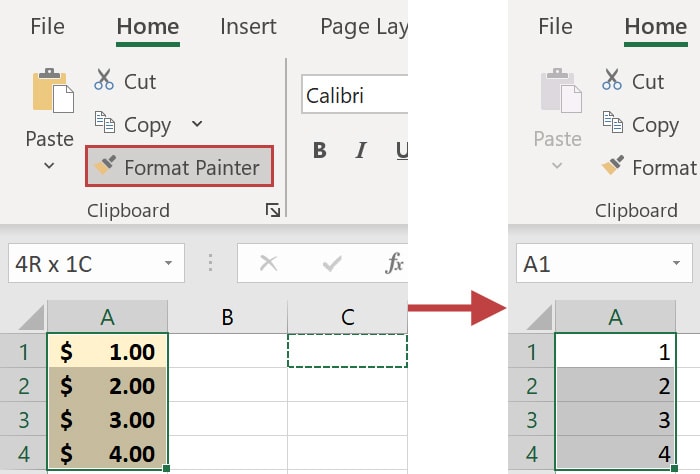
Web Aug 29 2023 nbsp 0183 32 Method 1 Through the Menu If you wish to clear format cells in Excel directly through the menu you can follow the steps below 1 Click on the cell table you wish to clear formatting 2 In the Home Menu click on the Eraser tool 3 Click on the Clear Formats option Method 2 Using Keyboard Shortcuts Web ALT H E F Note This would remove all types of formatting such as color borders as well as number formatting For example if you have dates being displayed in a specific format such as 01 01 2020 or 01 January 2020 this will clear that format and give you the underlying number which would be 43831
Clear All Formatting Excel Shortcut Candylikos How To Clear Formatting In Excel Remove Format From A Cell 5 Ways To Remove Table Formatting In Microsoft Excel How To Excel Copy Formatting Shortcut In Excel Superiorlasopa Copy Formatting Shortcut Not Working Operfpremium How To Clear Formatting In Excel multiple Options Keyboard Shortcut Excel Explained Excel Chart Formatting Shortcut Save Time Now Excel Quickie 28 YouTube How To Remove All Text Formatting In Word Simultaneously Lasopapersian Formatting Cell Shortcut Keys YouTube
Remove Formatting Shortcut
 Remove Formatting Shortcut
https://i.ytimg.com/vi/RXb2PBM3pv4/maxresdefault.jpg
Web Click on the Clear dropdown arrow in the Editing group Select Clear Formats Alternatively you can use the keyboard shortcut Ctrl Shift Z Method 2 Clear Specific Formatting If you only want to clear specific formatting such as font color or cell borders you can use the Clear Formats command Here s how
Templates are pre-designed files or files that can be utilized for different functions. They can conserve effort and time by offering a ready-made format and layout for developing various type of material. Templates can be used for personal or expert tasks, such as resumes, invites, flyers, newsletters, reports, discussions, and more.
Remove Formatting Shortcut

Copy Formatting Shortcut Mac Lasopalogic

How To Clear Formatting In Excel Remove Format From A Cell
5 Ways To Remove Table Formatting In Microsoft Excel How To Excel
Copy Formatting Shortcut In Excel Superiorlasopa
How To Clear Formatting In Excel multiple Options Keyboard Shortcut Excel Explained

Excel Chart Formatting Shortcut Save Time Now Excel Quickie 28 YouTube
Web On the Home tab in the Font group click Clear All Formatting In PowerPoint On the Home tab in the Font group click Clear All Formatting In Outlook On the Message tab in the Basic Text group click Clear All Formatting OneNote On the Home tab in the Basic Text group click Clear All Formatting

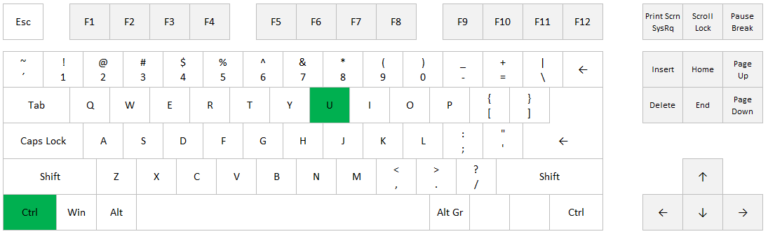
Web Clear Cell Contents This Excel Shortcut deletes the contents of the selected cell s PC Shorcut Delete Mac Shorcut fn Delete Clear Cell Formatting This Excel Shortcut deletes the formatting of the selected cell s PC Shorcut ALT gt H gt E gt F Remember This Shortcut PC Alt is the command to activate the Ribbon shortcuts

Web Jun 3 2022 nbsp 0183 32 What Is The Shortcut to Remove All Formatting in Excel The shortcut to remove all formatting in excel is Alt H E F How Do I Remove Formatting but Keep Values If you want to remove formatting but want to keep values select the data range Then press Alt H E F

Web Aug 5 2023 nbsp 0183 32 You can remove formatting in Excel using shortcut keys Simply press the ALT H E F keys in the given sequence and the formatting will be removed from the selected cells in your
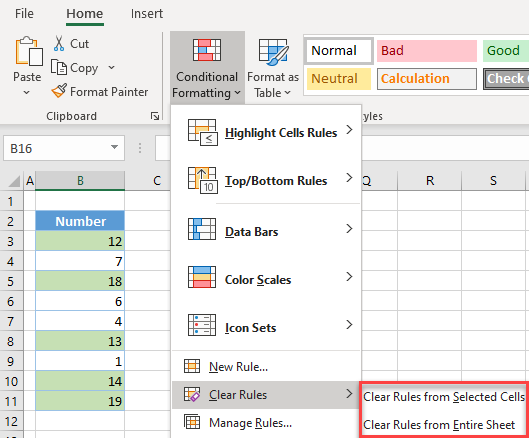
Web Mar 22 2022 nbsp 0183 32 Press ATL H E F Quick Tip You need to press the keys in successive order not all at once Remove all Cell Formatting from the entire worksheet Removing cell formatting from the entire worksheet is just as easy Press CTRL A to select the entire cells from your worksheet
[desc-11] [desc-12]
[desc-13]