Remove Column In Pandas Dataframe How To Use The Pandas Drop Technique Sharp Sight Intro To Pandas How To Add Rename And Remove Columns In Pandas Problem With Date Column In Python Pandas Python Codecademy Forums Worksheets For How To Drop First Column In Pandas Dataframe How To Delete A Column Row From A DataFrame Using Pandas ActiveState Web Jan 20 2015 nbsp 0183 32 How can I delete the id column from the above data frame I tried the following import pandas as pd df pd read csv path file tsv header 0 delimiter t print df drop id 1 But it raises this exception ValueError labels id not contained in axis python python 2 7 pandas csv io Share Improve this question Follow
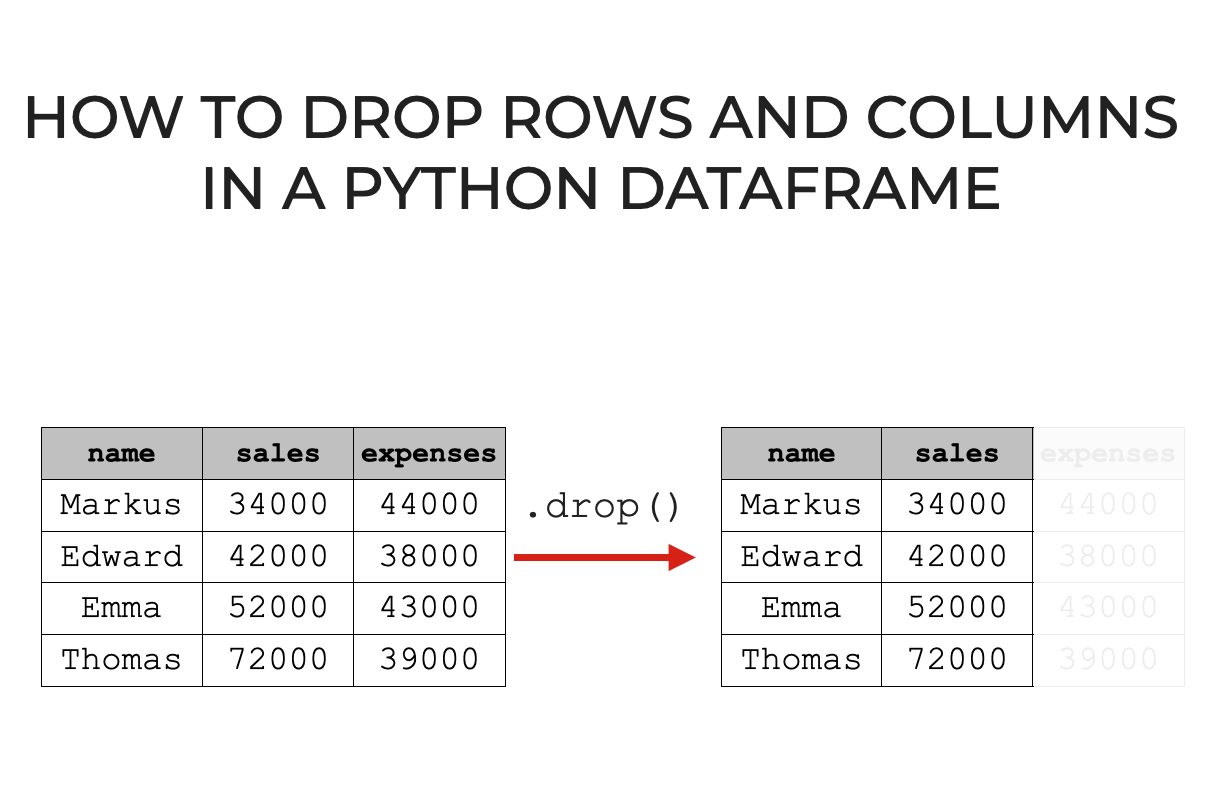
Web You can delete one or multiple columns of a DataFrame To delete or remove only one column from Pandas DataFrame you can use either del keyword pop function or drop function on the dataframe To delete multiple columns from Pandas Dataframe use drop function on the DataFrame Web Aug 8 2023 nbsp 0183 32 The drop method allows you to delete rows and columns from pandas DataFrame pandas DataFrame drop pandas 2 0 3 documentation Delete rows from pandas DataFrameSpecify by row name label Specify by row numberNotes on when the index is not set Specify by row name label Specify by row number Note
How To Delete A Column Row From A DataFrame Using Pandas ActiveState Adding A New Column In Pandas Dataframe From Another Dataframe Mobile Pandas Drop Last Column Pandas Delete Last Column Of Dataframe In Python Creating A Column In Pandas Dataframe By Calculation Using Www Python Pandas Data Frames Part 5 Dataframe Operations Informatics Hot Post Concatenate Two Or More Columns Of Dataframe In Pandas Python Odab jik Valakihez Szemeszter Biztos How To Skip Last Rows In Panda Pandas Dataframe Index Row Number Webframes 8 Ways To Drop Columns In Pandas A Detailed Guide Thatascience
Remove Column In Pandas Dataframe
 Remove Column In Pandas Dataframe
https://www.sharpsightlabs.com/wp-content/uploads/2021/09/pandas-drop_FEATURED-IMAGE.png
Web Aug 24 2020 nbsp 0183 32 When using the Pandas DataFrame drop method you can drop multiple columns by name by passing in a list of columns to drop This method works as the examples shown above where you can either Pass in a list of columns into the labels argument and use index 1 Pass in a list of columns into the columns argument
Templates are pre-designed files or files that can be utilized for numerous functions. They can save time and effort by offering a ready-made format and layout for producing different type of material. Templates can be utilized for personal or expert jobs, such as resumes, invites, flyers, newsletters, reports, discussions, and more.
Remove Column In Pandas Dataframe

Python Pandas DataFrame Merge Join
Adding A New Column In Pandas Dataframe From Another Dataframe Mobile

Pandas Drop Last Column Pandas Delete Last Column Of Dataframe In

Python Creating A Column In Pandas Dataframe By Calculation Using Www
Post Concatenate Two Or More Columns Of Dataframe In Pandas Python
Odab jik Valakihez Szemeszter Biztos How To Skip Last Rows In Panda

Web Dec 7 2023 nbsp 0183 32 Dataframe Drop Column in Pandas using df drop Method Example 1 In this example we Remove specific single columns as the below code uses Pandas to create a DataFrame from a dictionary and then removes the

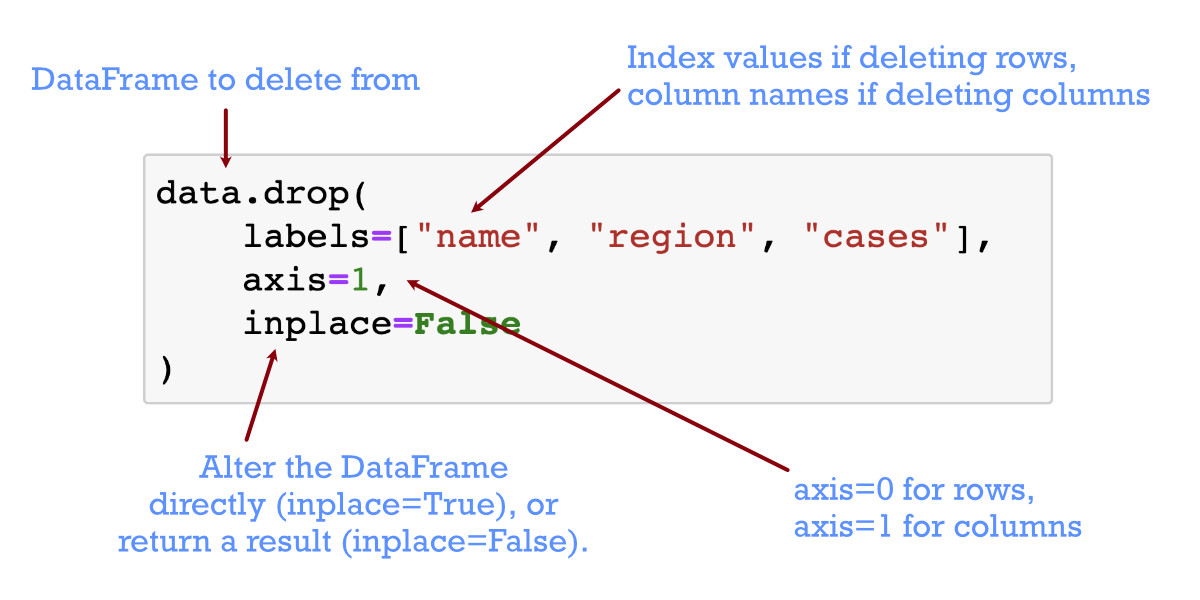
Web DataFrame drop labels None axis 0 index None columns None level None inplace False errors raise source Drop specified labels from rows or columns Remove rows or columns by specifying label names and corresponding axis or by directly specifying index or column names

Web The recommended way to delete a column or row in pandas dataframes is using drop To delete a column df drop column name axis 1 inplace True To delete a row df drop row index axis 0 inplace True You can refer this post to see a detailed conversation about column delete approaches

Web Dec 19 2023 nbsp 0183 32 In this article we will how to delete a row in Excel using Pandas as well as delete a column from DataFrame using Pandas Pandas DataFrame drop Method Syntax Syntax DataFrame drop labels None axis 0 index None columns None level None inplace False errors raise Parameters

Web Mar 27 2023 nbsp 0183 32 The drop method is a built in function in Pandas that allows you to remove one or more rows or columns from a DataFrame It returns a new DataFrame with the specified rows or columns removed and does not modify the original DataFrame in place unless you set the inplace parameter to True The syntax for using the drop
Web Jan 15 2024 nbsp 0183 32 Iterative Method 1 Using df drop to Drop Column in Pandas In this example we are using df drop method to drop column in Pandas We create a sample DataFrame and then use the df drop method to drop the B column Here axis 1 argument signifies that we are dropping a column import pandas as pd Web May 10 2022 nbsp 0183 32 copy bool or Non value default None Copy data from inputs For dict data the default of None behaves like copy True For DataFrame or 2d ndarray input the default of None behaves like copy False There are three different ways to delete column from data Frame drop method del Command
Web Delete column with pandas drop and axis 1 The default way to use drop to remove columns is to provide the column names to be deleted along with specifying the axis parameter to be 1 Delete a single column from the DataFrame data data drop labels quot deathes quot axis 1