Python Df Delete Row By Index Delete Blank Rows In Excel Using Python Printable Forms Free Online Pandas Drop Rows From DataFrame Examples Spark By Examples Pandas Select Rows By Index Position Label Spark By Examples Worksheets For Get Unique Rows From Pandas Dataframe Vim Web Sep 1 2023 nbsp 0183 32 Drop Function in Pandas Pandas provide data analysts with a way to delete and filter data frames using dataframe drop method Rows or columns can be removed using an index label or column name using this method Syntax DataFrame drop labels None axis 0 index None columns None level None inplace False
Web Jul 17 2021 nbsp 0183 32 Here are two ways to drop rows by the index in Pandas DataFrame 1 Drop single row by index For example you may use the syntax below to drop the row that has an index of 2 df df drop index 2 2 Drop multiple rows by index For instance to drop the rows with the index values of 2 4 and 6 use df df drop index 2 4 6 Web Jul 31 2015 nbsp 0183 32 Remove certain rows from dataframe based on index Ask Question Asked 8 years 4 months ago Modified 8 years 4 months ago Viewed 2k times 2 I have the following dataframe date col 1 col 2 exchange symbol CME abc 2015 01 02 435 5678 2015 01 03 754 236 JSE xyz 2015 01 02 15 6871 2015 01 03 7258 7236
Vim Wood Return Air Grilles RA Fixed Insert PLSQL Developer Jquery Datatables Remove Row By Index Stack Overflow How To Delete A Column Row From A DataFrame Using Pandas ActiveState Jquery Datatables Remove Row By Index Stack Overflow Python Df isnull sum Is Still Showing Values As Null even Though I Dropped Na Values Using Pandas Examen De Pandas Machine Learning Intermedio Test Examen Examen Test OnLine Cibertest
Python Df Delete Row By Index
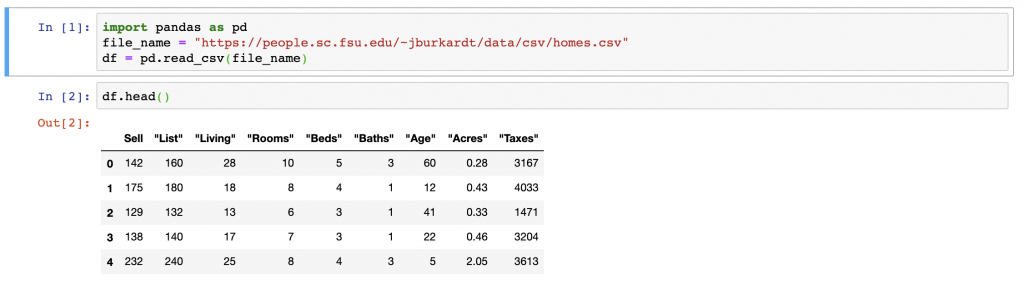 Python Df Delete Row By Index
https://www.datacourses.com/wp-content/uploads/2019/08/Screen-Shot-2019-08-08-at-6.02.28-PM-1024x286.png
Web Apr 30 2023 nbsp 0183 32 As df drop function accepts only list of index label names only so to delete the rows by position we need to create a list of index names from positions and then pass it to drop Suppose we want to delete the first two rows i e rows at index position 0 amp 1 from the above dataframe object
Templates are pre-designed documents or files that can be utilized for different purposes. They can save time and effort by providing a ready-made format and design for developing various kinds of material. Templates can be used for individual or expert projects, such as resumes, invitations, flyers, newsletters, reports, discussions, and more.
Python Df Delete Row By Index

Select Rows Of Pandas DataFrame By Index In Python Extract Get Row
Wood Return Air Grilles RA Fixed Insert

PLSQL Developer

Jquery Datatables Remove Row By Index Stack Overflow

Jquery Datatables Remove Row By Index Stack Overflow

Python Df isnull sum Is Still Showing Values As Null even Though I Dropped Na Values Using
Web May 14 2021 nbsp 0183 32 You can use the following syntax to drop one row from a pandas DataFrame by index number drop first row from DataFrame df df drop index 0 And you can use the following syntax to drop multiple rows from a

Web Dec 13 2012 nbsp 0183 32 df drop df df score lt 50 index inplace True Multiple conditions see Boolean Indexing The operators are for or amp for and and for not These must be grouped by using parentheses To remove all rows where column score is lt 50 and gt 20 df df drop df df score lt 50 amp df score gt 20 index

Web Mar 31 2017 nbsp 0183 32 If the index of the row s to be dropped are given then query or drop can be used too For example the following drops the second row idx 1 df1 df query quot index idx quot equivalently df1 df drop idx

Web DataFrame drop labels None axis 0 index None columns None level None inplace False errors raise source Drop specified labels from rows or columns Remove rows or columns by specifying label names and corresponding axis or by directly specifying index or column names
Web Dec 1 2023 nbsp 0183 32 Delete a Single Row in DataFrame by Row Index Label To remove a row from a DataFrame by its index label the drop function in pandas can be utilized By passing the specific index label of the row we want to eliminate this function removes that particular row from the DataFrame
Web Jul 10 2020 nbsp 0183 32 How do I delete a row of indexes with the starting and ending index in a dataframe python Asked 3 years 4 months ago Modified 3 years 4 months ago Viewed 2k times 2 For example INDEX FRUIT 0 quot banana quot 1 quot apple quot 2 quot donut quot 3 quot pizza quot 4 quot noodles quot 5 quot ice cream quot 6 quot grapefruit quot Web May 1 2017 nbsp 0183 32 df1 reset index drop True This resets the index to the default integer index and removes the original one If you want to assign this change to original dataframe it is easier to use df1 reset index drop True inplace True As it will edit the df1 dataframe without making a copy of it Share
Web Apr 7 2023 nbsp 0183 32 df drop df index 1 inplace True The inplace True parameter ensures that the changes are made to the dataframe itself To remove multiple rows by index you can pass a list of index values to the drop method For example to remove rows at the second and third index positions you can use the following code df drop df index 1 2