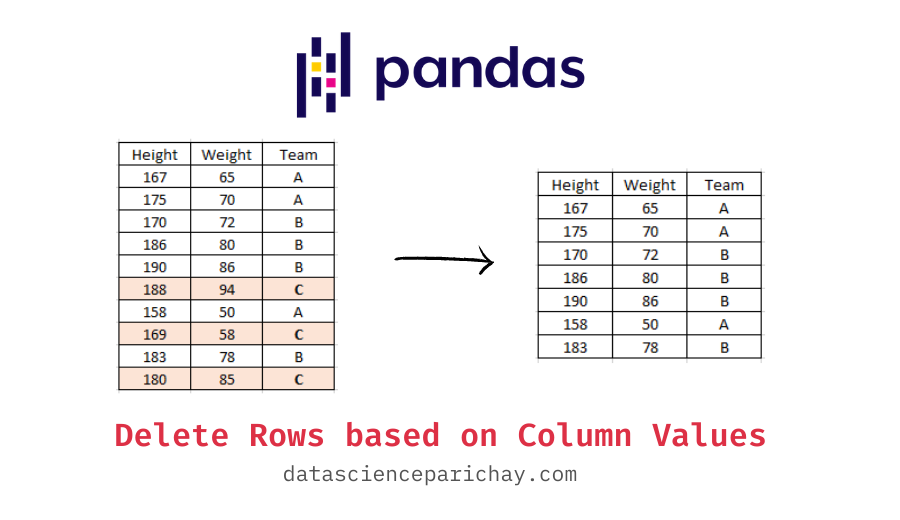
Python Dataframe Remove Rows With Certain Values Get Index Of Rows With Match In Column In Python Example Find Value How To Use The Pandas Dropna Method Sharp Sight Drop Infinite Values From Pandas DataFrame In Python Remove Inf Rows Python Delete Rows Of Pandas DataFrame Remove Drop Conditionally Python Replace Values Of Rows To One Value In Pandas Dataframe Www Pandas drop function has another way to remove rows from a DataFrame This method requires a bit more setup than Boolean indexing but it can be more intuitive for some users First we need to identify the index values of the rows we want to drop In our case we want to drop rows where the grade is below 60 Here s how we can do it
1 Have a look at this pandas pydata pandas docs stable generated Specifying both labels and index or columns will raise a ValueError Samir Dec 21 2017 at 21 33 Add a comment 4 Answers Sorted by 22 Change it to df train drop wrong indexes train axis 1 Share Improve this answer Follow edited Dec 21 2017 at 21 44 In this article we will discuss how to delete rows based in DataFrame by checking multiple conditions on column values DataFrame provides a member function drop i e Copy to clipboard DataFrame drop labels None axis 0 index None columns None level None inplace False errors raise It accepts a single or list of label names and
Python Replace Values Of Rows To One Value In Pandas Dataframe Www Worksheets For Get Unique Rows From Pandas Dataframe Python Pandas Tutorial Add Remove Rows And Columns From Dataframes Riset Worksheets For How To Drop First Column In Pandas Dataframe How To Remove Duplicate Rows In Excel Table ExcelDemy Pandas Iloc And Loc Quickly Select Data In DataFrames Remove Index Name Pandas Dataframe Remove Rows With NA Values In R Data Science Parichay Pandas Dataframe Remove Rows With Missing Values Webframes
Python Dataframe Remove Rows With Certain Values
 Python Dataframe Remove Rows With Certain Values
https://statisticsglobe.com/wp-content/uploads/2021/06/Index-of-Rows-with-Certain-Value-Python-TN.png
Dropping a row in pandas is achieved by using drop function Lets see example of each Delete or Drop rows with condition in python pandas using drop function Drop rows by index position in pandas Remove or Drop NA rows or missing rows in pandas python Remove or Drop Rows with Duplicate values in pandas
Templates are pre-designed documents or files that can be utilized for various purposes. They can conserve time and effort by offering a ready-made format and design for producing various sort of content. Templates can be used for personal or professional projects, such as resumes, invitations, flyers, newsletters, reports, discussions, and more.
Python Dataframe Remove Rows With Certain Values

How To Create Python Pandas Dataframe From Numpy Array Riset

Worksheets For Get Unique Rows From Pandas Dataframe

Python Pandas Tutorial Add Remove Rows And Columns From Dataframes Riset
Worksheets For How To Drop First Column In Pandas Dataframe
Pandas Iloc And Loc Quickly Select Data In DataFrames
Remove Index Name Pandas Dataframe

Pandas provide data analysts a way to delete and filter data frame using dataframe drop method We can use this method to drop such rows that do not satisfy the given conditions Let s create a Pandas dataframe import pandas as pd details Name Ankit Aishwarya Shaurya Shivangi Priya Swapnil

Method 1 Drop the specific value by using Operators We can use the column name function along with the operator to drop the specific value Syntax dataframe dataframe column name operator value where dataframe is the input dataframe column name is the value of that column to be dropped operator is the relational operator

You can use the following syntax to drop rows in a pandas DataFrame that contain any value in a certain list define values values value1 value2 value3 drop rows that contain any value in the list df df df column name isin values False The following examples show how to use this syntax in practice

In this article you ll learn how to drop rows of a pandas DataFrame in the Python programming language The tutorial will consist of this 1 Example Data Add On Packages 2 Example 1 Remove Rows of pandas DataFrame Using Logical Condition 3 Example 2 Remove Rows of pandas DataFrame Using drop Function index Attribute

This command works and removes all the values that are 10 df2 result result Value 10 But when I try to add the qualifier I get the error message SyntaxError invalid syntax df3 result result Value 10 I feel like there is probably a really simple solution python pandas row multiple columns Share Follow
Example 1 Drop All Rows Except Those with Specific Value in Column We can use the following syntax to drop all rows except those with a value of Mavs in the team column drop all rows except where team column is equal to Mavs df df query team Mavs view updated DataFrame print df team points assists 0 Mavs 18 5 1 Mavs 22 7 Dropping Duplicates pandas DataFrame drop duplicates method allows you to efficiently remove duplicate rows based on identical values in one or more columns Dropping by Index Range This involves removing a range of rows based on their index values which can be achieved using slicing and the drop method
In Pandas you can delete a row in a DataFrame based on a certain column value by using the drop method and passing the index label of the row you want to delete For example if you have a DataFrame named df and you want to delete a row where the value in the Age column is 30 you can use the following code df df df Age 30 Watch a