Pull Data From Another Sheet Excel Excel Index Match Formula To Pull Data From Another Tab file Stack How To Pull Data From Another Sheet In Excel Midargus How To Pull Data From Another Sheet Based On A Criteria In Excel How To Pull Data From Another Sheet Based On Criteria In Excel Excel How To Pull Data From Another Sheet Based On Criteria Statology Web Jul 25 2022 nbsp 0183 32 Excel How to Pull Data from Another Sheet Based on Criteria Step 1 Enter Data into the First Sheet First let s enter the following dataset into the first sheet of an Excel Step 2 Define Criteria Now suppose we would like to pull each of the rows that contain Mavs in the Team column into
Web Jul 10 2019 nbsp 0183 32 Type an equal sign into a cell click on the Sheet tab and then click the cell that you want to cross reference As you do this Excel writes the reference for you in the Formula Bar Press Enter to complete the formula How to Reference Another Excel File You can refer to cells of another workbook using the same method Web The generic formula for pulling values from another worksheet looks like VLOOKUP lookup value sheet name range col index num range lookup The parameters of the VLOOKUP function are lookup value a value that we want to find in another worksheet sheet name range a range in another worksheet in which we
Excel How To Pull Data From Another Sheet Based On Criteria Statology How To Pull Data From Another Sheet Based On Criteria In Excel How To Pull Data From Another Sheet Based On Criteria In Excel 41 Excel Pull Data From Another Worksheet Worksheet Resource Vba Excel Pulling Data From Another Sheet Based On Another Cell Value Awasome How To Insert Data From Another Excel Sheet 2022 Fresh News Worksheet Function Excel How To Pull Data From A Sheet And List 41 Excel Pull Data From Another Worksheet Worksheet Resource Excel How To Pull Data From Another Sheet Based On Criteria Statology
Pull Data From Another Sheet Excel
 Pull Data From Another Sheet Excel
https://i.stack.imgur.com/yNrgU.png
Web Dec 15 2022 nbsp 0183 32 Using the fill handle from the first cell drag the formula to the remaining cells OR a Select the cell with the formula and press Ctrl C or choose Copy from the context menu right click b Select the rest of the cells in the column and press Ctrl V or choose Paste from the context menu right click
Pre-crafted templates use a time-saving solution for creating a varied variety of documents and files. These pre-designed formats and layouts can be utilized for various individual and expert jobs, consisting of resumes, invitations, flyers, newsletters, reports, discussions, and more, improving the material production process.
Pull Data From Another Sheet Excel

How To Pull Data From Another Sheet Based On Criteria In Excel

How To Pull Data From Another Sheet Based On Criteria In Excel
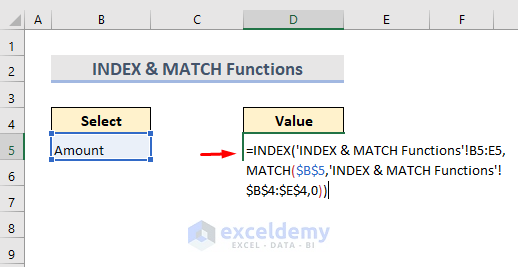
How To Pull Data From Another Sheet Based On Criteria In Excel
41 Excel Pull Data From Another Worksheet Worksheet Resource

Awasome How To Insert Data From Another Excel Sheet 2022 Fresh News

Worksheet Function Excel How To Pull Data From A Sheet And List

Web Feb 19 2023 nbsp 0183 32 6 Methods to Pull Values from Another Worksheet in Excel 1 Utilize Generic Formula with Cell Reference to Insert Values Here you can pull values from another worksheet by 2 Use VLOOKUP Function to Pull Values from Another Worksheet Pulling or retrieving or fetching whichever name you 3
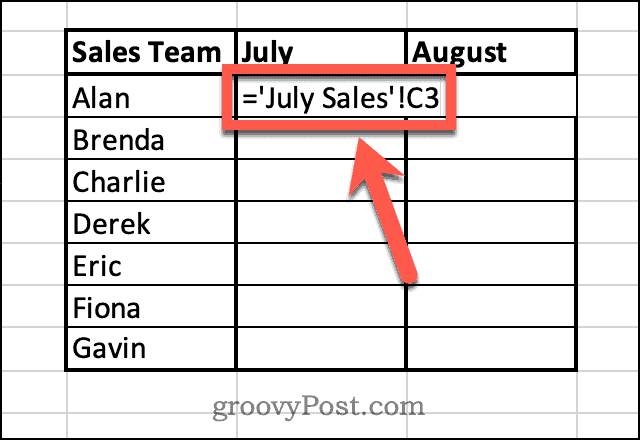
Web Sep 21 2023 nbsp 0183 32 Here is how to pull data from a sheet to another Open the workbook and navigate to the worksheet where you want to insert the data Click on the cell where you want to add the formula and add an Equals sign to initiate a formula Enter the sheet name from which you want to pull the data Make

Web May 20 2022 nbsp 0183 32 To pull data from another sheet by using cell references in Excel Click in the cell where you want the pulled data to appear Type equals sign followed by the name of the sheet you want to pull data from If the name of the sheet is more Type followed by the cell reference of the cell you

Web May 20 2023 nbsp 0183 32 If you want to pull data from another sheet using a key value you can use the VLOOKUP function This function looks for a specific value in the first column of a table and returns a corresponding value in the same row from a specified column Select the cell you want the result to appear in Type the equal sign followed by VLOOKUP

Web Mar 21 2023 nbsp 0183 32 Start typing a formula either in a destination cell or in the formula bar When it comes to adding a reference to another worksheet switch to that sheet and select a cell or a range of cells you want to refer to Finish typing the formula and press the Enter key to
[desc-11] [desc-12]
[desc-13]