Prevent Sleep Command Line Osx Library Does Not Scroll To Last Line OSX Autodesk Community How To Use The Sleep Command 2 Minute Linux Tips YouTube Find Out What Program Is Interrupting Windows Sleep Mode CNET Command Board Boards Rewards Kingdom Hearts Birth By Sleep Guide Bash Sleep Command A Quick Guide To Use It In Your Scripts Web Aug 3 2012 nbsp 0183 32 caffeinate t 144000 amp The number attached to the t flag is the amount of time in seconds for sleep to be disabled on the Mac Caffeinate can also be attached to other
Web May 25 2023 nbsp 0183 32 When the Terminal window opens enter the following combination in it pmset g grep hibernatemode and press Enter The Terminal will show you the sleep mode for your Mac hibernatemode 0 Web Feb 3 2015 nbsp 0183 32 You can also completely disable system sleep due to inactivity from the command line with the same command replacing the number with Never to indicate
Bash Sleep Command A Quick Guide To Use It In Your Scripts Linux Sleep Command Summary With Examples YouTube Sleep Command In Ubuntu How To Use It How To Use The Sleep Command In Linux To Pause Scripts LinuxForDevices Sleep Command In Linux YouTube Linux Sleep Command Explained with Examples VITUX Visual Studio Code For Macbook Air M1 How To Use Sleep Command In Linux Explained With Examples How To Use Sleep Command In Linux Explained With Examples
Prevent Sleep Command Line Osx

https://forums.autodesk.com/t5/image/serverpage/image-id/1007530i22ADCB5DBC9575EC?v=v2
Web See the manpage for more information about it The interesting setting we want to manipulate is sleep sleep system sleep timer value in minutes or 0 to disable So we
Templates are pre-designed files or files that can be used for various purposes. They can conserve time and effort by offering a ready-made format and layout for producing different kinds of content. Templates can be used for individual or professional jobs, such as resumes, invitations, flyers, newsletters, reports, discussions, and more.
Prevent Sleep Command Line Osx

Spec Ops The Line OSX How To Remove Intro Videos YouTube

Linux Sleep Command Summary With Examples YouTube

Sleep Command In Ubuntu How To Use It
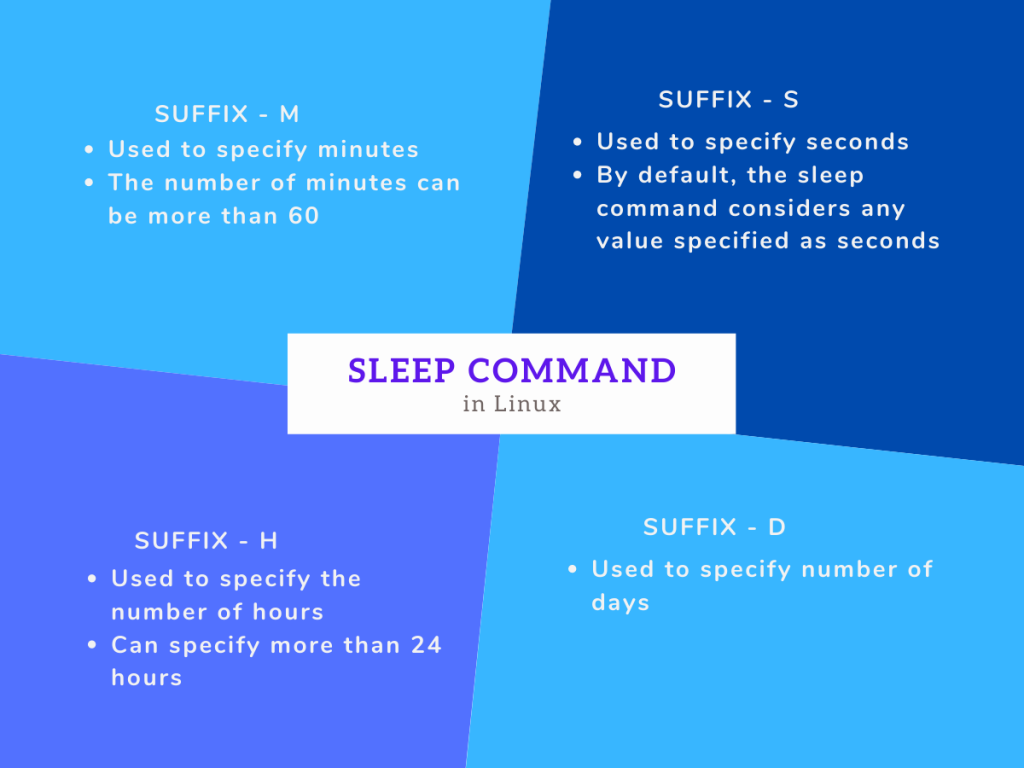
How To Use The Sleep Command In Linux To Pause Scripts LinuxForDevices

Linux Sleep Command Explained with Examples VITUX
Visual Studio Code For Macbook Air M1

Web Aug 31 2015 nbsp 0183 32 Syntax The syntax is caffeinate caffeinate options caffeinate options command Examples Let us see how to use the

Web Aug 1 2009 nbsp 0183 32 3 Answers Sorted by 5 The answer to your problem is however a simple Apple osx Terminal command that prevents OSX to go idle pmset noidle Preventing

Web Aug 27 2016 nbsp 0183 32 There are dozens of things that can prevent sleep built into macOS and third party software can also disable sleep The first troubleshooting step is to run this

Web Mar 23 2016 nbsp 0183 32 command as well To prevent the display from sleeping use caffeinate d To prevent the system from idle sleeping use caffeinate i If you want to prevent the disk from going idle then you

Web Jun 22 2022 nbsp 0183 32 To keep your Mac from sleeping change the Energy Saver settings in System Preferences You can disable sleep mode temporarily by running the
Web Jun 2 2019 nbsp 0183 32 There is a built in utility called caffeinate that will temporarily stop your Mac from going to sleep Open the Terminal app and run caffeinate i s This will stop the Web The app is a small wrapper around Apple s caffeinate command line utility All current versions of macOS ship with this tool by default macOS limitations and out of thermal
Web The first option is to disable system sleep entirely which can be done in the Energy Saver system preferences or by running the following command in the Terminal in the