Powershell View Scheduled Tasks Details How To Automate PowerShell Scripts With Task Scheduler MSSQL DBA Blog How To Create And Manage Scheduled Tasks In PowerShell SharePoint Diary Configure Clustered Scheduled Tasks With Powershell On Windows Server Learn How To Create A Scheduled Task With PowerShell TechTarget Mastering Scheduled Tasks A Comprehensive Guide To Running PowerShell Sep 23 2020 nbsp 0183 32 Enable quot Windows Subsystem for Linux quot WSL in PowerShell 1 Open an elevated PowerShell 2 Copy and paste the command below into the elevated PowerShell and press
Mar 8 2022 nbsp 0183 32 Is it possible to scan all wifi networks with powershell I tried this but it doesn t work it only shows current connections Only works when I click bottom right on wifi connection and Sep 14 2021 nbsp 0183 32 PowerShell Get FULL TargetPath of Shortcut Good evening As I have setup a LOT of Shortcuts in a specific folder I wanted to find a way of extracting specific data from
Mastering Scheduled Tasks A Comprehensive Guide To Running PowerShell Use PowerShell To Show Results Of Scheduled Tasks Scripting Blog How To Schedule A Post On Facebook The Tech Edvocate Scheduled Tasks Tab Scripting All Agent Jobs Using SQL Server Management Studio SQLMatters Secure Windows Scheduled Tasks With Managed Service Accounts Cyber Windows Registry Analysis Today s Episode Tasks Cyber wtf How To Create A PowerShell Scheduled Task LazyAdmin How To Deploy Scheduled Tasks Via Intune With PowerShell See Smitty
Powershell View Scheduled Tasks Details
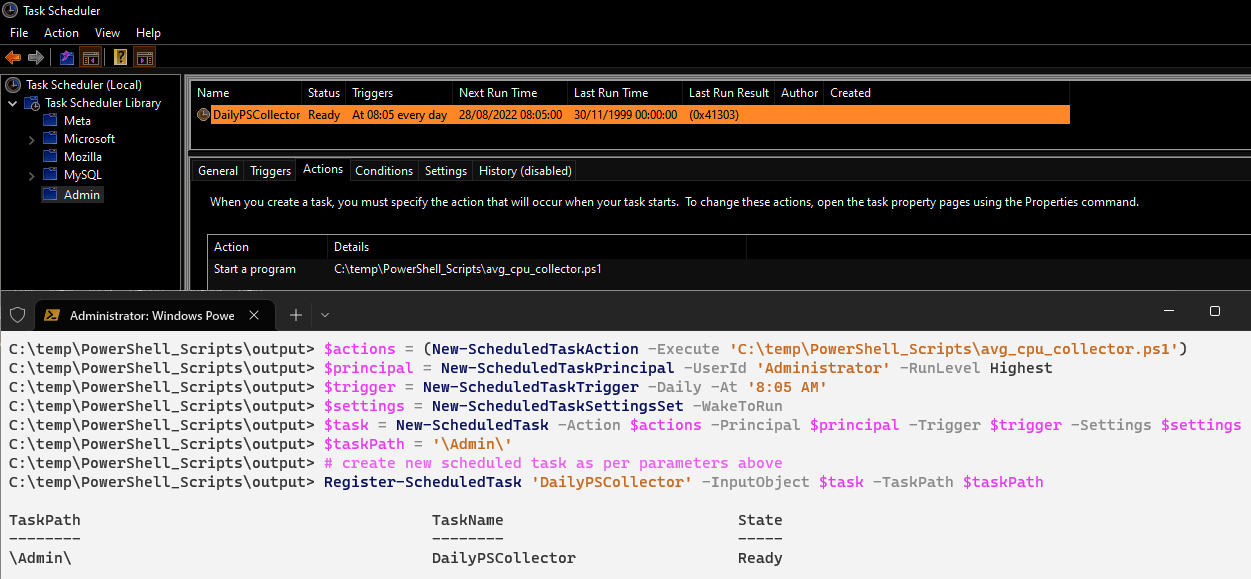 Powershell View Scheduled Tasks Details
https://peter-whyte.com/wp-content/uploads/2022/08/create_scheduled_task_windows_powershell_feature.png
Oct 2 2020 nbsp 0183 32 5 Brink I suggest to make one modification to point 12 in the tutorial I can think of a situation where the admin account used to run Powershell has some apps already
Templates are pre-designed documents or files that can be used for various purposes. They can save time and effort by providing a ready-made format and layout for creating different type of material. Templates can be utilized for individual or professional projects, such as resumes, invites, flyers, newsletters, reports, discussions, and more.
Powershell View Scheduled Tasks Details

How To Run PowerShell Script As A Windows Scheduler Task
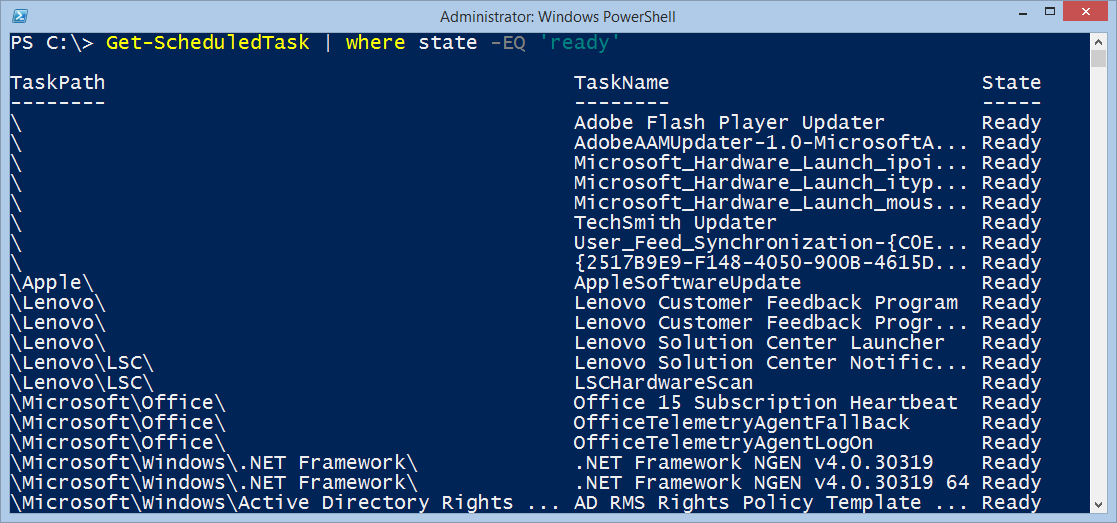
Use PowerShell To Show Results Of Scheduled Tasks Scripting Blog

How To Schedule A Post On Facebook The Tech Edvocate

Scheduled Tasks Tab
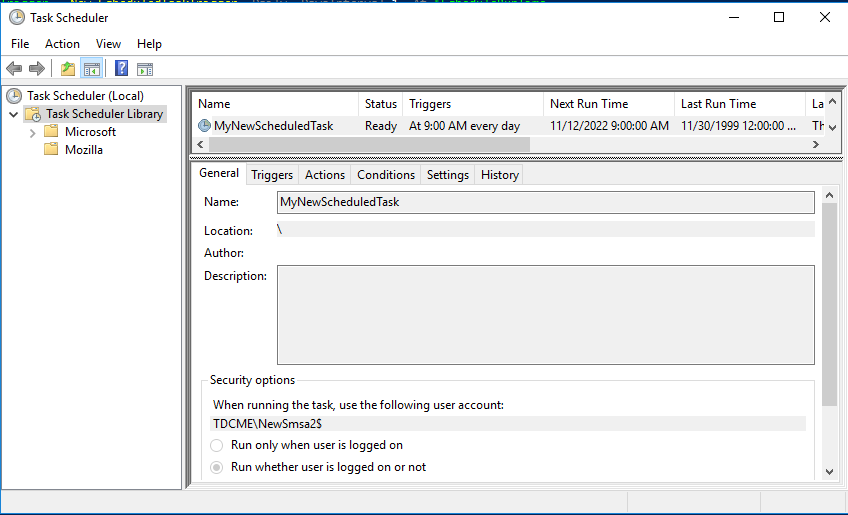
Secure Windows Scheduled Tasks With Managed Service Accounts Cyber

Windows Registry Analysis Today s Episode Tasks Cyber wtf
May 4 2023 nbsp 0183 32 How to Install PowerShell 7 0 in Windows 7 Windows 8 and Windows 10 Microsoft has announced the Generally Available GA release of PowerShell 7 0 on March 4 2020

Windows PowerShell Windows PowerShell Windows PowerShell Windows PowerShell Windows PowerShell

Dec 6 2019 nbsp 0183 32 How to Install or Uninstall Windows PowerShell ISE in Windows 10 The Windows PowerShell Integrated Scripting Environment ISE is a host application for Windows
Jul 29 2022 nbsp 0183 32 1 Open an elevated PowerShell 2 Do step3 step 4 step 5 recommended step 6 or step 7 below for what DISM command you would like to use 3 To Use DISM CheckHealth
Nov 7 2017 nbsp 0183 32 One of many PowerShell security features is that you can t run a script simply by double clicking it s icon on desktop or in a folder Doing so will by default open script in
[desc-11] [desc-12]
[desc-13]