Powershell Get Process Running PowerShell For Pentesters SecurityTube Training Definitive Service Manager Powershell Part 1 Top 8 Powershell 15 Cmd Forensic Analysis Of PowerShell Attacks Introduction To Windows PowerShell 5 1 Install PowerShell 5 1 PowerShell Get EdgeEnterpriseMSI ps1 At Master Matbe PowerShell GitHub May 26 2021 nbsp 0183 32 How to Open Windows PowerShell in Windows 10 Windows 10 comes with Windows PowerShell 5 0 included Windows PowerShell is a task based command line shell
Sep 28 2019 nbsp 0183 32 How to Backup and Import Device Drivers in Windows 10 Using PowerShell Device drivers are very much essential to ensure a smooth functioning of any OS To backup Aug 20 2022 nbsp 0183 32 Check What Graphics Card or GPU is in PC in PowerShell 1 Open a PowerShell 3 Copy and paste either command below into PowerShell and press Enter see screenshots
PowerShell Get EdgeEnterpriseMSI ps1 At Master Matbe PowerShell GitHub 4 Ways To Run Powershell WikiHow Discovering PowerShell Get The Basics And Master The Essentials Here PowerShell Scripts Get process With SQL Server Process SQL Unlocking The Power Of PowerShell Parameters A Comprehensive Guide To Powershell Get Content Works When Run Locally Returns Nothing When Steamy PowerShell Get Process Cmdlet For Running Processes Rapid Recovery Powershell Module Download Opecsoul Your Guide To Updating To PowerShell 7
Powershell Get Process Running
 Powershell Get Process Running
http://www.securitytube-training.com.s3-website-us-east-1.amazonaws.com/wp-content/uploads/2015/10/POWERSHELL.png
Sep 21 2023 nbsp 0183 32 How to Uninstall Desktop Apps and Windows Apps in Windows 10 If you no longer want or use an app then you could uninstall the app to remove it and free up space on the
Templates are pre-designed documents or files that can be used for numerous functions. They can conserve time and effort by providing a ready-made format and layout for developing various kinds of content. Templates can be used for individual or expert tasks, such as resumes, invites, leaflets, newsletters, reports, discussions, and more.
Powershell Get Process Running
GitHub StartAutomating obs powershell Script OBS With PowerShell

4 Ways To Run Powershell WikiHow

Discovering PowerShell Get The Basics And Master The Essentials Here

PowerShell Scripts Get process With SQL Server Process SQL

Powershell Get Content Works When Run Locally Returns Nothing When
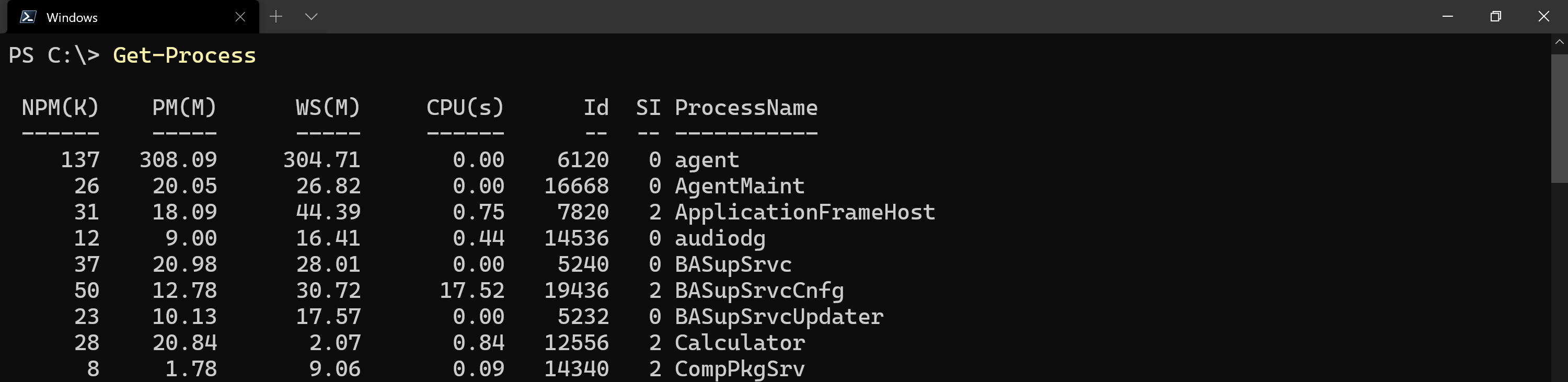
Steamy PowerShell Get Process Cmdlet For Running Processes
May 4 2023 nbsp 0183 32 How to Install PowerShell 7 0 in Windows 7 Windows 8 and Windows 10 Microsoft has announced the Generally Available GA release of PowerShell 7 0 on March 4 2020

Jul 29 2022 nbsp 0183 32 1 Open an elevated PowerShell 2 Do step3 step 4 step 5 recommended step 6 or step 7 below for what DISM command you would like to use 3 To Use DISM CheckHealth
Nov 7 2017 nbsp 0183 32 One of many PowerShell security features is that you can t run a script simply by double clicking it s icon on desktop or in a folder Doing so will by default open script in

Dec 6 2019 nbsp 0183 32 How to Install or Uninstall Windows PowerShell ISE in Windows 10 The Windows PowerShell Integrated Scripting Environment ISE is a host application for Windows
Aug 11 2023 nbsp 0183 32 To Turn On or Off Windows Media Player in PowerShell 1 Open an elevated PowerShell 2 Copy and paste the command below you want to use into the elevated
[desc-11] [desc-12]
[desc-13]