Power Query Remove Non Numeric How To Remove Non Numeric Characters From A Cell In Excel Free Excel Removing Non numeric Characters From A Cell A Blog About Data Solved Remove Non numeric Characters In A Column 9to5Answer Remove Duplicates Using Power Query In Excel YouTube Function To Clear Non Numeric Characters In SQL Server MSSQL Query Web Posted on May 13 2020 There are a couple of useful actions that help a lot in cleaning data removing digits or keeping digits and removing everything else In this short blog article I ll explain a simple method to do that using Power Query Sample Data My sample data table looks like this sample input data Removing Digits
Web May 13 2021 by Philip Treacy In this post I m going to use the Text Remove and Text Select functions in PQ to extract characters from text strings I ll show you how to extract letters either uppercase or lowercase and a mixture of both and how to extract numbers and I ll show you a really cool way to remove a wide range of characters Web Nov 19 2015 nbsp 0183 32 So for example if we want to remove letters only we can use construction like this below CharsToRemove quot a quot quot z quot amp Text ToList quot 243 quot and then the last step looks like this quot Added Custom quot Table AddColumn quot Changed Type quot quot Result quot each Text Remove Text Lower Quantity CharsToRemove
Function To Clear Non Numeric Characters In SQL Server MSSQL Query Function To Clear Non Numeric Characters In SQL Server MSSQL Query How To Remove Non Numeric Characters From Cells In Excel Strip Or Remove Non numeric Characters From Text Strings Power Query The 2022 Definitive Beginners Guide UpSlide Remove Duplicates With Power Query How To Excel At Excel Solved Most Efficient Way To Remove Non numeric List 9to5Answer How To Remove Non numeric Characters From String In Python Sneppets Microsoft Office Tutorials Remove Columns Power Query
Power Query Remove Non Numeric
 Power Query Remove Non Numeric
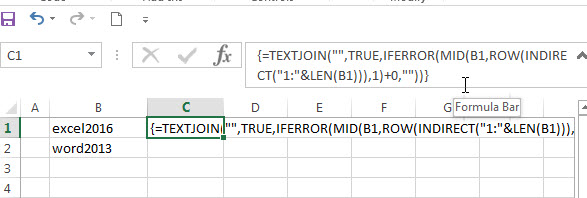
https://www.excelhow.net/wp-content/uploads/2017/11/Remove-non-numeric-characters-with-an-Excel-Formula1.jpg
Web If you want to remove one or more column filters for a fresh start for each column select the down arrow next to the column and then select Clear filter Filter by using AutoFilter Filter by using text filters Filter by using number filters Filter by using date time filters Filter multiple columns Filter by null or blank values
Pre-crafted templates provide a time-saving option for creating a diverse range of documents and files. These pre-designed formats and layouts can be used for various individual and expert jobs, including resumes, invites, leaflets, newsletters, reports, presentations, and more, improving the material creation process.
Power Query Remove Non Numeric
Remove Non Numeric Character From String In SQL
Function To Clear Non Numeric Characters In SQL Server MSSQL Query
How To Remove Non Numeric Characters From Cells In Excel

Strip Or Remove Non numeric Characters From Text Strings
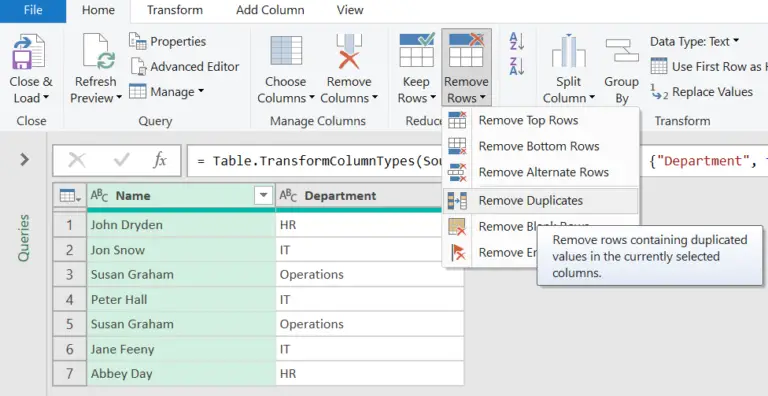
Remove Duplicates With Power Query How To Excel At Excel

Solved Most Efficient Way To Remove Non numeric List 9to5Answer
Web May 24 2020 nbsp 0183 32 I would like to filter this column as to ignore these rows with a bad reference number I will be applying TRIM to to eliminate leading trailing spaces but would like to filter out the rest Format should be integer between positive amp negative 9223372036854775808 Examples 467942267953789 good 5996425788700210091 good 678964 good

Web 05 10 2022 05 50 AM Anonymous In Power Query create this custom column The ranges such as 32 47 refer to ASCII characters Text Remove DT Number Character FromNumber 32 Character FromNumber 47 Character FromNumber 58 Character FromNumber 255

Web Mar 15 2018 nbsp 0183 32 1 ACCEPTED SOLUTION OwenAuger Super User 03 17 2018 04 14 AM rajeshchawla Here is one way of doing it The below code filters rows to only those where Text is equal to just the alphanumeric characters from Text This assumes the last step of the query is PreviousStep and the column of interest is named Text

Web Dec 16 2020 nbsp 0183 32 In the above example to strip out all non numeric characters you simply pass in the range of 0 9 or the Character FromNumber function using 48 and 57 That s much easier right Text Select The Text Column Character FromNumber 48 Character FromNumber 57

Web Apr 24 2024 nbsp 0183 32 Syntax Text Remove text as nullable text removeChars as any as nullable text About Returns a copy of the text value text with all the characters from removeChars removed Example 1 Remove characters and from the text value Usage Power Query M Copy Text Remove quot a b c quot quot quot quot quot Output quot abc quot Was this page helpful
Web Nov 21 2022 nbsp 0183 32 2 Answers Sorted by 2 Try this let Change next line to reflect Data source Source Excel CurrentWorkbook Name quot Table3 quot Content change next line to include all columns and their names quot Changed Type quot Table TransformColumnTypes Source quot COLUMN quot type any Change next line to be Web Jul 13 2021 nbsp 0183 32 Reply Topic Options Syndicate Admin Administrator Clear Field with non alpha numeric characters 07 13 2021 02 05 AM Some of the data I am importing in my query is using a different alphabet so just appearing in the import as a random selection of special characters in the fields
Web Nov 15 2021 nbsp 0183 32 1 ACCEPTED SOLUTION Syndicate Admin Administrator 11 15 2021 03 14 PM Here s one way to do it in the query editor with a custom filter expression To see how it works just create a blank query open the Advanced Editor and replace the text there with the M code below let