Power Query Get Data From Range Power Query Part 4 3 Tamil Get Data From Folder Tamil Video Introduction To Power Query Excel Off The Grid Power Bi Where Is Power Query Editor Printable Forms Free Online How To Append Two Files Together In Excel Power Query Stringfest Home www surfing ai Explore subscription benefits browse training courses learn how to secure your device and more Use Power Query in Excel to import data into Excel from a wide variety of popular data sources including CSV XML JSON PDF SharePoint SQL and more
Assigning that named range in Power Query Next I ll create a Power Query connection by selecting any of the values above in columns A or B Under the Data tab selecting From Table Range under the Get Transform Data section will launch Power Query From that screen you can launch the Advanced Editor under the Query section of the Home Creating a named range Highlight the data you wish to pull into Power Query Type your desired Named Range in the name box next to Excel s formula bar no spaces Connecting Power Query to the named range Select the data by selecting the Named Range from the name box Create a new query From Table Range
Home www surfing ai How To Convert Csv File Excel Using Power Query Unlocked Vrogue Steps 7 11 How To Move Your Operating System To Another Hard Drive Make Table Query Vba Brokeasshome Power Query Power Query Get All Dates Between The Start And End Date By Amit 50 Things You Can Do With Excel Power Query Get Transform In 2022 What Is Power Query Why Do You Need It Office Instructor Query Overview In Power BI Desktop Power BI Microsoft Learn
Power Query Get Data From Range
 Power Query Get Data From Range
https://i.ytimg.com/vi/VvV28lggXnU/maxresdefault.jpg
I might want to pull data from these ranges into a query on employee data to use for parameter selection for example If I create a Blank Query I can use the Excel CurrentWorkbook function to show me what tables and ranges are available To create a Blank Query in the Data tab I choose the New Query option and select Blank Query from the From Other Sources section
Templates are pre-designed documents or files that can be utilized for numerous purposes. They can save time and effort by providing a ready-made format and design for creating different kinds of content. Templates can be used for personal or expert jobs, such as resumes, invites, flyers, newsletters, reports, presentations, and more.
Power Query Get Data From Range

Get Data From Pivot Table Power Query Printable Forms Free Online

How To Convert Csv File Excel Using Power Query Unlocked Vrogue

Steps 7 11 How To Move Your Operating System To Another Hard Drive

Make Table Query Vba Brokeasshome

Power Query Get All Dates Between The Start And End Date By Amit

50 Things You Can Do With Excel Power Query Get Transform In 2022

Step 1 Create a query to get the named range Firstly create a named range to reference I have called my named range FilePath and copied in a new folder location Add a named range by typing in the name FilePath into the name box Then copy in the folder path into this cell Go to the Power Query tab From the Get External Data section press

That will work great to get the data out of a table but it won t work for the named range So let s try this a different way Go to Power Query From Other Sources Blank Query Click in the formula bar and type the following Excel CurrentWorkbook Yes it s case sensitive

The following uses Example 1 Table xlsx from the downloads To get an Excel Table into Power Query Select any cell in the Table Click Data From Table Range The Power Query window will open As this is our first look at the user interface we will spend some time understanding what s here
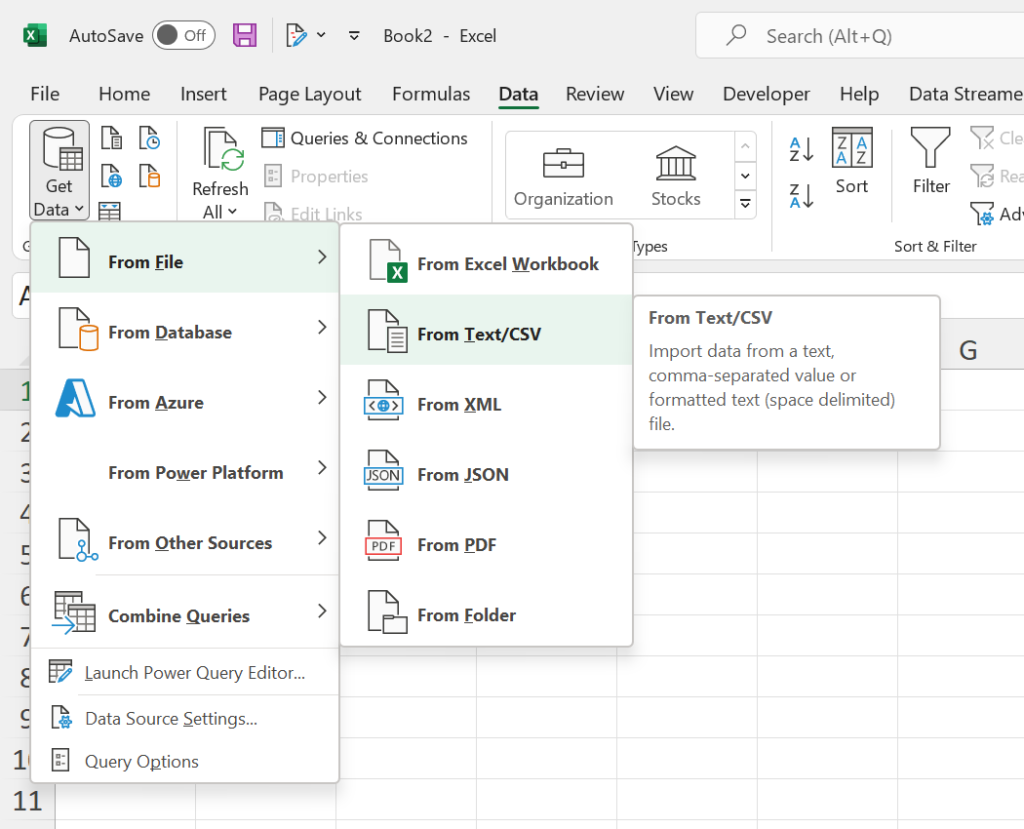
In Excel click Data Get Data From Other Sources Blank Query The Power Query Editor opens There is one step in the Applied Steps window nothing in the Preview window and most transformations are greyed out While the Applied Steps window shows Source as the step there is nothing in this step at present

In this article Syntax List Range list as list offset as number optional count as nullable number as list About Returns a subset of the list beginning at the offset list An optional parameter offset sets the maximum number of items in the subset Example 1 Find the subset starting at offset 6 of the list of numbers 1 through 10
Open the Sales Data worksheet Position the cursor on the Excel table Select Data Get Transform Data From Table Range Excel opens the Power Query Editor with your data displayed in a preview pane To display all query tables in the workbook from the Queries pane select the arrow to the left of the preview pane Here are the steps Open a new blank Excel workbook Click the Data tab then click the Get Data button in the Get Transform Data section In the dropdown select From File From TXT CVS Browse the folder where you downloaded the sample files
To get data into Power Query the most common method is to import from a table or range Learn about how to import data from a table or range of data on a worksheet