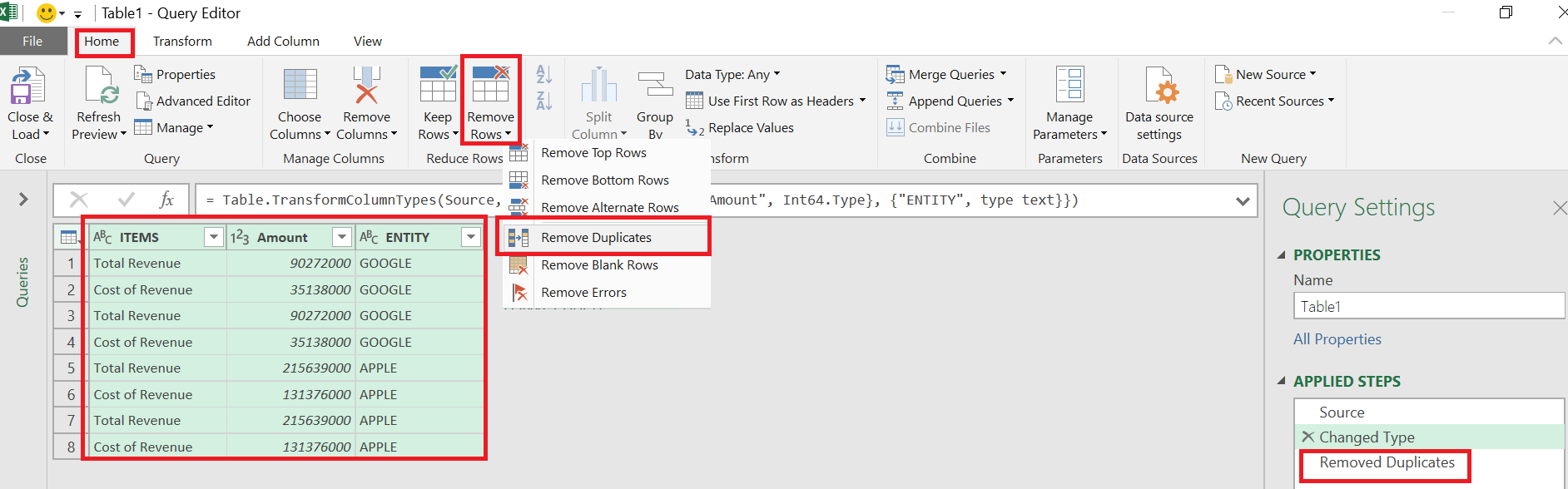
Power Bi Remove Duplicates Keep Oldest Solved Power BI Remove Row Breakdown For Some Group Value Solved Re Add New Rows To Transform Quarterly And Yearly How To Remove Duplicate Rows In Power Query In Power Bi Desktop Power Can You Remove Duplicates In Excel Fmvlero Solved How To Remove Duplicates In Calculated Table Microsoft Power One of the operations that you can perform is to remove duplicate values from your table Select the columns that contain duplicate values Go to the Home tab In the Reduce rows group select Remove rows From the drop down menu select Remove duplicates Warning
Here s a step by step guide to removing duplicate values in Power BI Select the table or column that contains the duplicate values Click on the Home tab and then on the Edit Queries button This will open the Power Query Editor Choose the Remove Duplicates option from the Home tab Go to the Home tab and click on the Remove Rows dropdown Choose Remove Duplicates from the options A dialog box will appear showing the selected columns Click OK to remove the duplicate rows Power BI will remove all the duplicate rows keeping only the unique values 2
Solved How To Remove Duplicates In Calculated Table Microsoft Power Removing Duplicate Rows In Power BI Power BI Excel Are Better Together Solved Remove Duplicated Rows In SUM Calculation Microsoft Power BI Solved Merged Queries Resulting In Duplicates Microsoft Power BI Power BI How To Remove Duplicates And Keep Most Recent Solved Removing Duplicate Values Microsoft Power BI Community Powerbi Deleting Rows Based On A Condition Using Power Query M 14 Power BI Remove Duplicate Data In Hindi YouTube How To Remove Duplicates On Power BI Full Guide
Power Bi Remove Duplicates Keep Oldest

https://community.powerbi.com/t5/image/serverpage/image-id/330272i24695494FD1E945D?v=v2
Duplicate rows can be viewed as part of a Power Query data model by following these steps Step 1 Launch the Power Query Editor Step 2 Right Click on a Query and Select Reference A reference query in Power BI creates a link to another query or table within your data model
Pre-crafted templates provide a time-saving solution for developing a varied range of documents and files. These pre-designed formats and layouts can be used for different personal and professional projects, consisting of resumes, invites, flyers, newsletters, reports, presentations, and more, improving the content development procedure.
Power Bi Remove Duplicates Keep Oldest

Detaliat Lupte Libere nmorm ntare Power Bi Duplicate Table Configura i
Removing Duplicate Rows In Power BI Power BI Excel Are Better Together

Solved Remove Duplicated Rows In SUM Calculation Microsoft Power BI

Solved Merged Queries Resulting In Duplicates Microsoft Power BI

Solved Removing Duplicate Values Microsoft Power BI Community

Powerbi Deleting Rows Based On A Condition Using Power Query M

1 Group by the product and a new column with All Rows Here is what that looks like 2 Copy this Data column 3 Extract the latest date with List Max To do this click on the arrows and use the Aggregate function There is no Max function so just select Count of Date 4

Matt Peterson Feb 01 2021 A week ago in my last training I was demonstrating how to get rid of duplicate records when making a dimension table One of the people in attendance asked is there a way to get rid of duplicates but keep the most recent duplicate record based on a date column I thought Of Course
Select the customer key column and then remove duplicates But when you do this in Power Query it does not work as expected As you can see in the Sales table below each customer has many transactions with different order dates In Power Query I sorted by OrderDate descending then removed duplicates as shown below

Power Apps Pro Dev ISV Power Apps Portals GCC GCCH DoD Federal App Makers FAM Power Platform Integration Better Together Power Platform Integrations Power Platform and Dynamics 365 Integrations Power Apps Community Blog Community Connections How To Videos Community App Samples

Cancel anytime Dismiss In this video I explain how to use the Table Buffer function in the Power Query Editor to remove duplicate records with differing dates and keep the most re
This function removes all entries in a table that are duplicates of other entries within the same table To access the function click on the Modeling tab in the ribbon and choose Remove duplicates A new window will appear allowing you to select the column s you wish to remove duplicates from First select the column s you want to remove duplicates from Next click on the Remove Duplicates option in the Home tab You ll then need to select the criteria for removing duplicates such as whether to keep the first or last occurrence of each row After you ve selected your criteria click OK and Power Query Editor will remove
Here s a four step process for removing duplicates in Power BI In Power Query Editor select the column s from which you want to remove duplicates Click on the Remove Duplicates button in the Home tab of the ribbon Select the columns that should be considered while removing duplicates Click on the OK button to apply the changes