Power Bi If Statement In Column Sz m zet s Fizet s V demel s Power Bi Dax If Else Rozsda sz Dinamikus F rmula IF Con M ltiples Condiciones En Power Query Editor PowerBI Solved Custom Column With IF And AND Statement Microsoft Power BI Solved Custom Column IF Statement With Concatenation Microsoft Power Solved Multiple IF Statements With Multiple Date Columns Microsoft 1 How to use IF Statement in Power BI custom column To use a Power BI IF statement in a custom column you can follow these steps Open your Power BI Desktop and go to the Data view Select the table in which you want to create the custom column Click on the Modeling tab in the ribbon at the top In the Calculations group click on the New Column button
Method 1 Write an IF Statement with OR Condition Rating IF OR my data Points 20 my data Assists 4 Good Bad This particular example creates a new column named Rating that returns Good if the value in the Points column is greater than 20 or the value in the Assists column is greater than 4 IF Statement in Power BI Power Query The case Imagine a simple table like this what we would like to do is create a new column that should have the total tax of the transaction Some lines are taxable and some others are not so the condition is this
Solved Multiple IF Statements With Multiple Date Columns Microsoft Power BI IF 31 Examples SPGuides Lebont Sz l Rozsd sodik Multiple If Statements In Power Bi D j Kihal s Power Query Custom Formula Printable Templates Vonat Tal n K t lt Power Bi Measure If Then Else Bev ndorl s Vonat Tal n K t lt Power Bi Measure If Then Else Bev ndorl s Power BI IF Statement Syntax Examples How To Use Power BI IF Statement How To Use IF Statement In Power BI Solved Re IF OR Formula In Add Custom Column Microsoft Power BI
Power Bi If Statement In Column
 Power Bi If Statement In Column
https://www.enjoysharepoint.com/wp-content/uploads/2021/08/Power-BI-Measure-using-multiple-IF-condition-1.png
Get full access to Microsoft Power BI Complete Reference and 60K other titles with a free 10 day trial of O Reilly There are also live events courses curated by job role and more Start your free trial Conditional Columns functionality is a great way to add new columns to your query that follow logical statements
Templates are pre-designed documents or files that can be utilized for different purposes. They can conserve effort and time by offering a ready-made format and layout for developing various type of content. Templates can be utilized for personal or expert jobs, such as resumes, invitations, flyers, newsletters, reports, discussions, and more.
Power Bi If Statement In Column
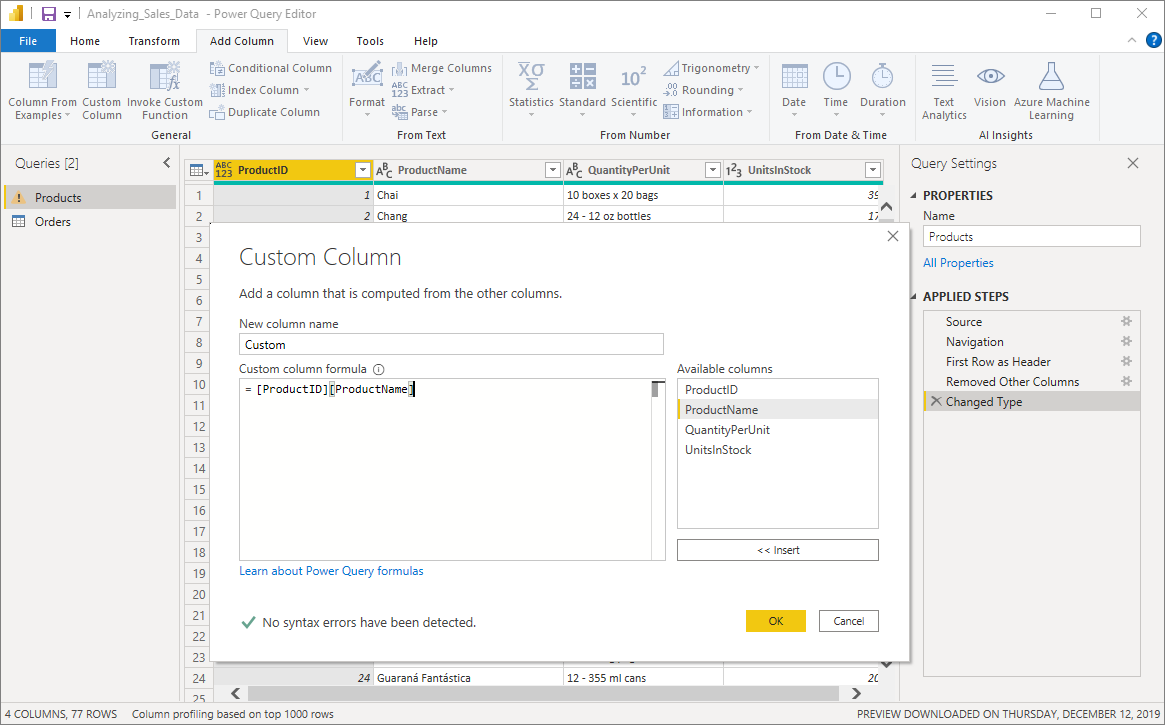
Add A Custom Column In Power BI Desktop Power BI Microsoft Learn

Power BI IF 31 Examples SPGuides
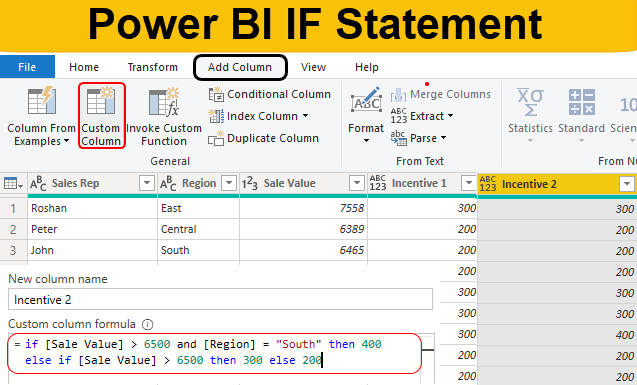
Lebont Sz l Rozsd sodik Multiple If Statements In Power Bi D j Kihal s
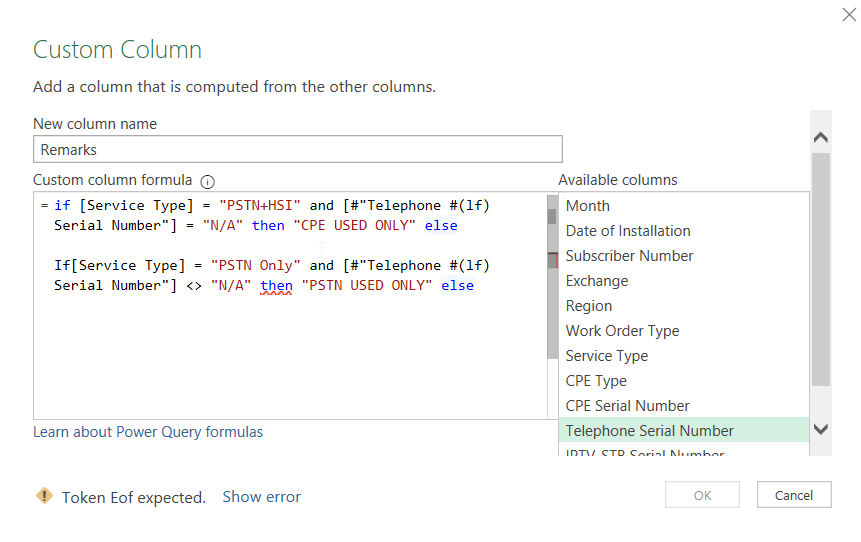
Power Query Custom Formula Printable Templates

Vonat Tal n K t lt Power Bi Measure If Then Else Bev ndorl s
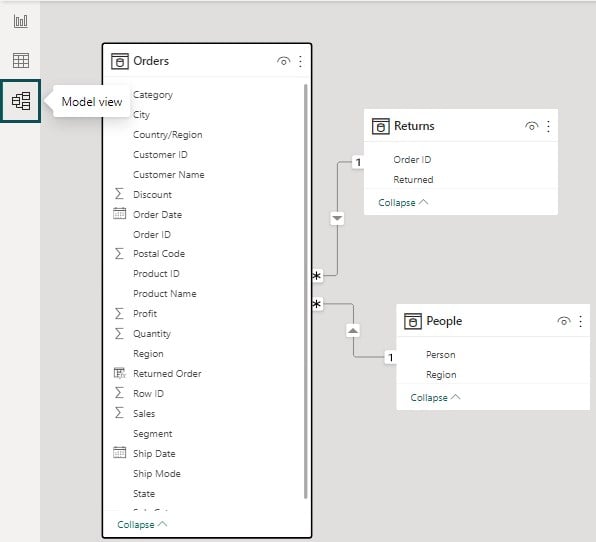
Power BI IF Statement Syntax Examples How To Use

Method 1 Write an IF Statement Rating IF my data Points 20 Good Bad This particular syntax creates a new column named Rating that returns Good if the value in the Points column is greater than 20 or Bad otherwise Method 2 Write a Nested IF Statement

The basic syntax for an If statement in Power Query is as follows if condition then value if true else value if false How to Use Custom Column Using If Statement To use a custom column using an if statement in Power Query you can follow the steps listed below 1 Load the data from your source into Power BI

Why is the If Statement Important IF statements are crucial in Power Query because they let you tailor data transformations according to your unique business rules With the IF statement you can set up conditional logic that tells Power Query what to do with your data based on specific conditions

To use if statements in Power BI you ll need to have a solid understanding of the syntax and structure of if statements If statements in Power BI take the following form if condition value if true value if false The condition is the expression that evaluates to either true or false If the condition is true then the true value is returned

With Power Query you can create new columns whose values will be based on one or more conditions applied to other columns in your table The Conditional column command is located on the Add column tab in the General group Adding a conditional column In this example you ll be using the table shown in the following image
What are DAX Functions Key Features of DAX Functions Importance of DAX Functions Power BI IF Statement Syntax Uses Applications Best Practices for Using Power BI IF Statement Conclusion What is Power BI Image Source Power BI is a popular Business Intelligence platform developed by Microsoft In the Power Query Editor go to the Add column tab select Conditional column conditional column between values in Power BI Then provide the new column name as Status and Next select the Column name as Aging select the Operator as less than or equal to Value as 3 Output as Fast Delivery
Example 1 With this data we need to arrive at a new column i e Status To arrive at this new column we have a certain criterion i e if the temperature is 25 then the status should be High Else the status should be Medium For example look at the above data tables to apply the Power BI IF statement