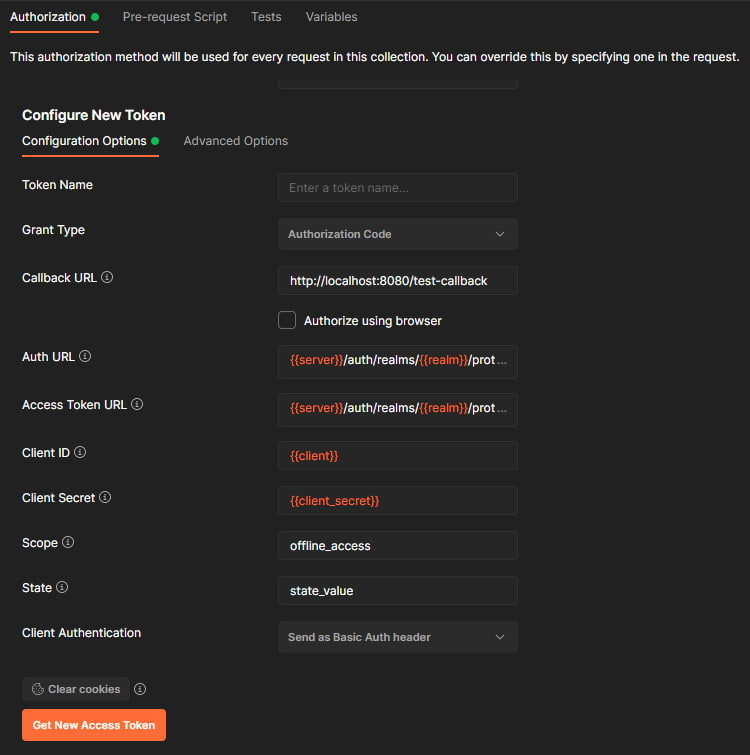
Postman Authorization Code Flow Example OAuth 2 0 Configuration In Postman Postman OAuth 2 0 Authorization Flow Using The Dropbox API And Postman YouTube Implement Authorization By Grant Type Okta Developer OAuth 2 0 Implicit Flow Is Dead Try PKCE Instead Postman Blog Authorization flow settings The token name should be set to Bearer Next we configure the authorization flow type For this article we will use the authorization code flow with
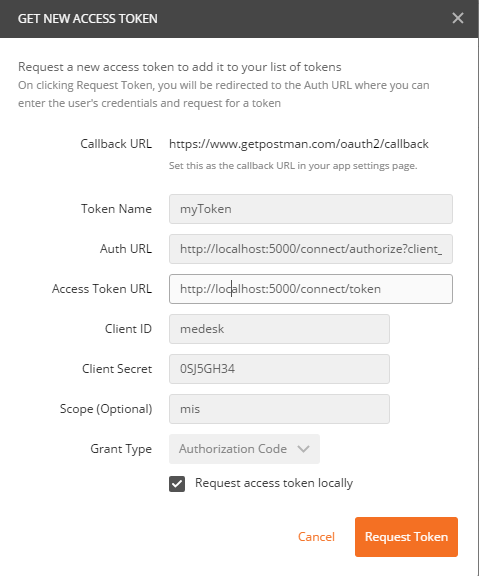
When you create a Send Request block and select a request to a supported API that requires authorization and has the No Auth authorization type you ll be prompted to set up authorization for the request Select set up authorization to add your API key to the request Last modified 2023 12 27 Send data between blocks Open Postman and create a new request Click on the Authorization tab 3 Select OAuth 2 0 as the type of authorization 4 Click on the Configure New Token button 5 Click on the Get New Access Token button If the authorization is successful the access token will be displayed in the Access Token field
OAuth 2 0 Implicit Flow Is Dead Try PKCE Instead Postman Blog OAuth 2 0 Authorization Code Grant With Postman Part 1 DEV Community OAuth 2 0 Authorization Code Grant With Postman Part 1 DEV Community Authorization Code Flow OAuth 2 0 Authorization Code Grant With Postman Part 1 DEV Community File Authorization Code Flow png BibbleWiki How Do Oauth Authorization Code Flow Works Computer Science OAuth 2 0 Implicit Flow Is Dead Try PKCE Instead Postman Blog Using Azure Active Directory To Sign in OneDrive API OneDrive Dev
Postman Authorization Code Flow Example
 Postman Authorization Code Flow Example
https://www.codeontime.com/blog/2022/03/oauth-2-0-configuration-in-postman/RFH2mW7YxU85Wi6ZXeeeE0nwTx4.png
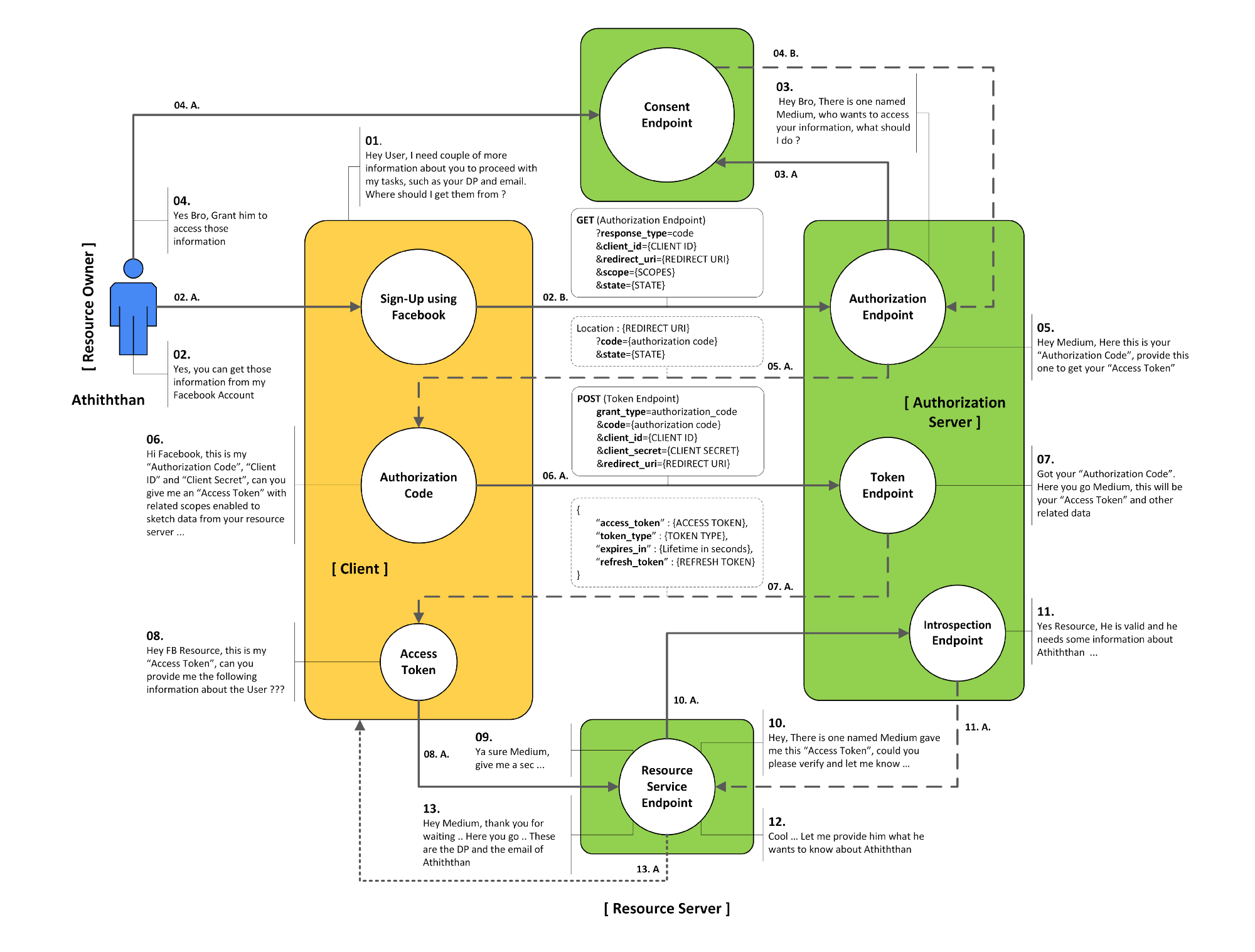
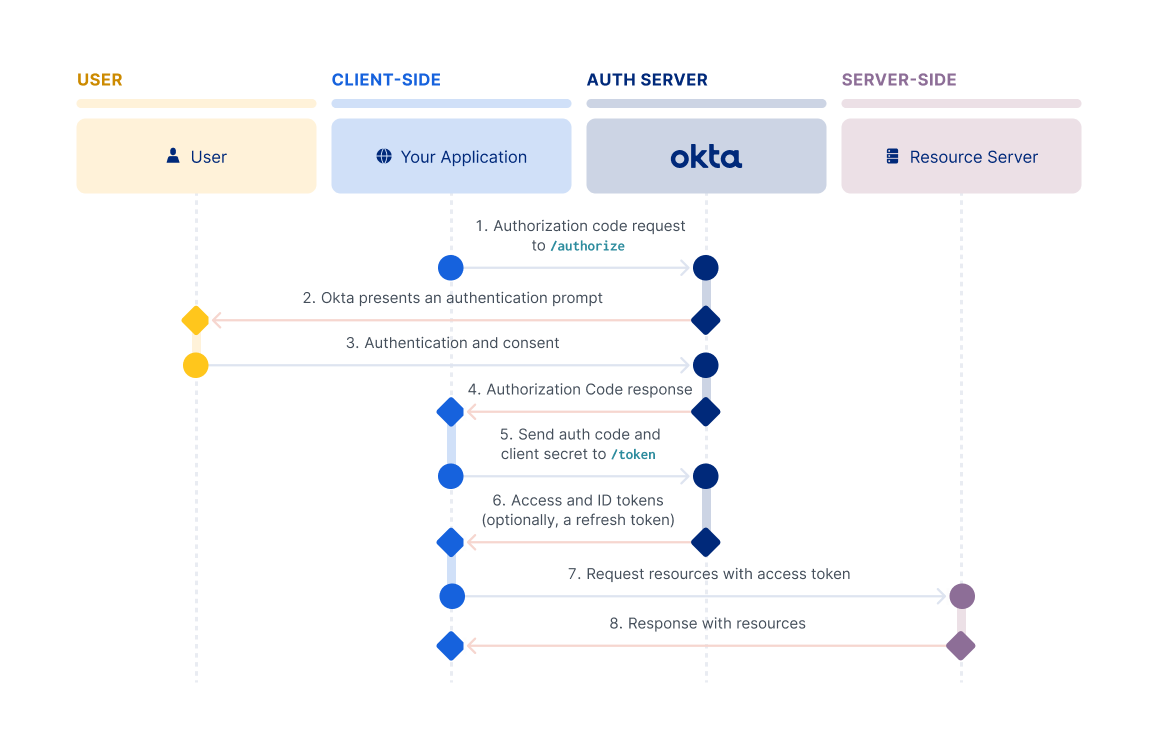
OAuth 2 0 defines four primary types of authorization grants Authorization code grant In the example above we mentioned that the authorization server generates a code and shares it with the client after the user successfully logs in This code known as an authorization code is the most secure and common type of authorization grant
Templates are pre-designed documents or files that can be utilized for different functions. They can save time and effort by supplying a ready-made format and design for developing different type of material. Templates can be utilized for personal or expert tasks, such as resumes, invites, flyers, newsletters, reports, presentations, and more.
Postman Authorization Code Flow Example

OpenID Connect OIDC Op De Microsoft Identity Platform Microsoft
OAuth 2 0 Authorization Code Grant With Postman Part 1 DEV Community

OAuth 2 0 Authorization Code Grant With Postman Part 1 DEV Community
Authorization Code Flow
File Authorization Code Flow png BibbleWiki

How Do Oauth Authorization Code Flow Works Computer Science

The Postman blog is your hub for API resources news and community Learn about the Postman API Platform and much more How to Use JWT Authorization Set Up Authorization for Your Public Apis Blog posts Announcing easier API authentication in Postman OAuth 2 0 just got easier introducing token refresh and ID token support New custom

In this post we ll learn why the Authorization Code flow with PKCE is the new standard for more secure authorization for these types of apps With the release of Postman v7 23 we announced support for Proof Key for Code Exchange better known as PKCE pronounced pixy

1 I have a Spring Boot REST service I use OAuth2 with Keycloak and Authorization Code Grant Type I want to access some endpoints via Postman I see under Authorization for selection OAuth 2 0 selecting it provides many fields
OAuth 2 0 Authorization Code Flow GET Authorize Request POST Token Request Auth Code GET Microsoft Graph Request POST Token Request Refresh Token OAuth 2 0 Implicit Flow OpenID Connect Sign In OAuth 2 0 Client Credentials flow OAuth 2 0 Device Flow POST OAuth 2 0 ROPC OAuth 2 0 Authorization Code Flow Azure AD v2 0 Protocols

Postman supports the OAuth 2 0 code flow as well as PKCE and OpenID Connect OIDC parameters Yet sometimes the tester may need to run more advanced flows like the ones covered by the Financial grade API FAPI Security Profiles JWT Secured Authorization Request JAR Pushed Authorization Requests PAR
This request is an example of using the Authorization helper in Postman The following request shows an example of how to do this by manually adding a header instead In Postman Let s use the Authorization Code flow helper for this request from the Spotify Web API Under the Authorization tab select OAuth 2 0 Input the required Launch PostMan and click on the Authorization section Choose OAuth 2 0 in the drop down under Type Click on Get New Access Token button In the Get New Access Token dialog For Grant Type choose Authorization Code With PKCE from the drop down
Overview In the first part we have shown how the OAuth 2 0 Authorization code grant works when using Keycloak and Postman Authorization code flow is the most common secure OAuth 2 0 flow In the sixth step of that process the client should provide client credentials in a base64 encoding format for requesting an access token