Pip Install Trusted Host Example Pip Install i Http mirrors aliyun pypi simple trusted host windows docker pip IT SSL Verify Pip Trusted Host Docker python python Docker pip weixin 39539764 CSDN Pip pip END CSDN It is not entirely obvious how to add multiple hosts to the trusted hosts section of the config file In an enterprise it becomes important to trust pypi and an internal host providing a PYPI registry such as that provided by Jfrog Artifactory An appropriate section for this would be in the user guide It already contains an example detailing how to add multiple URLs to find links like so
Note that keyring the Python package needs to be installed separately from pip This can create a bootstrapping issue if you need the credentials stored in the keyring to download and install keyring It is thus expected that users that wish to use pip s keyring support have some mechanism for downloading and installing keyring 1 Update Pip First things first ensure you have the latest pip version Run the following command in your terminal python m pip install upgrade pip This command updates pip to the latest version potentially resolving the issue if outdated protocols were the culprit 2 Use Trusted Host Option You can bypass certificate verification
Pip pip END CSDN Docker Get Start Part 2 Containers Instalar Tkinter Para Python En Mac Passauni pip pip Jankin CSDN Python python CSDN Python Adding trusted host To Pycharm Package Installer Stack Yamlapi Docker Python Pip Install Unable To Get Local Issuer Certificate ssl c pip Windows MacOS
Pip Install Trusted Host Example
 Pip Install Trusted Host Example
https://img2020.cnblogs.com/blog/1873666/202005/1873666-20200505203908392-755232265.png
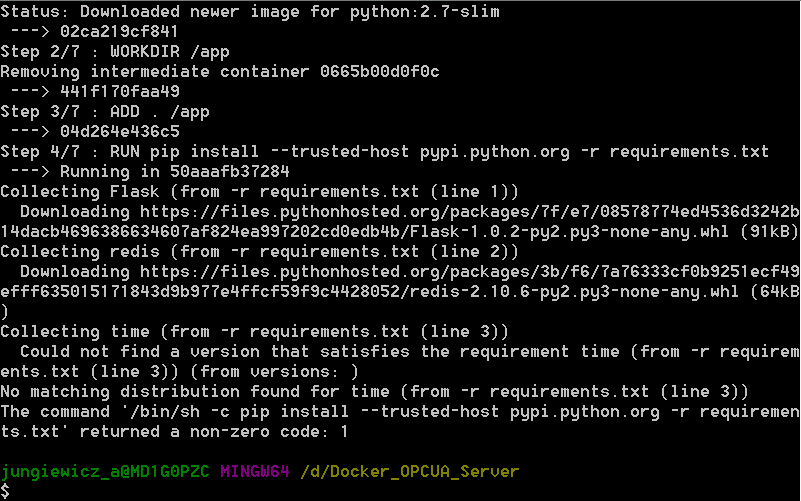
I have tried doing the installation using python 3 and python 2 I have installed upgraded the setuptools like so pip3 install upgrade setuptools I have tried to use the trusted host option like so pip3 install trusted host pypi python Scrapy But I always get the same error message when I run pip3 install Scrapy
Templates are pre-designed documents or files that can be utilized for different functions. They can conserve effort and time by offering a ready-made format and design for developing different sort of content. Templates can be utilized for personal or expert tasks, such as resumes, invitations, leaflets, newsletters, reports, presentations, and more.
Pip Install Trusted Host Example

Python Pip Hengdin

Docker Get Start Part 2 Containers

Instalar Tkinter Para Python En Mac Passauni

pip pip Jankin CSDN

Python Adding trusted host To Pycharm Package Installer Stack

Yamlapi Docker

Pip allows a user to change its behaviour via 3 mechanisms command line options environment variables configuration files This page explains how the configuration files and environment variables work and how they are related to pip s various command line options See also pip config command which helps manage pip s configuration

7 Answers Sorted by 18 You can set that through the pip configuration file which is in HOME pip pip conf or APPDATA pip pip ini on Windows global cert usr local share ca certificate mycert crt This file lets you set basically all the flags that are used by pip

On the command line pip install trusted host pypi trusted host pypi python trusted host files pythonhosted PACKAGE NAME Run the following command to get the list of configuration files pip config v list You will see something like this your username instead of FooBar
Pip offers the log option for specifying a file where a maximum verbosity log will be kept This option is empty by default This log appends to previous logging Like all pip options log can also be set as an environment variable or placed into the pip config file See the Configuration section

Solution Disabling SSL unsafe not recommended conda config set ssl verify False Configuring certificate while SSL authentication is true recommended conda config set ssl verify True conda
Open the pip conf file and add trusted host under the global param 1 global 2 trusted host pypi python 3 pypi 4 files pythonhosted Restart your python and then the pip installer will trust these hosts permanently Ends up calling pip install with index some index url whereas pipenv install xyz calls it with index None pip install will call prepare pip source args with just url some index url if index string whereas if index none the correct url verify ssl object is passed It also seems to correctly parse the trusted hosts in parse indexes but does nothing with it
Specifying multiple trusted hosts in pip conf 4 pip is configured with locations that require TLS SSL however the ssl module in Python is not available Despite running as trusted host 1 ValueError check hostname requires server hostname pip windows