Outlook Manual Settings How To Set Up Gmail In Outlook 2003 Copyholoser Swipebooks Settings Outlook For Android Setup Instructions Setting Up Two Email Accounts In Outlook Lpojournal Microsoft Outlook Is Changing For Better And Worse TechRadar Feb 22 2020 nbsp 0183 32 See how you can configure Outlook with an Outlook Hotmail Gmail Yahoo AOL or iCloud account The account settings are given for each possible account type and clarified with screenshots
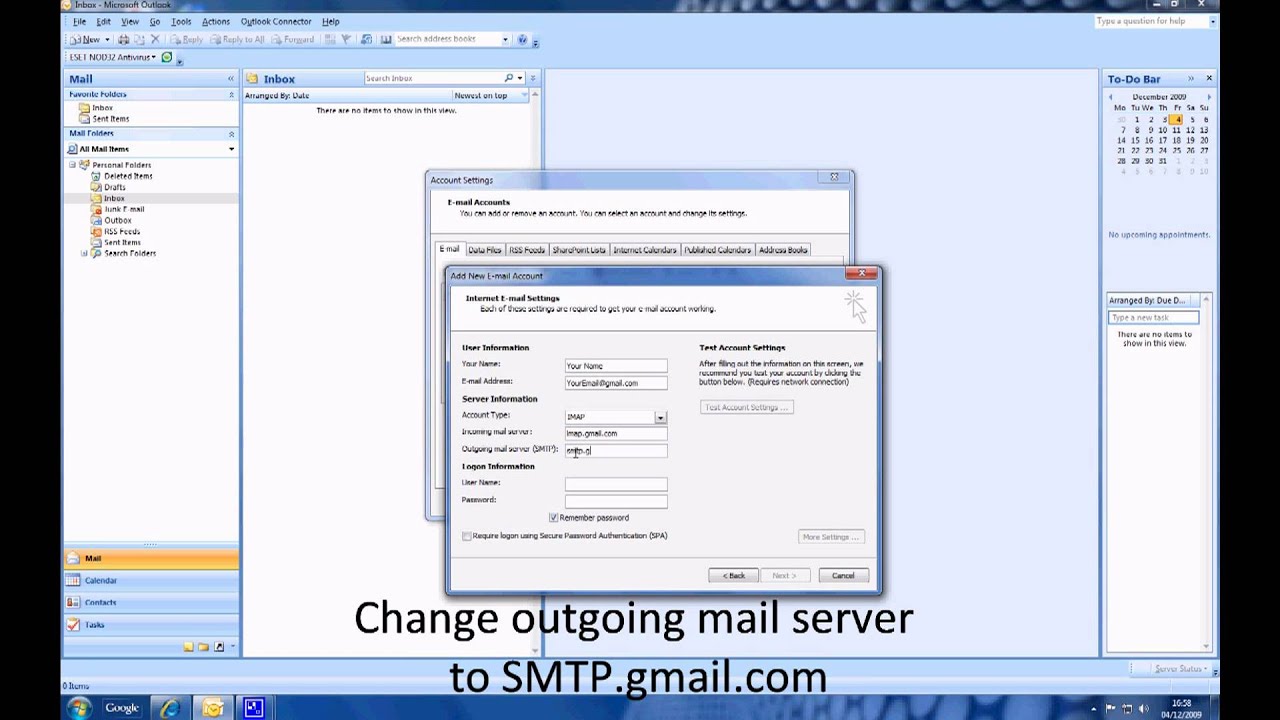
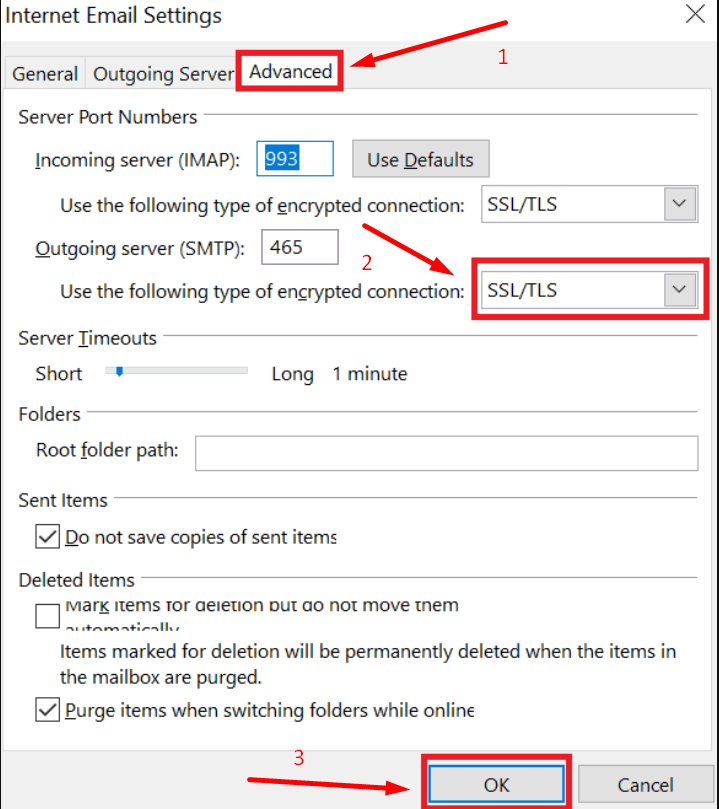
Jul 17 2024 nbsp 0183 32 Configuring Gmail with Microsoft Outlook involves adding your Gmail account and tweaking the server settings to ensure smooth communication between Gmail s and Outlook s servers Sep 2 2020 nbsp 0183 32 Gmail IMAP Is Now Set Up In Outlook IMAP Internet Message Access Protocol deals with email directly on the server hosting it In the case of Gmail IMAP settings that s Google s Gmail servers POP Post Office Protocol downloads the email to reside on your device and you work with it locally
Microsoft Outlook Is Changing For Better And Worse TechRadar Microsoft Outlook Email Application Setup Outlook 2016 For Windows Bluehost India Email Settings For Gmail In Outlook Jesusker Tutorial Microsoft Outlook Enhance Your Emails With Outlook Spell Check Learn How Restoring Your Outlook Personal Folders Pasaceleb My Microsoft Outlook Is Not Working Properly Mainsoc Outlook Calendar Meetings Vs Appointments Chris Menard Training
Outlook Manual Settings
 Outlook Manual Settings
https://i.ytimg.com/vi/XKyZhfOyQZk/maxresdefault.jpg
Aug 23 2024 nbsp 0183 32 Learn how you can set up amp configure Microsoft Outlook to connect to Gmail both POP3 and IMAP access using auto configure or manual settings
Pre-crafted templates use a time-saving option for creating a diverse range of documents and files. These pre-designed formats and designs can be made use of for various personal and expert jobs, consisting of resumes, invitations, leaflets, newsletters, reports, discussions, and more, improving the material creation procedure.
Outlook Manual Settings
How To Configure Right Outlook SMTP Settings To Send Emails

Microsoft Outlook
Email Application Setup Outlook 2016 For Windows Bluehost India

Email Settings For Gmail In Outlook Jesusker

Enhance Your Emails With Outlook Spell Check Learn How
Restoring Your Outlook Personal Folders Pasaceleb

Account Settings allows you to add or remove accounts change server settings and more Account Name and Sync Settings lets you update the friendly name for the account and

Aug 3 2020 nbsp 0183 32 a click on lt Advanced Options gt underneath the email address box b check the box for lt et me set up my account manually gt c click lt Connect gt d select the account type and proceed accordingly 2 With Outlook closed open the Control Panel lt Mail gt app

New to Outlook Use this guide to learn the basics Quick Access Toolbar Keep favorite commands permanently visible Explore the ribbon See what Outlook can do by selecting the

After installing the apps in Microsoft 365 you ll want set up Outlook to start using email calendar and contacts Here s how Open the Start menu Search for Outlook and choose it Enter your Microsoft 365 email address and select Connect
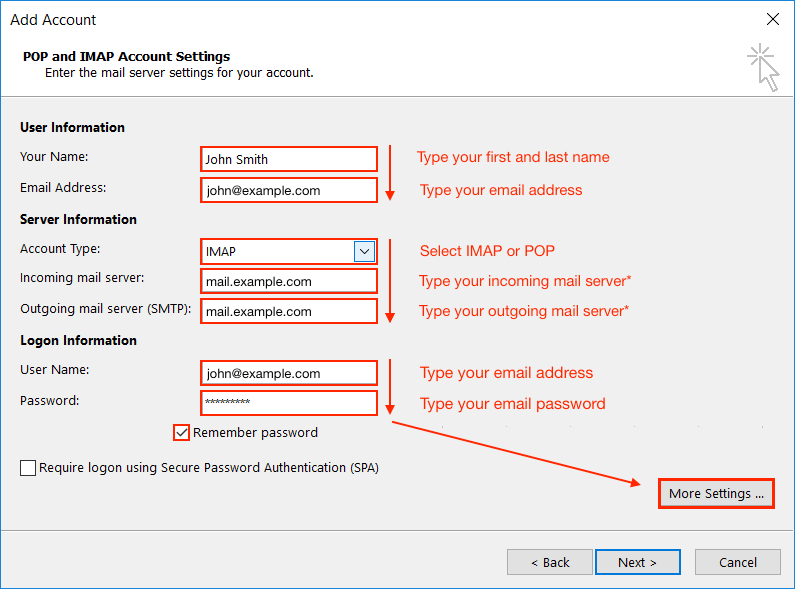
Step by Step Instructions Open Microsoft Outlook 2016 and click File in the menu Under Account Information click Add Account Select Manual setup or additional server types and click Next Select POP or IMAP and click Next Enter the user server and logon information Select the account type IMAP or POP3
Set up Outlook for Microsoft 365 for business email Set up mobile devices for Microsoft 365 for business users Getting started with the new Outlook for Windows Learn how to set up and configure Outlook so that you can begin to use it Feb 10 2023 nbsp 0183 32 Manually configuring your Microsoft 365 account in Outlook is tedious process but with these simple steps there can be an effective and active configuration in no time at all We ll walk through each step of this process so that at the end you ll have a fully functioning email program ready to use
How to add your email account to Outlook 2019 To synchronize your emails with IMAP or POP3 you need to activate this feature in your mail account Click Email Settings POP3 amp IMAP Enable access to this account via POP3 and IMAP