Openvpn Not Working Windows 11 Elastix Openvpn Client Download Vesthopde OpenVPN Not Working In Windows 11 4 Ways To Get Things On Track GitHub OpenVPN openvpn gui OpenVPN GUI Is A Graphical Frontend For USB C Not Working On Windows 10 FIX OpenVPN Not Working Installing And Using OpenWrt OpenWrt Forum 1 Update Windows One of the regular updates to Windows 11 that was released in January 2022 caused a number of problems with VPN connections A patch followed that fixed those issues If
Step 1 Open Windows 11 Settings app use Windows I keys Step 2 Go to Network internet menu Step 3 Scroll to Advanced network settings Step 4 From the Network adapters menu This fixed it for me from OVPN support You might need to clean Temp folder if client doesn t start Win R Temp Ctrl A Shift Delete Enter
OpenVPN Not Working Installing And Using OpenWrt OpenWrt Forum OpenVPN Not Working Installing And Using OpenWrt OpenWrt Forum Photos App Not Working In Windows 11 Here s How To Fix It OpenVPN Not Working In Windows 11 Here s What To Do OpenVPN Not Working In Windows 11 Here s What To Do OpenVPN Windows 11 4 How To Fix Windows 11 Photos App Nextprevious Not Working Vrogue What Is OpenVPN TechRadar How To Setup OpenVPN On Windows 10 YouTube
Openvpn Not Working Windows 11
 Openvpn Not Working Windows 11
https://cdn.windowsreport.com/wp-content/uploads/2020/12/OpenVPN-not-working-on-Windows-10-1200x1200.jpg
1 Reinstall Your WAN Miniport Network Adapters The most common problem causing the Windows 11 VPN to malfunction lies in the WAN Miniport network adapters Reinstalling them might help restore the VPN connectivity properly Here s how you do it Press Windows R to open the run search box
Pre-crafted templates provide a time-saving solution for producing a varied variety of documents and files. These pre-designed formats and layouts can be used for numerous personal and expert jobs, including resumes, invitations, leaflets, newsletters, reports, discussions, and more, enhancing the material development process.
Openvpn Not Working Windows 11
OpenVPN Not Working In Windows 11 Here s What To Do
OpenVPN Not Working Installing And Using OpenWrt OpenWrt Forum

Photos App Not Working In Windows 11 Here s How To Fix It
OpenVPN Not Working In Windows 11 Here s What To Do

OpenVPN Windows 11 4

How To Fix Windows 11 Photos App Nextprevious Not Working Vrogue

1 Restart Your PC One of the most effective yet easy to apply workarounds in this troubleshooting guide is to restart the affected PC Doing so will fix all the problems that may be causing this issue with it To know if it fixes the issue for you follow the below steps to restart your Windows 11 PC 1

On clean Windows 11 pro install which is fully up to date Along with PFSense OpenVPN server Server is remote and we are accessing a LAN behind it at the remote location Client is local here and is running on Windows 11 and is behind a PFSense NAT device here
OpenVPN is not working after Windows 11 upgrade Hi Team I upgraded from Windows 10 to Windows 11 after that my OpenVPN client is unable to launch Is anyone else facing that issue I tried different blogs available on Internet to allow that OpenVPN d15e1b05 a5d1 4a0d bc2b 32ce7c354fcd 313ea0cf b30d 4ae9 b908 bfbf48010b67 MohammadWaseem5

EDIT One other difference I noticed was in the Network and Sharing Center on Windows 11 the active network appears as OpenVPN Data Channel Offload 2 with the values Access type No network access and Connections OpenVPN Data Channel Offload

Windows 11 openvpn Share Improve this question Follow edited Apr 27 at 17 57 asked Jul 6 2022 at 22 28 Sled 402 1 6 16 Add a comment 1 Answer Sorted by 1 So following the suggestion from the official forums of deleting the file C Users Sled AppData Local Temp ovpn connect lockfile seemed to work for me Share Improve this answer Follow
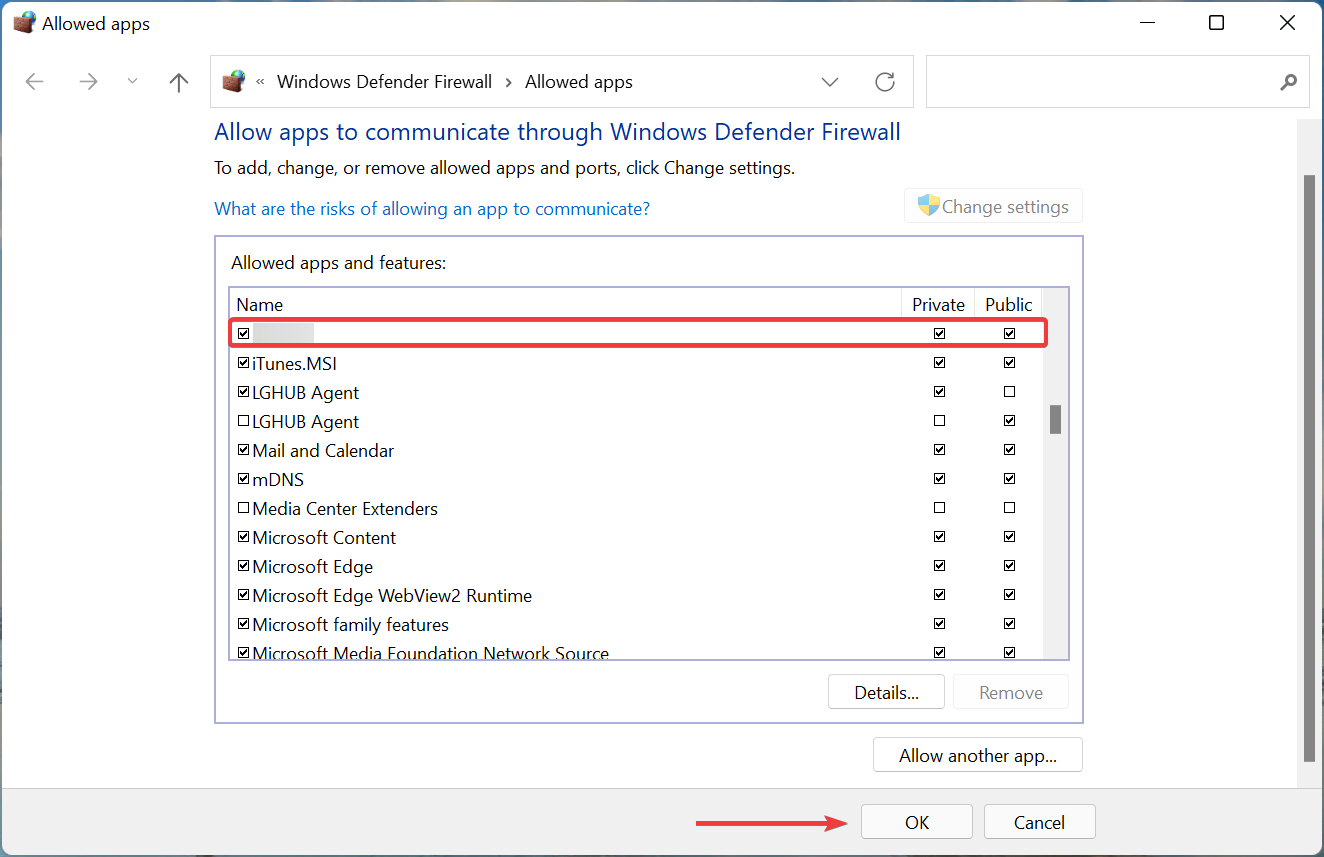
Fix 1 Update Windows 11 Fix 2 Reinstall the Drivers for WAN Miniports Fix 3 Flush DNS Fix 4 Turn off Internet Protocol Version 6 Fix 5 Don t Use a Proxy Server Fix 6 Allow VPN in Firewall Fix 7 Turn off Firewall Fix 8 Set up an Exception for UDP Fix 9 Reinstall VPN Fix 10 Reset Windows 11 Windows 11 VPN Not Working Fixes Are Here Step 1 Accessing the Network Internet settings The first step in adding a VPN connection is to access the Network Internet settings Here s how Click on the Start button in the bottom left corner of your screen Select the gear icon to open the Settings app Click on Network Internet
From here I was told to select the Trusted Root Certificate Authorities folder then to click Next then click Finish Credit PCMag Microsoft Now I was ready to enter all this information