Open Source Software Risk Assessment Checklist Risk Assessment Checklist Growing Psychology Task Risk Assessment Chart PDF Risk Assessment Check List Welcome AcqNotesacqnotes Risk Assessment Checklist Sample Free Download Risk Assessment Program Template Important To sign in to Chrome you must have a Google Account On your iPhone or iPad open Chrome Tap More Settings Sign in Under Sign In to Chrome select the account that you
On your Android phone or tablet open the Gmail app At the top right tap your Profile picture Manage accounts on this device Tap your Microsoft account Remove account When you Apr 7 2023 nbsp 0183 32 bandzip 7zip dzip dzip
Risk Assessment Program Template Site Specific Risk Assessment SafetyCulture Risk Assessment SafetyCulture Free IT Risk Assessment Management Templates Smartsheet Generic Free Risk Assessment Template Download Risk Assessment App SexiezPix Risk Assessment Software Try Free Today Transport Risk Assessment Template Manual Handling Risk Assessment Template Free Workplace Risk Assessment SafetyCulture
Open Source Software Risk Assessment Checklist
 Open Source Software Risk Assessment Checklist
https://static.wixstatic.com/media/e64064_77a926e4991047b79a17f5349b875a78~mv2.png/v1/fill/w_980,h_980,al_c,q_90,usm_0.66_1.00_0.01,enc_auto/e64064_77a926e4991047b79a17f5349b875a78~mv2.png
open source open source
Templates are pre-designed documents or files that can be used for numerous purposes. They can conserve effort and time by providing a ready-made format and layout for developing various kinds of content. Templates can be utilized for personal or professional jobs, such as resumes, invitations, flyers, newsletters, reports, presentations, and more.
Open Source Software Risk Assessment Checklist
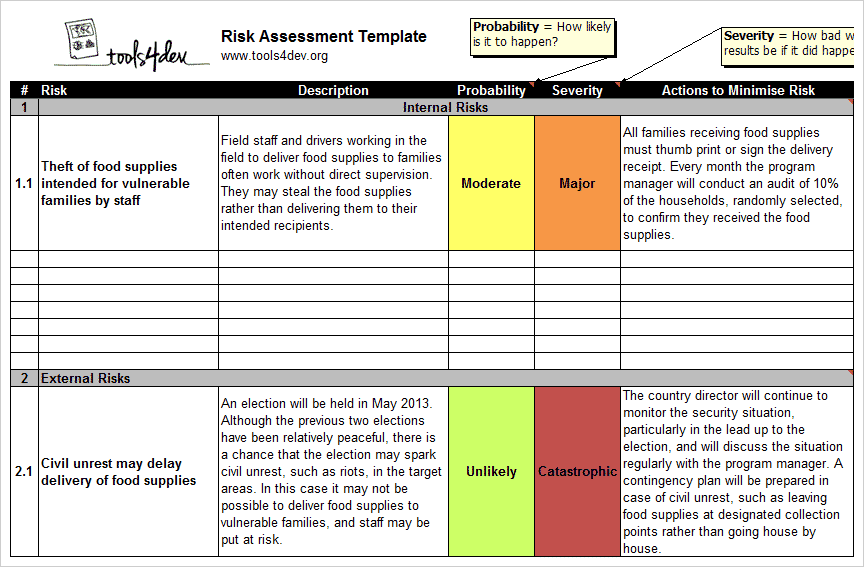
Project Management Risk Assessment Template

Site Specific Risk Assessment SafetyCulture

Risk Assessment SafetyCulture

Free IT Risk Assessment Management Templates Smartsheet Generic

Risk Assessment Software Try Free Today

Transport Risk Assessment Template

2011 1

If you make Chrome your default browser links you click will open automatically in Chrome whenever possible In some countries you may be asked to choose your default browser

To download an app Open Google Play On your Android device open the Google Play app On your Computer go to play google Search or browse for an app or content Select an item

On your device go to the Apps section Tap Google Play Store The app will open and you can search and browse for content to download

To open Gmail you can log in from a computer or add your account to the Gmail app on your phone or tablet Once you ve signed in check your email by opening your inbox
[desc-11] [desc-12]
[desc-13]