Open Service From Cmd Middleware Professional KVN March 2014 Middleware Professional KVN March 2014 Windows Run Exe From Cmd C ch Kh i Ch y T p Tin EXE B ng CMD Command Prompt C c n Gi n Middleware Professional KVN March 2014 Web Nov 17 2011 nbsp 0183 32 Start up the command prompt CMD with administrator rights Type c windows microsoft framework v4 0 30319 installutil exe your windows service path to exe Press return and that s that It s important to open with administrator rights otherwise you may find errors that come up that don t make sense
Web To start it type powershell at a normal command prompt The Get Service cmdlet gets a list of services which you can filter by any property For example this gets a list of disabled services Get Service StartType eq Disabled The Set Service cmdlet can set Web Apr 28 2014 nbsp 0183 32 To restart a Windows service from the command prompt or scheduled tasks use this cmd c quot net stop quot Service Name quot amp sc start quot Service Name quot quot
Middleware Professional KVN March 2014 Middleware Professional KVN March 2014 Anaconda Prompt Change Directory Ploraark Middleware Professional KVN March 2014 How To Open The Windows Command Prompt Using A Notepad Document What Middleware Professional KVN March 2014 Middleware Professional KVN March 2014 How To Install Nvm On Windows 10 Using Cmd Rasshark How To Hide Files In Windows Using CMD
Open Service From Cmd
 Open Service From Cmd
https://2.bp.blogspot.com/-6Su-FX7WI-c/UxL6REd8kzI/AAAAAAAAALg/p-7iJ8y3CAA/s1600/4.gif
Web Dec 9 2008 nbsp 0183 32 Viewed 312k times 69 I would like to be able to query whether or not a service is running from a windows batch file I know I can use sc query quot ServiceName quot but this dumps out some text What I really want is for it to set the errorlevel environment variable so that I can take action on that
Templates are pre-designed files or files that can be used for different purposes. They can save time and effort by supplying a ready-made format and layout for creating various sort of content. Templates can be utilized for personal or professional projects, such as resumes, invites, leaflets, newsletters, reports, discussions, and more.
Open Service From Cmd

Easy To Learn Oracle Database And Solve Your Problem November 2014
Middleware Professional KVN March 2014
Anaconda Prompt Change Directory Ploraark
Middleware Professional KVN March 2014
Middleware Professional KVN March 2014
Middleware Professional KVN March 2014
Web Oct 17 2019 nbsp 0183 32 Use the following commands to start stop or check the status of a service in Windows on the command line prompt CMD Start a service C gt net start serviceName Get a service status C gt sc query serviceName Stop a service C gt net stop serviceName Cool Tip Kill a hanging process in Windows from the CMD
Web Aug 15 2010 nbsp 0183 32 We normally use Services msc to start or stop or disable or enable any service We can do the same from windows command line also using net and sc utilities Below are commands for controlling the operation of a service You need to have administrator privileges to run net start stop commands

Web Jul 7 2023 nbsp 0183 32 You can also use the Command Prompt to start stop pause resume service To use it from the WinX Menu open Command Prompt Admin and execute one of the following commands To start a service
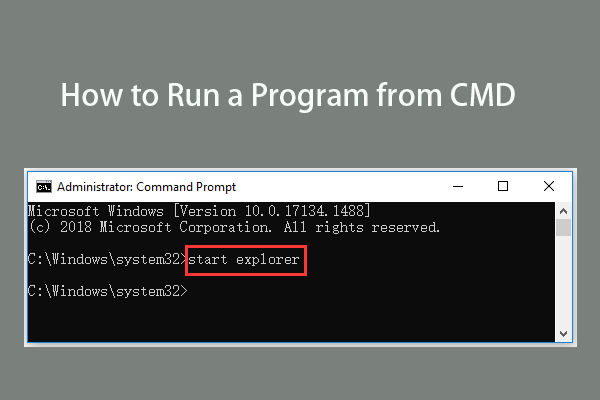
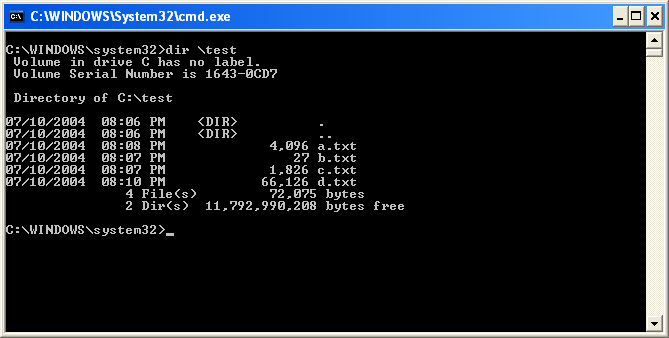
Web Mar 10 2011 nbsp 0183 32 The run command to open services console is Services msc Open Services console from CMD The command Services msc can be used from command prompt as well If you are logged in as a non admin user and want to open services console as an admin you can use runas command
Web Feb 16 2022 nbsp 0183 32 Press Windows R type cmd and hit Enter to open Command Prompt in Windows 10 Then type the Windows Services command line services msc and hit Enter to open it Way 6 Start Services in Windows 10 with PowerShell Press Windows X and choose Windows PowerShell to open PowerShell
Web Oct 16 2019 nbsp 0183 32 The services in Windows can be listed using the Service Manager tool To start the Service Manager GUI press Win keybutton to open the Start menu type in services to search for the Service Manager and press Enter to launch it The services can also be listed using the command line prompt CMD or the PowerShell Web Dec 22 2022 nbsp 0183 32 To enable a service with a command use these steps Open Start Search for Command Prompt right click the top result and select the Run as administrator option
Web Jul 11 2023 nbsp 0183 32 1 Use the Start menu screen Press the Start or button Type services Click or tap the matching result 2 Use the Run dialog Press the Win R keys simultaneously Type services msc Press OK or hit Enter 3 Use the Command Prompt Open the Command Prompt Press the Start or button and type command prompt