Npm Install Specific Version Windows How To Install Specific Version Of Npm In Windows 10 YouTube How To Install Specific Package Versions With Pip And Python How To Install Nodejs On Mac Step By Step How To Install Specific Version Of Package Using Apt Install Node js And Npm In 3 Easy Steps Node Version Manager more commonly called nvm is the most popular way to install multiple versions of Node js but is only available for Mac Linux and not supported on Windows Instead we recommend installing nvm windows and then using it to install Node js and Node Package Manager npm There are alternative version managers to consider as
The legacy bundling argument will cause npm to install the package such that versions of npm prior to 1 4 such as the one included with node 0 8 can install the package This eliminates all automatic deduping See folders for a more detailed description of the specific folder structures that npm creates Limitations of npm s Install In windows console I try with this npm install email protected And it throws this error npm ERR No compatible version found email protected npm ERR Valid install targets npm ERR 0 0 0 In linux the result is similar I try with sudo npm install email protected and the output is npm ERR version not found email protected
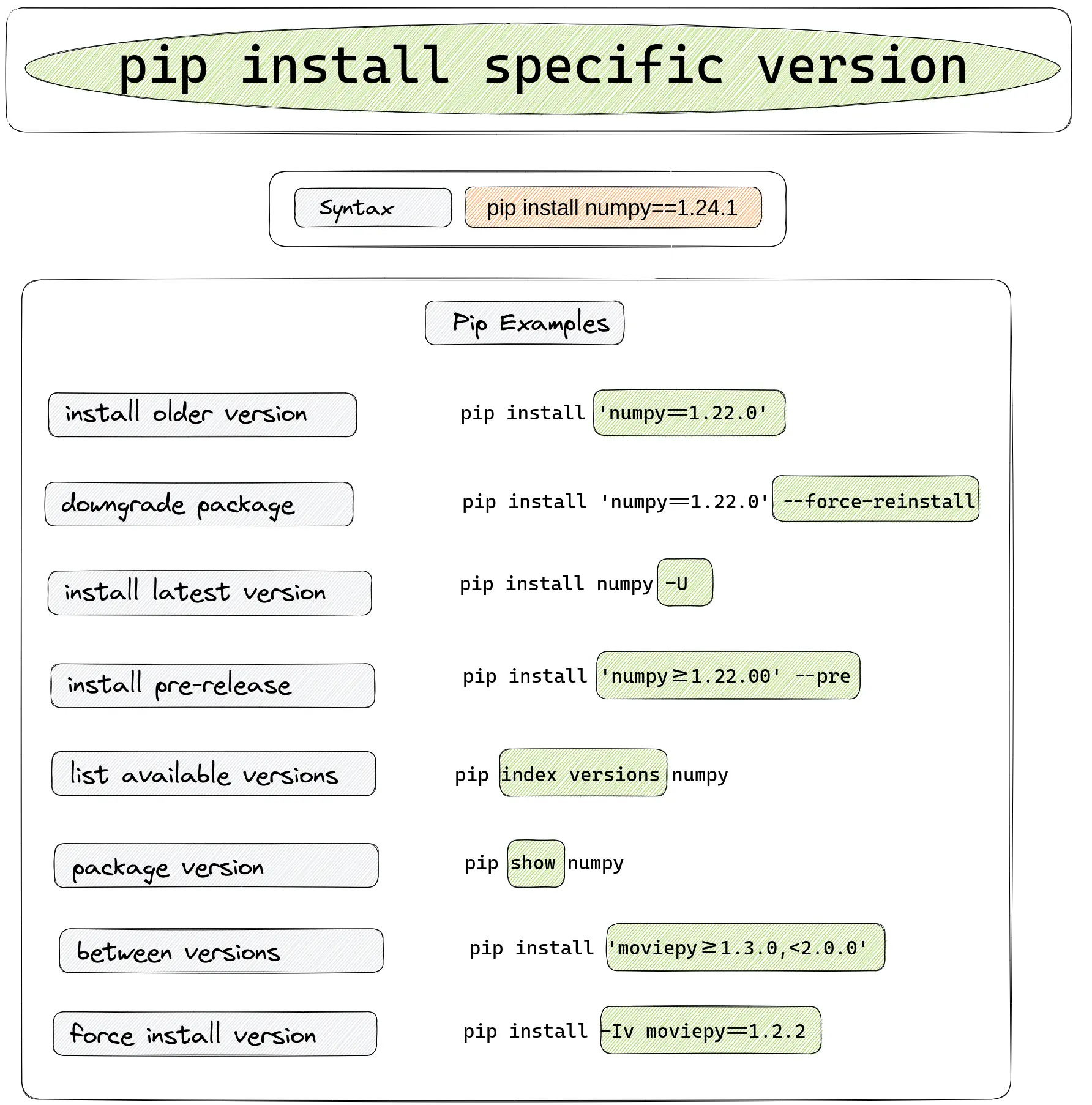
Install Node js And Npm In 3 Easy Steps How To Download Npm Specific Package Version Twitter How Can You Install A Pre Release Version Of Python Real Python Solved How To Install Specific Version Of rlang 9to5Answer How To Install Npm And Install Node Js In Windows 10 Node Js How To Install A Specific Version Of Angular cli ItSolutionStuff NVM For Windows Windows 10 Pip Install Specific Version How To Install A Specific Python Package NPM How To Install Specific Version Of A Module
Npm Install Specific Version Windows
 Npm Install Specific Version Windows
https://i.ytimg.com/vi/yD4MWw9pP3Q/maxresdefault.jpg
To get Node js and NPM running on your Windows machine carry out these steps 1 Open your favorite web browser navigate to the official Node js downloads page and download the Node js Windows 64 bit Installer Downloading the Node js installer 2
Pre-crafted templates offer a time-saving option for creating a varied variety of documents and files. These pre-designed formats and layouts can be made use of for various personal and expert jobs, including resumes, invitations, flyers, newsletters, reports, presentations, and more, streamlining the material production process.
Npm Install Specific Version Windows
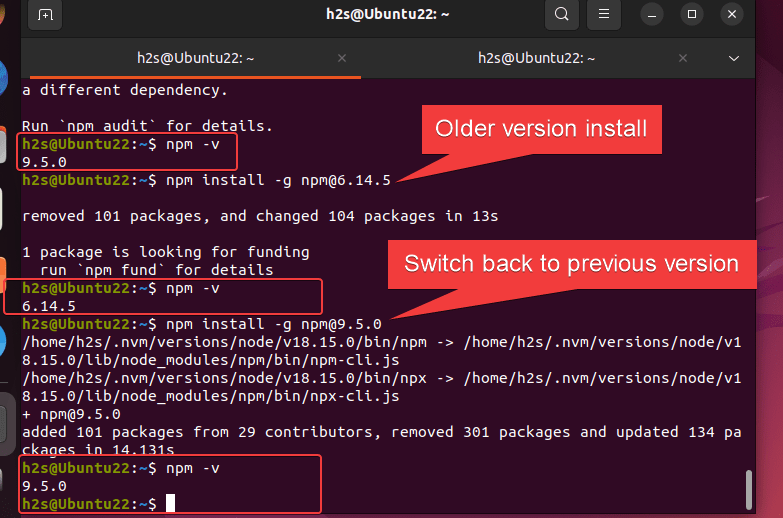
How To Change NPM Version In Linux Windows Or MacOS

How To Download Npm Specific Package Version Twitter

How Can You Install A Pre Release Version Of Python Real Python

Solved How To Install Specific Version Of rlang 9to5Answer
How To Install A Specific Version Of Angular cli ItSolutionStuff
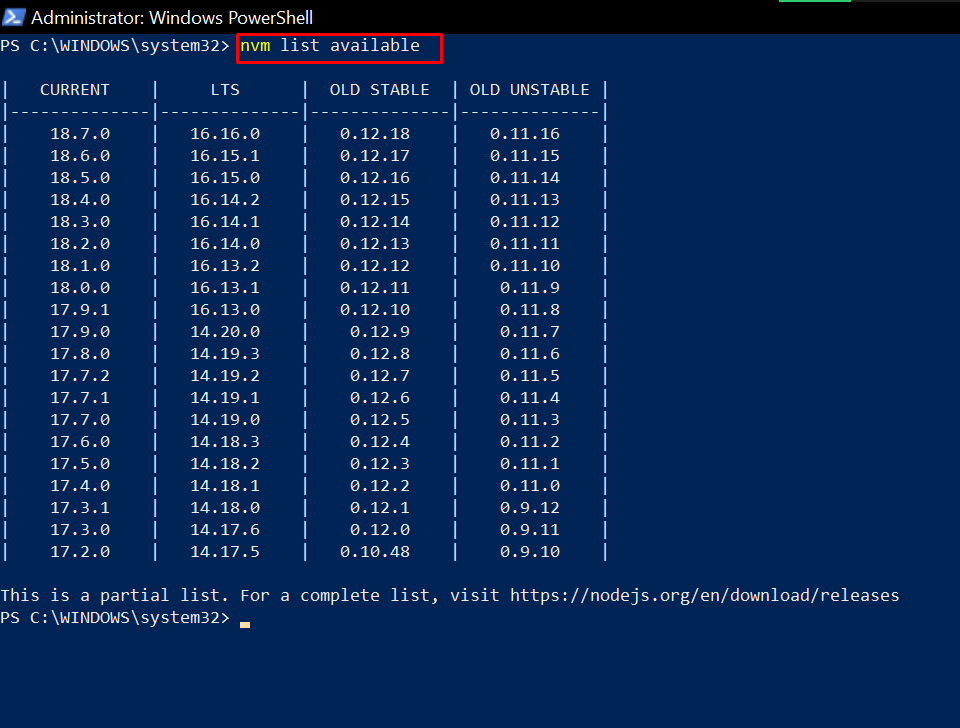
NVM For Windows Windows 10

Using a Node version manager to install Node js and npm Node version managers allow you to install and switch between multiple versions of Node js and npm on your system so you can test your applications on multiple versions of npm to ensure they work for users on different versions OSX or Linux Node version managers nvm n Windows Node
The Node installer installs directly into the npm folder a special piece of Windows specific configuration that tells npm where to install global packages When npm is used to install itself it is supposed to copy this special builtin configuration into the new install There was a bug in some versions of npm that kept this from working so

Downloads Latest LTS Version 20 10 includes npm 10 2 3 Download the Node js source code or a pre built installer for your platform and start developing today LTS Recommended For Most Users Current Latest Features Windows Installer node v20 10 x 86 msi

Note If there is a file or folder named name in the current working directory then it will try to install that and only try to fetch the package by name if it is not valid npm install alias npm name Install a package under a custom alias Allows multiple versions of a same name package side by side more convenient import names for packages with otherwise long ones and using git

To do this we can specify the version using the syntax npm install package version Continuing with our example above we would execute something like this As you can see NPM has installed the package we specified With NPM we also have other options for specifying the version of a package Using either a caret or a tilde we
Npm install package name version number The above command will install the particular package version you want alongside any packages that it depends on For example to install a specific version of Renovate you can run the following command npm install renovate 20 5 1 Or you can use the shortened version of the command To install a specific version of a Node package you need to run this command npm install package name version number Replace package name with the name of your desired package and version number with the version number of your package Since npm uses semantic versioning a package version number is specified using the major minor
So you don t need to install NPM separately If the version of NPM you want to use is not available run npm install npm version number g to install it Now to see the list of Node versions you have installed on your Windows machine run nvm list To use a specific version of Node run nvm use latest to use the latest version