Notification Bar Symbols Samsung Dating App Notification Symbols Android Astuce Des Ic nes Beginner s Guide To Android How To Use The Notification Bar Android Samsung Status Bar Icon Plus Sign With Circle Ladereng Android Icon Glossary Edit The Notifications Bar With Samsung TouchWiz Android VIP Club Learn which devices get Google prompts You ll get Google prompts on any Android phone signed in to your Google Account How Google prompts help protect your account We recommend
Modify Google Calendar notifications To help remind you about upcoming events you can get notifications on your phone computer or by email You can change your notification settings I cannot set a notification sound for just google messages Google Messages Community Help Center Community Google Messages Notification
Edit The Notifications Bar With Samsung TouchWiz Android VIP Club Solved Glance Icon In Notification Bar Samsung Members 8 Samsung Cell Phone Icon Meanings Images Samsung Galaxy S4 How To Customize The Galaxy S10 Notification Bar How To Grasp Android Courting App Icons In 6 Simple Steps Cerro Digital Samsung Galaxy Note 4 Notification Bar Icons Explained 15 Android Icons Explained Images Samsung Galaxy S3 Notification 14 Android Notification Icons Images Android Phone Notification Icons Android Status Bar Symbols And Notification Icons Cell Phone Vector
Notification Bar Symbols
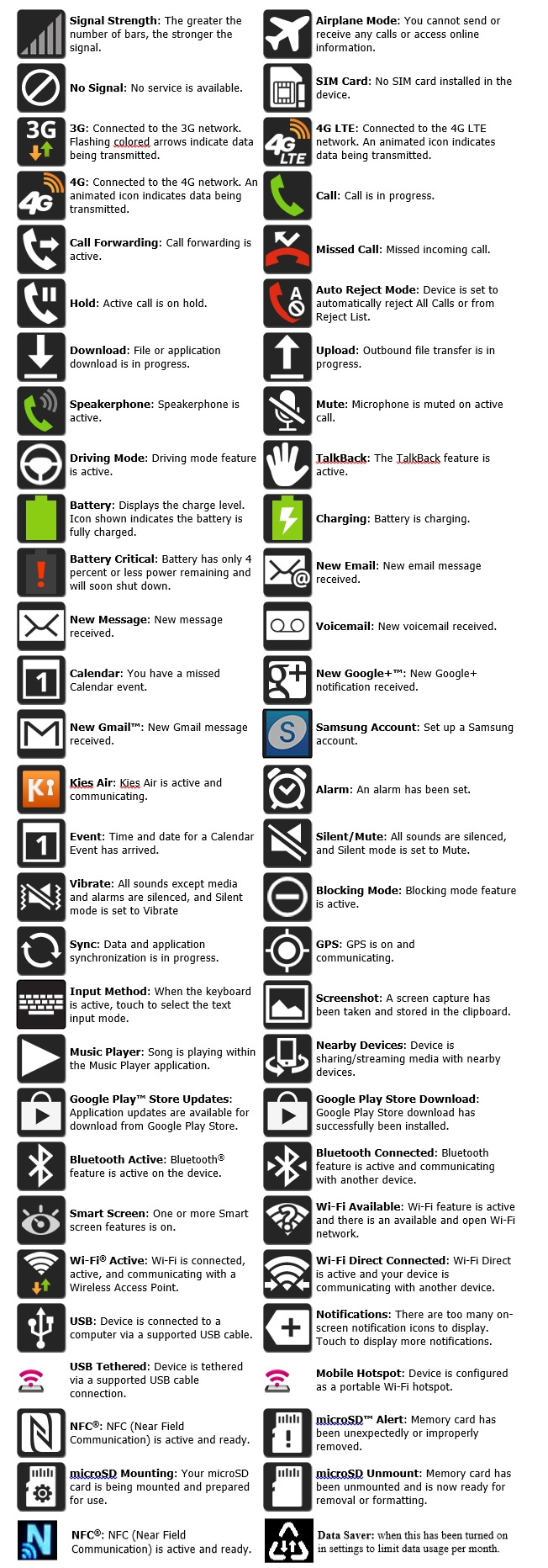 Notification Bar Symbols
https://images.samsung.com/is/image/samsung/p5/nz/faq_images/hhp_images/liana/notificationicons.png?$ORIGIN_PNG$
On your computer go to Gmail In the top right click Settings See all settings At the top choose a settings page such as General Labels or Inbox Make your changes After you re done with
Templates are pre-designed documents or files that can be used for various purposes. They can save time and effort by offering a ready-made format and layout for creating different sort of material. Templates can be utilized for personal or professional projects, such as resumes, invites, flyers, newsletters, reports, discussions, and more.
Notification Bar Symbols
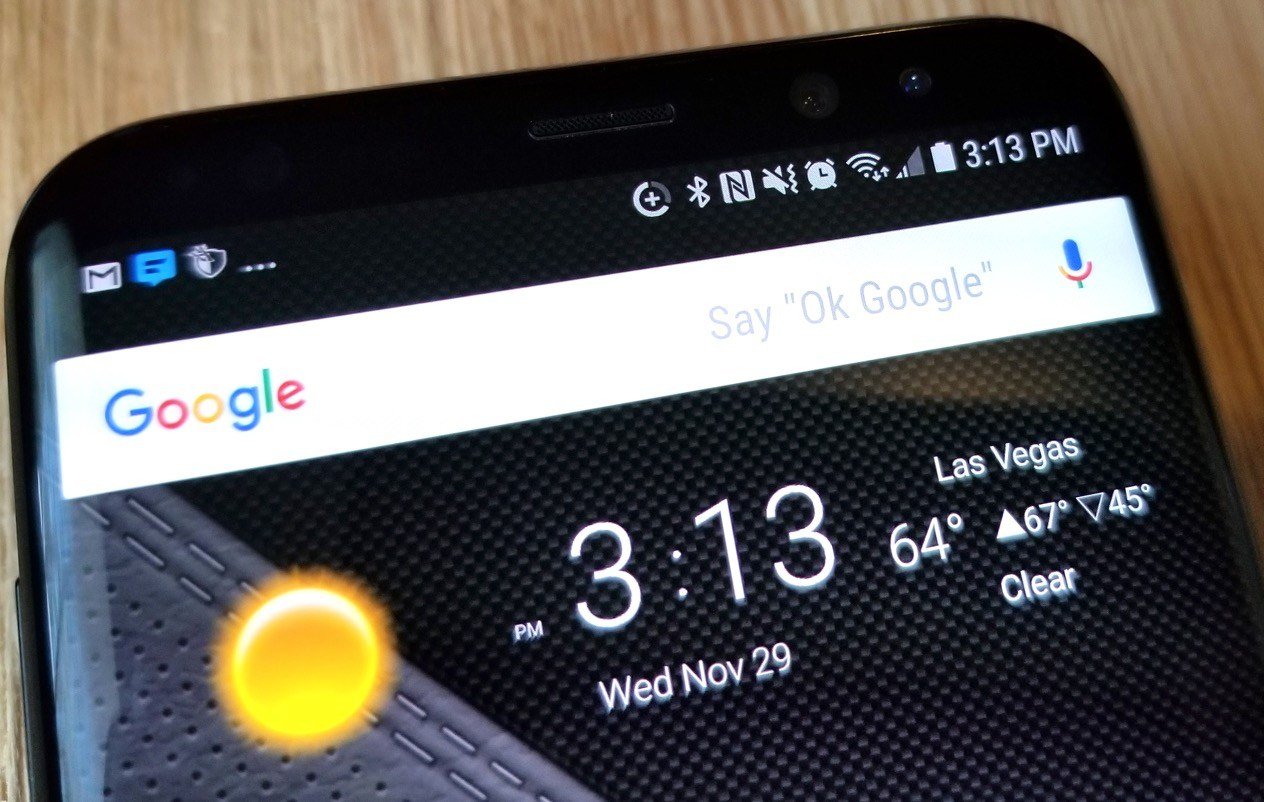
What Does This Symbol Mean On My Samsung Phone Derrtrautman

Solved Glance Icon In Notification Bar Samsung Members

8 Samsung Cell Phone Icon Meanings Images Samsung Galaxy S4

How To Customize The Galaxy S10 Notification Bar

Samsung Galaxy Note 4 Notification Bar Icons Explained
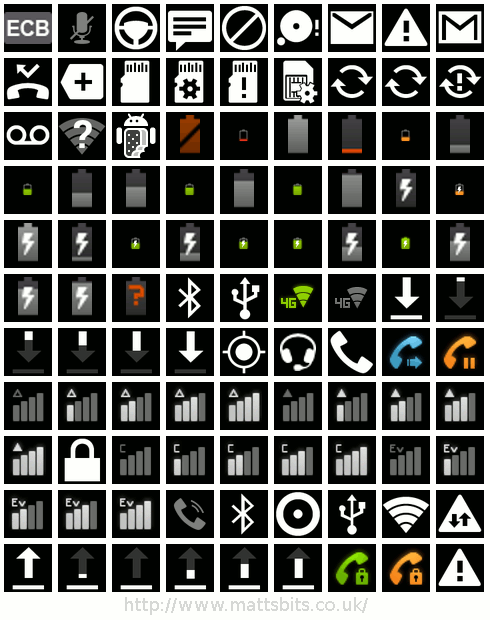
15 Android Icons Explained Images Samsung Galaxy S3 Notification

How notifications work By default Chrome alerts you whenever a website app or extension wants to send you notifications You can change this setting at any time When you browse

You can set up Chrome to get notifications like meeting reminders from websites apps and extensions If you get pop ups or ads learn how to block or allow pop ups

You ll receive notifications on the followed topic on your device For more details refer to this article Follow a topic on Search amp Discover You may also receive updates from the Google
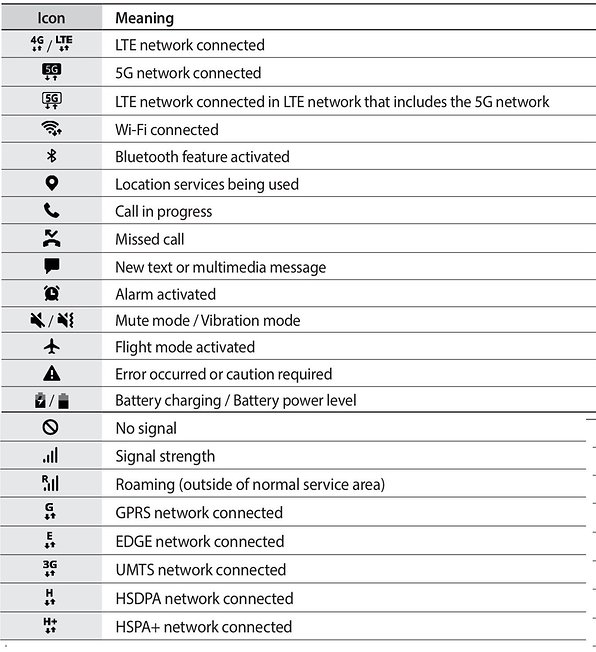
Change global settings Change default notification settings Get notifications on your phone from Google Messages Tap Notifications Turn on Incoming messages Stop sound notifications

Turn notification sounds on or off On your iPhone or iPad open the Gmail app At the top left tap Menu Settings To change your notification under quot Notifications quot Email Tap Email
[desc-11] [desc-12]
[desc-13]