Mv Command Example Mv Command In Bash YouTube Linux Mv Command Online Tutorials Library List Tutoraspire How To Use Mv Command To Move Files And Folders In Linux Or Ubuntu Step Linux And Unix Mv Command Tutorial With Examples George Ornbo Basic Commands Linux Basics TTC1040 Web Oct 11 2016 nbsp 0183 32 Tutorial on using mv a UNIX and Linux command to move or rename files Examples of moving a file moving multiple files moving a directory prompting before overwriting and taking a backup before moving The UNIX and Linux mv command October 11 2016 Updated May 24 2023
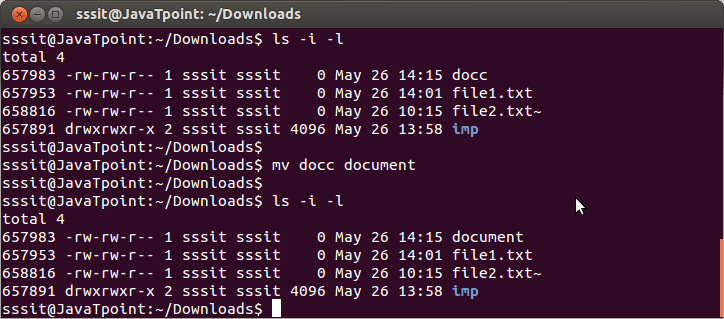
Web Jul 5 2022 nbsp 0183 32 Using mv command in Ubuntu The mv command has a simple syntax mv options source file target file location It is mandatory to have another filename or directory location otherwise you ll see quot mv missing destination file operand after quot error Let s see some practical examples of this mv command in Ubuntu Linux 1 Web Aug 1 2023 nbsp 0183 32 Renaming with mv The mv command in Linux isn t only for moving files and directories it s also a primary method for renaming them When you use mv to change the name of a file or directory you re essentially moving it to a new name in the same location
Basic Commands Linux Basics TTC1040 How To Move A Folder In Linux Using Mv Command NixCraft Kaufmann Gummi Substantiv Mv Agusta Brutale Motorrad Liebe Mann V terlich Linux Mv 9 Quick mv Command Practical Examples In Linux Mv Command In Linux With Options Taste The Linux MV Command In Linux With Examples Linux Move File Mv Command In Linux Mv Command In Linux Complete Guide To Mv Command In Linux
Mv Command Example
 Mv Command Example
https://i.ytimg.com/vi/290axF1wpPE/maxresdefault.jpg
Web May 4 2019 nbsp 0183 32 Move the files myfile1 and myfile2 to the directory myfiles mv myfile1 myfile2 myfiles Same as the previous command mv n file file2 If file2 exists and is a directory file is moved into it If file2 does not exist file is renamed file2 If file2 exists and is a file nothing happens mv f file file2
Templates are pre-designed files or files that can be utilized for different functions. They can save effort and time by offering a ready-made format and layout for creating various type of material. Templates can be utilized for personal or expert jobs, such as resumes, invitations, leaflets, newsletters, reports, discussions, and more.
Mv Command Example
Linux Mv Command Explained For Beginners 8 Examples

How To Move A Folder In Linux Using Mv Command NixCraft

Kaufmann Gummi Substantiv Mv Agusta Brutale Motorrad Liebe Mann V terlich
Linux Mv
Mv Command In Linux With Options Taste The Linux

MV Command In Linux With Examples Linux Move File

Web May 2 2023 nbsp 0183 32 Examples of mv Command 1 Renaming a file in Linux Syntax mv source file name s Destination file name Enter your source file name in place of source file name s and your destination file name in place

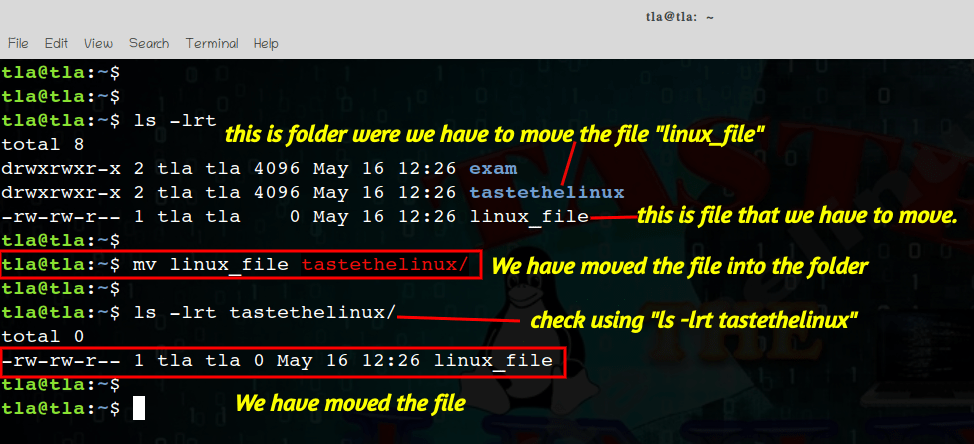
Web Oct 8 2019 nbsp 0183 32 For example to move the files file1 and file2 to the dir1 directory you would type mv file1 file2 dir1 The mv command also allows you to use pattern matching For example to move all pdf files from the current directory to the Documents directory you would use mv pdf Documents mv Command Options

Web Jul 14 2023 nbsp 0183 32 Just like the files we can use the mv command to move multiple directories at once Let s understand this with a simple example First create a few directories using the mkdir command mkdir dir 1 dir 2 dir 3 dir 4 Now let s move all these directories to the dir 4 directory mv v dir 1 dir 2 dir 3 dir 4

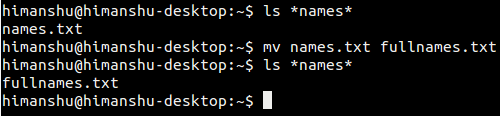
Web Nov 18 2022 nbsp 0183 32 Q1 How to use the mv command in Linux If you want to just rename a file you can use the mv command in the following way mv filename new filename For example mv names txt fullnames txt Similarly if the requirement is to move a file to a new location use the mv command in the following way mv filename dest dir For example

Web Jul 21 2022 nbsp 0183 32 You also use the mv command to rename directories and files if the destination doesn t already exist If the destination exists then they re moved using the syntax mv source destination Here is an example
[desc-11] [desc-12]
[desc-13]