Multiple Arguments In Excel Multiple Arguments In Function Excel VBA YouTube Excel Using The AND Function To Make To 2 Arguments With The IF COUNTIF Multiple Criteria How To Use COUNTIF Function Earn Excel Excel You ve Entered Too Many Arguments For This Function YouTube 3 1 How Can We Add Multiple Arguments In Sub Excel Automation Web Jun 15 2019 nbsp 0183 32 What to Know IF D7 lt 30000 D 3 D7 IF D7 gt 50000 D 5 D7 D 4 D7 is the formula you enter to start the Nested IF function Enter the Logical test argument which compares two items of data then enter the Value if true argument Enter the Nested IF Function as the Value if false Argument
Web Functions are predefined formulas that perform calculations by using specific values called arguments in a particular order or structure Functions can be used to perform simple or complex calculations You can find all of Excel s functions on the Formulas tab on the Ribbon Excel function syntax Web Feb 22 2019 nbsp 0183 32 The ISTEXT function is used to check for the presence of text This returns TRUE if there is text so the NOT function reverses this to FALSE And the IF performs its calculation IF NOT ISTEXT B2 B2 5 0 Mastering logical functions will give you a big advantage as an Excel user
3 1 How Can We Add Multiple Arguments In Sub Excel Automation How To Use Multiple Countif Formula In Excel Printable Templates What Are Excel Function Arguments A Detailed Discussion What Are Arguments In Excel Excel Function Arguments Earn Excel Retrieve The Excel Function Arguments Stack Overflow Excel Functions Excel Accountancy Shortcut Key For Function Arguments In Excel YouTube Excel Medium How Do We Change The Number Format In Excel Create Custom Format In
Multiple Arguments In Excel
 Multiple Arguments In Excel
https://i.ytimg.com/vi/DT3Oz8DM0Gk/maxresdefault.jpg
Web Mar 26 2021 nbsp 0183 32 The IF function in Excel is an inestimable ally when we need to implement conditional logic that is when we need different results depending on a condition The syntax is IF logical test value if true value if false where logical test is an expression that evaluates to TRUE or FALSE value if true is an optional argument and
Pre-crafted templates offer a time-saving option for producing a varied variety of documents and files. These pre-designed formats and layouts can be used for different personal and expert jobs, consisting of resumes, invites, leaflets, newsletters, reports, discussions, and more, streamlining the content creation process.
Multiple Arguments In Excel

What Is Argument In Excel
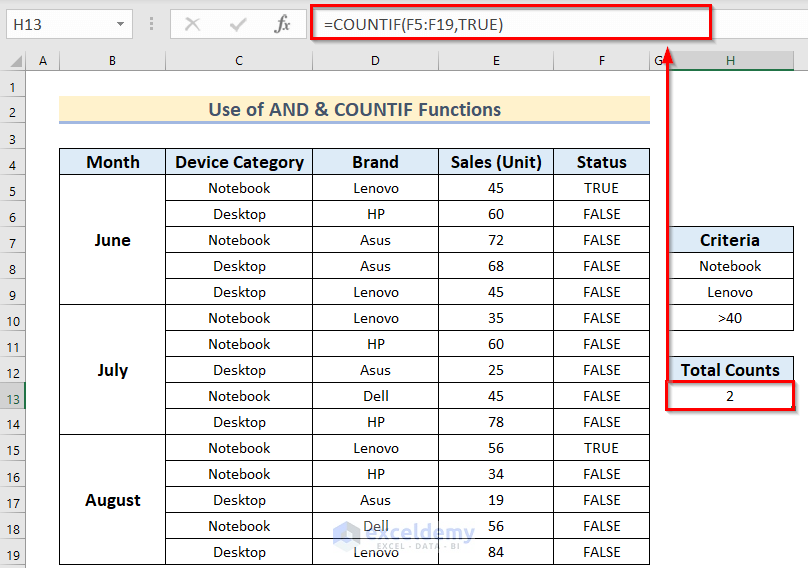
How To Use Multiple Countif Formula In Excel Printable Templates

What Are Excel Function Arguments A Detailed Discussion

What Are Arguments In Excel Excel Function Arguments Earn Excel

Excel Functions Excel Accountancy

Shortcut Key For Function Arguments In Excel YouTube

Web We use the following steps Select cell C2 and type in the below formula IF B2 gt 90 quot A quot IF B2 gt 80 quot B quot IF B2 gt 70 quot C quot IF B2 gt 60 quot D quot quot F quot Click Enter in the cell to get the result of the formula in the cell Copy the formula for the rest of the cells in the column The assigned letter grades appear in column C Explanation of the formula

Web Multiple IF functions can be nested together to allow for multiple criteria The Excel IF function statement allows you to make a logical comparison between a value and what you expect by testing for a condition and returning a result if True or False

Web Use the IF function along with AND OR and NOT to perform multiple evaluations if conditions are True or False Syntax IF AND IF AND logical1 logical2 value if true value if false

Web Mar 16 2023 nbsp 0183 32 IF AND B2 quot delivered quot C2 lt gt quot quot quot Closed quot quot quot The screenshot below shows the IF AND function in Excel If you d like to return some value in case the logical test evaluates to FALSE supply that value in the value if false argument For example IF AND B2 quot delivered quot C2 lt gt quot quot quot Closed quot quot Open quot

Web Mar 22 2023 nbsp 0183 32 Excel IF statement with multiple conditions by Svetlana Cheusheva updated on March 22 2023 The tutorial shows how to create multiple IF statements in Excel with AND as well as OR logic Also you will learn how to use IF together with other Excel functions
Web Go to the Formulas tab and click on quot Name Manager quot in the Defined Names group Click quot New quot and enter a name for the selected range Click quot OK quot to save the named range In your formula use the named range as the function argument C Advantages of using named ranges in function arguments Web Jan 3 2017 nbsp 0183 32 It says you have two many arguments because whatever you re trying to do you ve structured it in a way that doesn t conform with what the functions expect to see Edit the question to lay out in words what you re trying to accomplish Break the formula down into the component pieces of the logic fixer1234 Jan 3 2017 at 6 57 Add a comment
Web Apr 25 2023 nbsp 0183 32 Yes you can write two conditions in an IF statement using the AND or OR function You can also use nested IF functions or the IFS function to check multiple conditions What are the 3 arguments of the IF function The three arguments of the IF function in Excel are Logical test the condition you want to check