Ms Visual Studio 2019 System Requirements Visual Studio 2019 System IO Ports SerialPort Dr Haven Microsoft Visual Studio 2019 V16 11 10 Free Download KUYHAA Visual Studio 2019 Professional Vprozone Visual Studio 2019 System Requirements Completemzaer Visual Studio 2019 System IO Ports SerialPort Dr Haven For questions about running other versions of Visual Studio side by side with Visual Studio 2019 see Visual Studio 2019 Platform Targeting and Compatibility n moniker end n moniker range vs 2022 n n n Check the system requirements These requirements help you know whether your computer supports Visual Studio 2022 n n n
Download Visual Studio Tools Install Free for Windows Mac Linux Supercharge Visual Studio 2022 with GitHub Copilot Building new functionality writing unit tests and learning new technologies has never been easier or more fun Free trial Learn more Downloads Visual Studio 2022 Download Microsoft Visual Studio for cloud application development in a powerful flexible 64 bit integrated development environment IDE See the minimum system requirements including operating systems hardware and supported languages for the Visual Studio 2019 family of products Ready when you are let s set up your Azure free
Visual Studio 2019 System IO Ports SerialPort Dr Haven Redshift TDR Visual Studio 2019 System IO Ports SerialPort Visual Studio 2019 System IO Ports SerialPort Studio One 4 System Requirements Treejh EP 11 Textbox Button C MS Redshift TDR Amazon Windows 10 Resource Kit Iceholden How To Install The Older Versions Of Visual Studio
Ms Visual Studio 2019 System Requirements
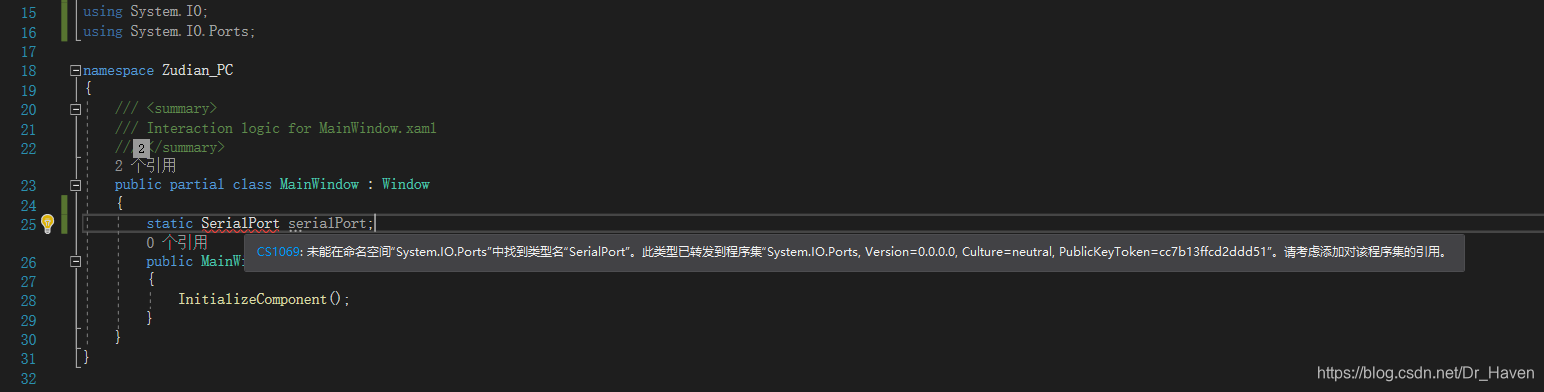 Ms Visual Studio 2019 System Requirements
https://img-blog.csdnimg.cn/20210508155412493.png?x-oss-process=image/watermark,type_ZmFuZ3poZW5naGVpdGk,shadow_10,text_aHR0cHM6Ly9ibG9nLmNzZG4ubmV0L0RyX0hhdmVu,size_16,color_FFFFFF,t_70
Visual Studio 2019 will install and run on the following operating systems 64 bit recommended Windows 10 version 1703 or higher Home Professional Education and Enterprise LTSC and S are not supported Windows Server 2016 Standard and Datacenter Windows 8 1 with Update 2919355 Core Professional and Enterprise
Templates are pre-designed documents or files that can be used for numerous purposes. They can save time and effort by supplying a ready-made format and layout for producing various type of material. Templates can be utilized for individual or expert tasks, such as resumes, invitations, flyers, newsletters, reports, discussions, and more.
Ms Visual Studio 2019 System Requirements

Visual Studio 2019 System IO Ports SerialPort
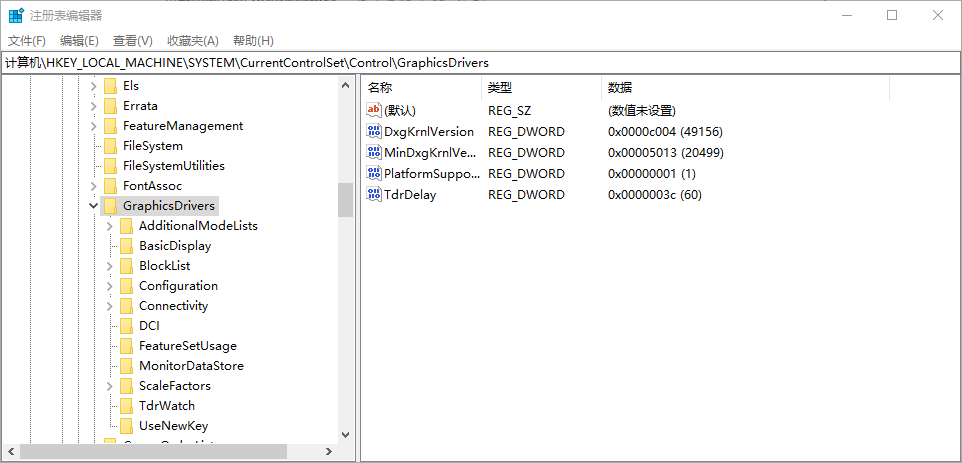
Redshift TDR

Visual Studio 2019 System IO Ports SerialPort

Visual Studio 2019 System IO Ports SerialPort

EP 11 Textbox Button C MS
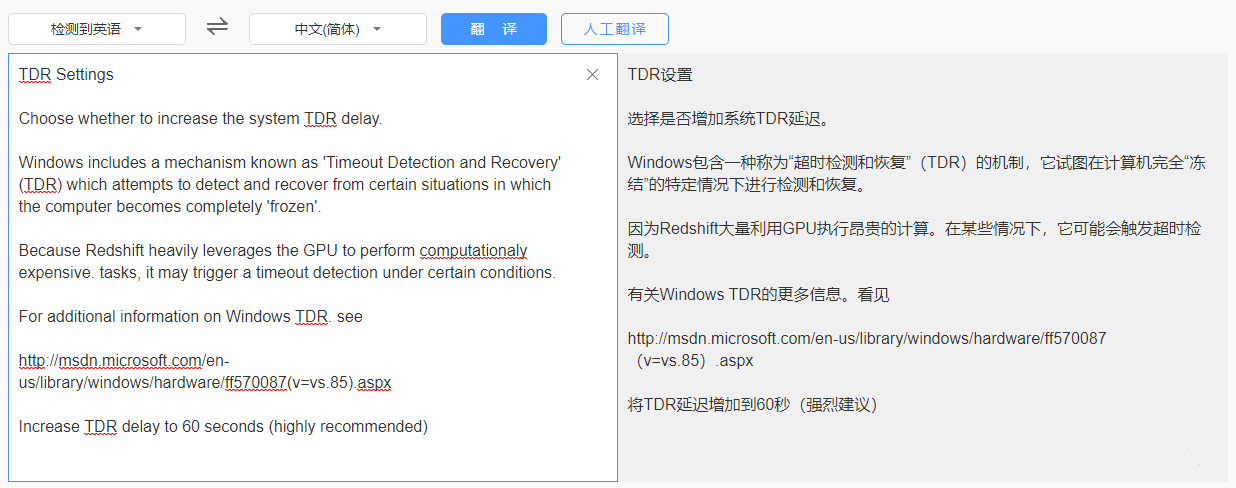
Redshift TDR

Visual Studio 2019 contains many new and exciting features and IDE productivity enhancements to support Windows app development cross platform mobile development Azure development web and cloud development and more To try out Visual Studio 2019 see Visual Studio 2019 Downloads

1 Installing the prerequisites 2 Download Visual Studio 2019 3 Starting Installation of Visual Studio 2019 4 Software License Terms 5 Installer Downloads the required files 6 Choose what to install 7 Installing Registration Summary Edition of Visual Studio 2019 The Visual Studio 2019 comes in three editions

The following products support the minimum system requirements below Visual Studio Enterprise 2022 Visual Studio Professional 2022 Visual Studio Community 2022

Visual Studio 2019 Professional Edition Hardware Requirements Marc Dominic M Magat 1 Jan 15 2021 2 27 AM Hi Microsoft This is to inquire what are the requirements of Visual Studio 2019 Professional Edition in terms of hardware specification Processor Storage and Memory Thank you Visual Studio Visual Studio Setup Sign in to follow 1 comment

Download Steps To kick off your experience with Visual Studio 2019 Community edition the first step is to download the installer Head to the official Microsoft website to grab the setup file Select The Edition Download The Installer
Here are the ideal system requirements for Visual Studio 2019 Operating System Microsoft recommends running Visual Studio 2019 on a 64 bit system It is ideal to use Windows 10 version 1703 or higher on a personal computer and Windows Server 2019 Standard and Datacenter when deploying the software on servers Remote Tools for Visual Studio 2019 Microsoft Visual C Redistributable for Visual Studio 2019 Web Installer Download 2017 Visual Studio 2017 and other Products To download any product from the following list click the download button and log in with your Visual Studio Subscription account when prompted
Overview This page contains the minimum system requirements for the Visual Studio 2017 family of products For information on compatibility see Visual Studio 2017 Platform Targeting and Compatibility If you need help with improving performance see Visual Studio performance tips and tricks What s New See what s new in Visual Studio 2017