Modify Sources List Ubuntu Ubuntu 10 10 Ubuntu 10 10 Ubuntu Free Stock Photo Public Domain Pictures Canonical Outs Major Kernel Security Updates For All Supported Ubuntu Understanding And Using Sources list For Ubuntu Simple Ubuntu Command The idea is that the primary sources list file is for the official Ubuntu repositories and for any external repositories and PPA you add a list file with the repository details in this sources list d directory This makes managing the repositories easier as you don t mess up with the default repositories
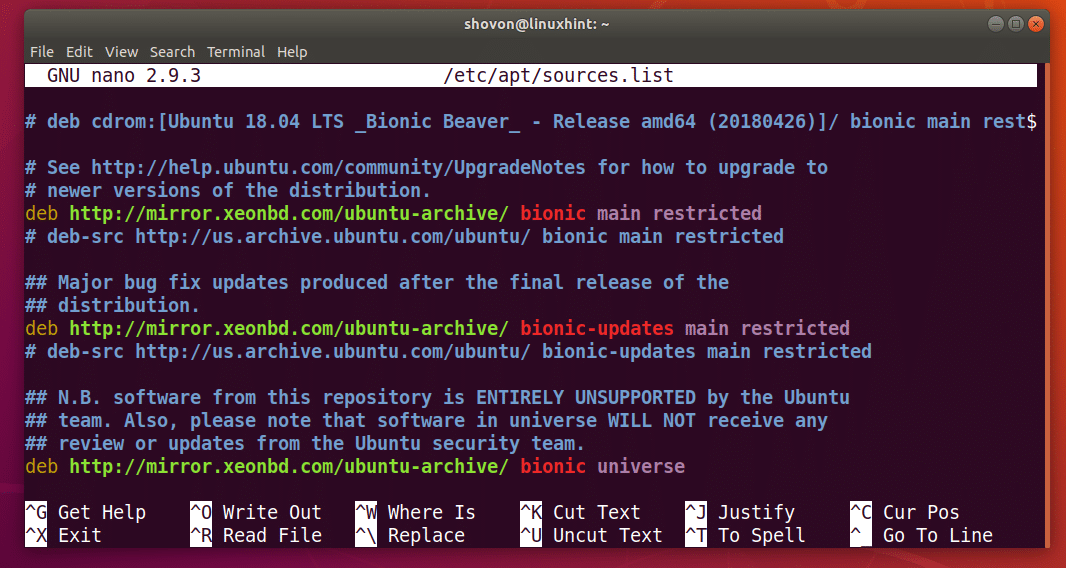
10 Use the default terminal text editor program nano instead of gedit to edit etc apt sources list Open the terminal and type sudo nano etc apt sources list The sources list file contains repository details with each uncommented line representing a separate repository Every line in the sources list file follows a common format The first field denotes the type of package provided by the repository On Debian and Ubuntu you ll find one of these two archive types deb and deb src
Simple Ubuntu Command File Ubuntu Alternative Background svg Wikimedia Commons Ubuntu 20 04 Myfreax Il Blog Di Antonio E Marilena Libretti Pediatrici A Met Ubuntu 17 10 Return Of The GNOME Ars Technica Sources list Barzek Barzek AdobeAir Is Now Available For Ubuntu 18 04 17 10 17 04 16 04 14 04 Ubuntu Sources List Editing Guide Settings Where Does One Set The Extent Of The Desktop In Ubuntu
Modify Sources List Ubuntu
 Modify Sources List Ubuntu
http://news.mydrivers.com/Img/20100919/09015337.jpg
After changing sources list on ubuntu how do I make him reload refresh Ask Question Asked 13 years 7 months ago Modified 13 years 7 months ago Viewed 39k times 14 after changing sources list on ubuntu how do I make him reload refresh So new packages in the new sources will be found ubuntu package management aptitude Share
Templates are pre-designed documents or files that can be utilized for different functions. They can save effort and time by offering a ready-made format and design for creating different sort of material. Templates can be used for personal or expert tasks, such as resumes, invites, flyers, newsletters, reports, discussions, and more.
Modify Sources List Ubuntu

Understanding The Sources list File In Ubuntu

File Ubuntu Alternative Background svg Wikimedia Commons

Ubuntu 20 04 Myfreax

Il Blog Di Antonio E Marilena Libretti Pediatrici A Met

Sources list Barzek Barzek

AdobeAir Is Now Available For Ubuntu 18 04 17 10 17 04 16 04 14 04
To start editing your sources list on Ubuntu with Software Updates launch the app by searching for Software Updates in the app menu Once the program is open follow along below Adding new repos If you want to add a new repo to Ubuntu by editing your sources list here s how to do it with the Software Updates app

To do so issue the following command sudo cp etc apt sources list etc apt sources list backup Typically the beginning of the file etc apt sources list looks like this

Login to edit SourcesList The sources list file is a key factor in adding or upgrading applications to your Ubuntu installation This is also used by your system for system updates The file is basically the roadmap for your system to know where it may download programs for installation or upgrade
2 System is clear and only installed and updated The problem is I clean etc apt sources list etc apt sources list When try to add repo add apt repository s deb http archive ubuntu ubuntu lsb release sc main restricted or add apt repository s deb http archive ubuntu ubuntu jammy main restricted

1 It opens etc apt sources list in an editor Exactly like the manpage says It might be easiest to understand if you simply try it user535733 Jun 9 2022 at 22 58 Thanks It let me to choice 3 editors I selected nano But why exists this option I mean the sources list can be edited by hand by other editor right such as vim Manuel Jordan
cat etc apt sources list Note this file is written by cloud init on first boot of an instance modifications made here will not survive a re bundle if you wish to make changes you can a add apt preserve sources list true to etc cloud cloud cfg or do the same in user data b add sources in etc apt sources list d The etc apt sources list d directory provides a way to add sources list entries in separate files Two different file formats are allowed as described in the next two sections Filenames need to have either the extension list or sources depending on the contained format
Just follow the below methods to edit etc apt sources list file in your Ubuntu system Edit etc apt sources list File First backup the etc apt sources list using the below command Open the terminal app ctrl alt t and run sudo cp etc apt sources list etc apt sources list bak You can edit that file using GUI and command line methods