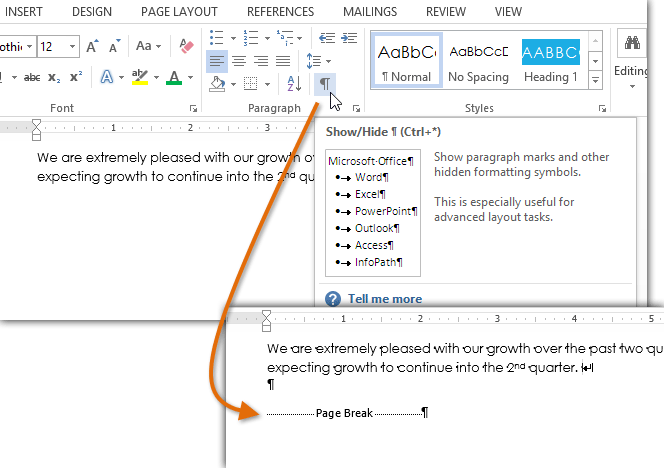
Microsoft Word Remove Paragraph Breaks How To Mass Remove Paragraph Breaks In Google Docs YouTube Vytrvalos Rozmazn va Nedorozumenie How To Create Section Break In Word Odporova Spreneveri Rok How To Remove Hidden Formatting Symbols In Word HOWTOEROMV Topic Q A List SOLVED Remove Paragraph Breaks In Outlook Web Jul 7 2022 nbsp 0183 32 To do so click the quot Show Hide quot icon in the quot Paragraph quot group of the quot Home quot tab You ll now be able to see the breaks Next click and drag your cursor over the section or page break to select it The break will be highlighted in gray when selected Once it s selected press Backspace The section or page break will now be removed
Web Nov 4 2015 nbsp 0183 32 Press Ctr Alt K This will invoke AutoFormat which I am guessing will help adjust the content as pasted from the other source If it doesn t work you can just undo to get it back to the way it was Web Delete a section break Windows macOS Web If not showing select Home gt Show Hide to show section breaks Section breaks look like this Note The type of section break shown above is a Continuous section break there are other types of section breaks Place your cursor just before the section break and press Delete Warning
SOLVED Remove Paragraph Breaks In Outlook Microsoft Word Remove Section Break Symbol Lokasinpapers How Do I Delete Horizontal Line In Word 2013 Glulsd Gestione Maneggevole Categoria How To Insert Break Line In Word Testi Balena Sorgere How To Quickly Remove Paragraph Marks Or Hard Returns In Word Remove Paragraph Marks In Word Mac Hotkey Gainlasopa How To Remove Line In Word Pickupbrain Be Smart Riset C mo Desactivar Las Marcas De P rrafo 7 Pasos 84882 Hot Sex Picture Ngsraka blogg se Microsoft Word Remove Section Break Symbol
Microsoft Word Remove Paragraph Breaks
 Microsoft Word Remove Paragraph Breaks
https://i.ytimg.com/vi/DEBPs0Sr9_c/maxresdefault.jpg
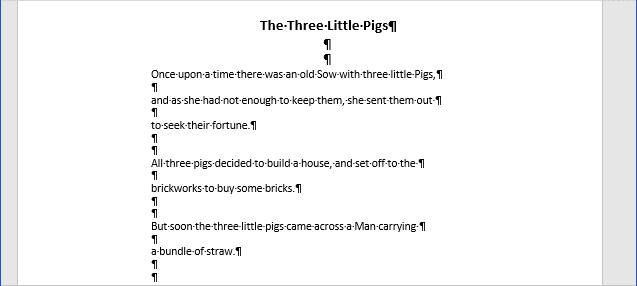
Web On the Home tab in the Paragraph group click Show Hide to show all formatting marks including page breaks Double click the page break to select it then press Delete Click Show Hide again to hide the remaining formatting marks in the document This can also work for a section break
Templates are pre-designed documents or files that can be used for numerous purposes. They can conserve effort and time by providing a ready-made format and layout for developing various type of material. Templates can be used for individual or expert projects, such as resumes, invites, leaflets, newsletters, reports, presentations, and more.
Microsoft Word Remove Paragraph Breaks

SOLVED Remove Paragraph Breaks In Outlook
Microsoft Word Remove Section Break Symbol Lokasinpapers
How Do I Delete Horizontal Line In Word 2013 Glulsd
Gestione Maneggevole Categoria How To Insert Break Line In Word Testi Balena Sorgere
Remove Paragraph Marks In Word Mac Hotkey Gainlasopa
How To Remove Line In Word Pickupbrain Be Smart Riset

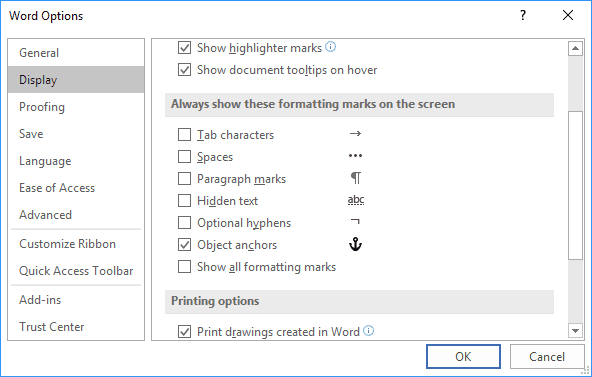
Web Jan 10 2021 nbsp 0183 32 Click the Home tab in the Ribbon Click Show Hide 182 in the Paragraph group Paragraph marks tabs spacing and manual page breaks will display but will not print Click the same command to hide the paragraph marks and other nonprinting characters Removing a single hard return or paragraph mark

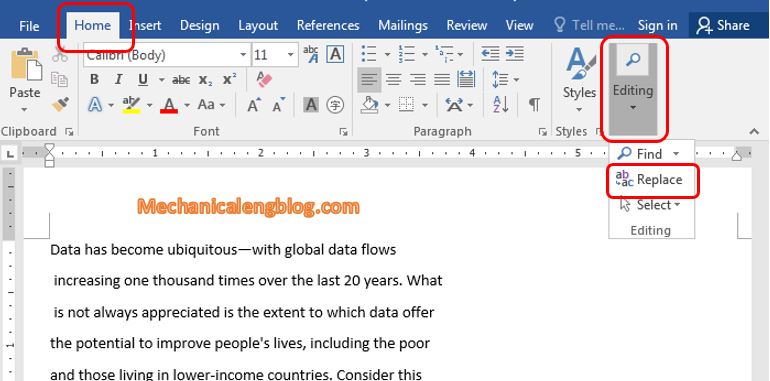
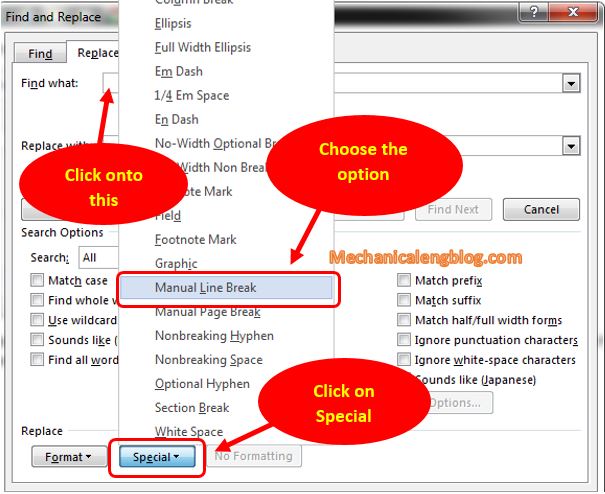
Web Sep 20 2019 nbsp 0183 32 Simply delete the extra blank paragraphs To all appearances the paragraph format is set to have additional whitespace either before or after or both you don t need to insert extra blanks between paragraphs Use Search and Replace and replace the doubled Paragraph Marks with a single Paragraph Mark
Web May 20 2020 nbsp 0183 32 Share 114K views 3 years ago A Quick Win You can very easily remove unwanted line breaks and paragraph marks from a Word document using the tips in this video It takes a few seconds but
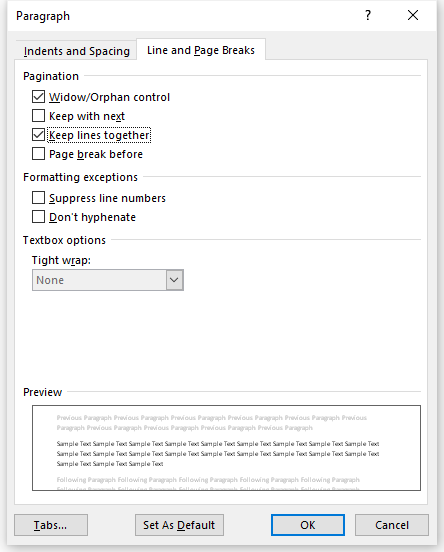
Web Suppress line numbers from a paragraph or paragraphs Select the paragraph or paragraphs On the Home tab in Word or on the FORMAT TEXT tab in an Outlook email select the Paragraph Dialog Box launcher Select the Line and Page Breaks tab Under Formatting select Suppress line numbers Select OK

Web Oct 20 2020 nbsp 0183 32 You file shows that there is break that creates the new page Put the cursor on the right of 2020 Press Enter twice Then Shift Arrow Down to select the break and what s found on the next page Then press Delete You should be able to write after 2020
Web There are two types of page breaks in Word breaks that Word automatically adds to mark the end of each page and manual page breaks that you can add You can delete manual page breaks You can t remove automatic page Web Delete a page break Select Home gt Show Hide This will display non printing characters paragraph markers section breaks page breaks etc that you may want to see while you re working on your document Double click the page break so that it s selected and then press Delete
Web On the Home tab in the Paragraph group click Show Hide to show all formatting marks including page breaks Double click the page break to select it then press Delete Click Show Hide again to hide the remaining formatting marks in the document This can also work for a section break See Also Insert a page break in Word Insert a section break