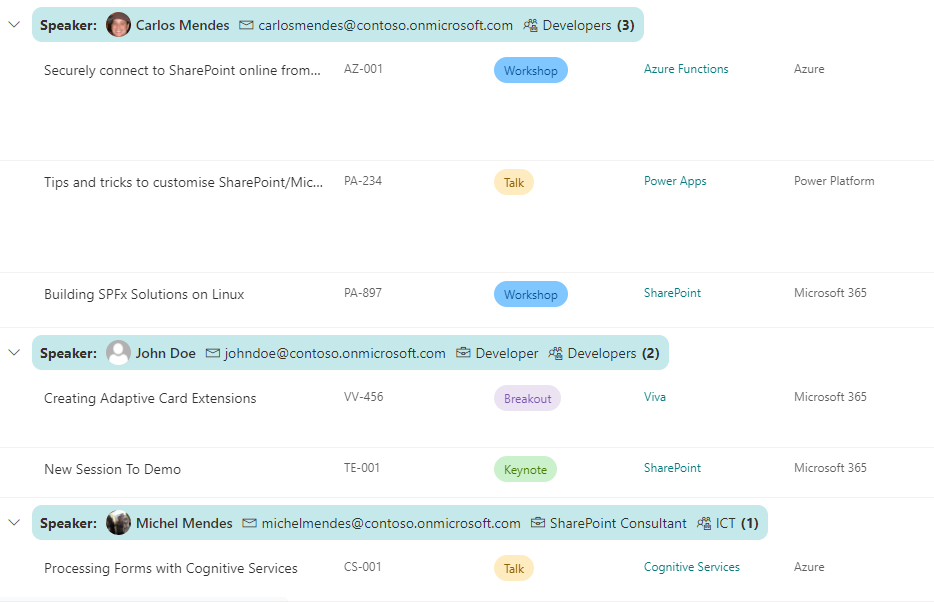
Microsoft Lists Sharepoint Lists Displaying Additional People Properties In SharePoint Lists Group MS Lists Sharepoint Seznamy Pro Za te n ky Dobr Kurzy S r o What Are Microsoft Lists Vs SharePoint Lists Capabilities And Lists Microsoft Lists SharePoint Microsoft Planner Microsoft Lists Evolving The Value Of SharePoint Lists And Beyond Web Jul 13 2021 nbsp 0183 32 On to the gems mixed with targeted tips and tricks and links to relevant documentation You ll also find a new episode of The Intrazone Top 5 hidden gems Microsoft Lists covering the 5 gems and audio snippets from Jeff Teper and Andrea Lum You ll also find a few upcoming events
Web May 2 2023 nbsp 0183 32 Microsoft Lists is designed to unlock your team s full potential by reducing the strain and drudgery of keeping everybody organized on the same page and No more editing dates in the time zone and region settings defined by the configuration of the backing SharePoint site Calendar View Improvements Roadmap 100504 Microsoft Lists Web The Microsoft Lists app is where you can find manage your lists quot Favorite quot a list Select the star symbol on a list to make it a favorite See recently used lists Recent lists shows the lists you recently created worked on or someone else shared with you To see only the lists in your personal storage select Recent lists gt My lists
Microsoft Lists Evolving The Value Of SharePoint Lists And Beyond Microsoft 365 Accessing Microsoft Lists From The SharePoint App Bar I Microsoft Lists Privater Blog Von Tomislav Karafilov Microsoft Lists Vs SharePoint Lists SMARTER Business Tip 1402 Why You Should Not Use Microsoft Lists SharePoint Lists For Getting Started With Microsoft Lists For SharePoint Online Bloom Software Microsoft Lists For Teams Reaches Ga As A New Business Apps Development The Latest Information Tracking Tool From Microsoft Lists Formerly SharePoint Lists Are Evolving A Guide To Microsoft 365 s New Service
Microsoft Lists Sharepoint Lists
 Microsoft Lists Sharepoint Lists
https://michelcarlo.com/wp-content/uploads/2021/12/group-header.png
Web Nov 2 2022 nbsp 0183 32 Microsoft Lists vs SharePoint Lists How to add Microsoft Lists to Microsoft Teams What is Microsoft Lists Remember SharePoint lists Imagine being able to use it externally outside the context of SharePoint like an independent app That s basically what Microsoft Lists is
Templates are pre-designed files or files that can be utilized for numerous purposes. They can save effort and time by providing a ready-made format and design for developing various sort of content. Templates can be utilized for individual or professional jobs, such as resumes, invitations, leaflets, newsletters, reports, discussions, and more.
Microsoft Lists Sharepoint Lists

Tracy Van Der Schyff My Data Summit 05 07 Sep 2022 Global Event

Microsoft 365 Accessing Microsoft Lists From The SharePoint App Bar I

Microsoft Lists Privater Blog Von Tomislav Karafilov
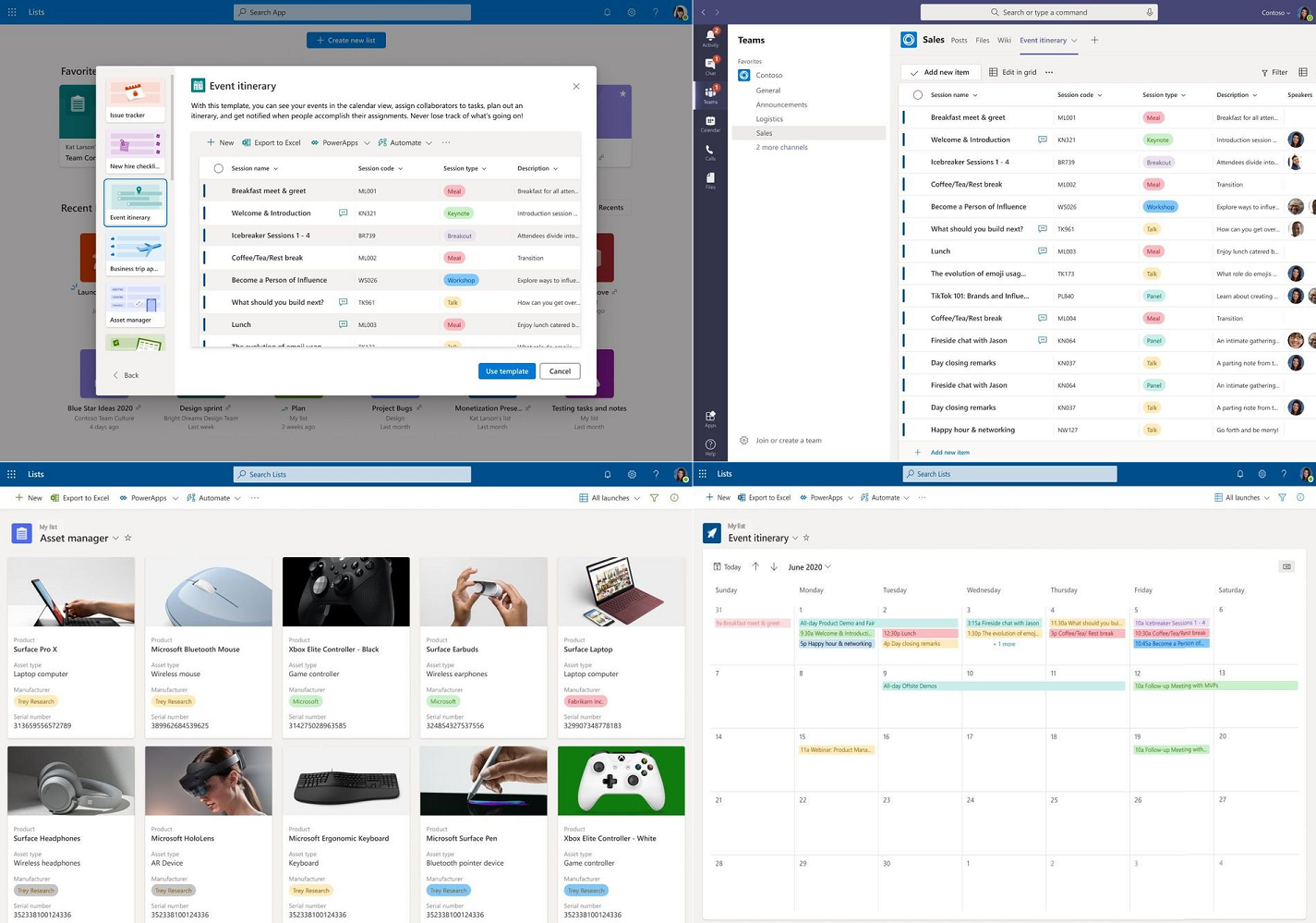
Microsoft Lists Vs SharePoint Lists SMARTER Business

Getting Started With Microsoft Lists For SharePoint Online Bloom Software

Microsoft Lists For Teams Reaches Ga As A New Business Apps Development
Web Work with anyone anywhere Configure your lists to better organize events issues assets and more Create share and track lists with anyone Start quickly with ready made templates See recent and favorite lists Track and manage lists wherever you re working Easily share lists with others Keep everyone in sync with lists in Microsoft Teams

Web Create a list From the Lists app in Microsoft 365 select New list To get to the Lists app at the top of any page select the Microsoft 365 app launcher select All apps and then select Lists From your SharePoint site home page

Web May 19 2020 nbsp 0183 32 Microsoft Lists are stored in SharePoint sites and can be accessed from the new Lists home page directly from the SharePoint team site as shown here or from within Microsoft Teams Microsoft Lists is a Microsoft 365 app that helps you track information and organize work
Web Feb 2 2023 nbsp 0183 32 This is true within Microsoft 365 for work and school AAD and personal and home plans MSA Preview Click the New list button at the top for the Microsoft Lists app in Microsoft 365 This brings up the common Create a list dialog front and center Clicking the Lists app icon brings you to the Lists app in Microsoft 365

Web Learn to get started with Microsoft Lists in the app Microsoft SharePoint Create a list in a SharePoint site Unlike SharePoint document libraries lists are not created by default when you create a site
Web Learn how to create relationships between lists by using a combination lookup columns and relationship enforcement cascade and restrict delete to preserve the integrity of your data and to view edit and delete items and lists in list relationships Web Jun 15 2022 nbsp 0183 32 Ready made templates Microsoft s built in ready made templates help you create lists using pre configured layouts that include columns color formatting and data structure You can customize each list to fit your situation by changing the formatting to highlight important data configuring forms to see more at a glance and setting
Web Go to the list or select the list item you want to share and then select Share For lists you can find Share in the top ribbon For list items you can find Share to the right of the Title column or in the top ribbon Select People with existing access can use the link Select Specific people then Apply