Meet Not Working Google Meet Not Working Conference Call How To Fix Mic Not Working In Google Meet How To Solve Mic Not Working How To Fix Google Meet Not Working Carlcare How To Fix Google Meet Not Working On Android LaptrinhX News Google Meet Camera Not Working In Chrome On Mac Fix MacReports WEB Dec 15 2023 nbsp 0183 32 Solution Change the setting to allow Meet to use your camera and microphone click on the camera icon in the address bar and select the Always allow option If these changes don t resolve the
WEB Dec 29 2022 9 05 AM PST There are several reasons your Google Meet camera could be malfunctioning Monticello Shutterstock If your camera isn t working in Google Meet test to see if WEB May 21 2023 nbsp 0183 32 1 Check Your Internet Connection 2 Clear Your Browser Cache and Cookies 3 Disable Extensions and Add Ons 4 Check Hardware Acceleration Mode amp Enable JavaScript 5 Change DNS 6 Google Meet Server Issues Reasons for Google Meet Not Working
Google Meet Camera Not Working In Chrome On Mac Fix MacReports Fix Google Meet Audio Not Working Problem YouTube Jitsi Meet Not Working After Jicofo Upgrade Openfire meetings Google Meet Not Working Top 10 Ways To Fix Google Meet Microphone Not Microphone Not Working In Google Meet Try These Common Fixes Google Meet Not Working Guide How To Fix Network Error In 2022 How To Fix Google WiFi Router Not Working Lifehack How To Fix Google Meet Not Working On Android Fix Google Meet Not Working On Chromebook Technipages
Meet Not Working
 Meet Not Working
https://conferrencecall.com/wp-content/uploads/2022/05/Google-Meet-Not-Working-1-1024x576.jpeg
WEB Google Meet is a video conferencing app It is the business oriented version of Google s Hangouts platform and is suitable for businesses of all sizes Using your browser share your video desktop and presentations with teammates and customers I have a problem with Google Meet Google Meet outages reported in the last 24 hours
Pre-crafted templates provide a time-saving service for developing a varied range of files and files. These pre-designed formats and designs can be made use of for numerous personal and expert tasks, consisting of resumes, invites, flyers, newsletters, reports, presentations, and more, streamlining the material development procedure.
Meet Not Working

Microphone Google Meet Tidak Berfungsi your Mic Is Muted By System

Fix Google Meet Audio Not Working Problem YouTube
Jitsi Meet Not Working After Jicofo Upgrade Openfire meetings
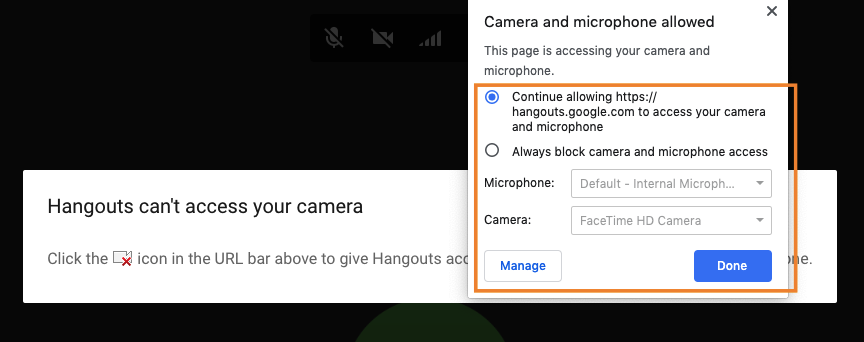
Google Meet Not Working Top 10 Ways To Fix Google Meet Microphone Not

Google Meet Not Working Guide How To Fix Network Error In 2022
How To Fix Google WiFi Router Not Working Lifehack

WEB Only meetings scheduled through Google Calendar will show up on meet google or in your Meet app Make sure you re signed in to your Google Workspace account for work or school or your

WEB Refresh the Google Meet page and grant camera access when prompted Troubleshoot more Check that your computer s camera is connected turned on and pointing towards you unobstructed Check if
WEB Jan 14 2024 nbsp 0183 32 If you re having problems joining an existing Google Meet video meeting or creating a new meeting first make sure that you are signed in with a Google or Google Workspace account you can do so
WEB To see if Meet is experiencing issues go to the Google Workspace Status Dashboard Green icon Meet is operating normally Try the troubleshooting tips in this article to resolve issues

WEB Nov 12 2021 nbsp 0183 32 Solutions to Try Frequently Asked Questions Your Google Meet camera may not be working in many ways When you try to launch your video stream there s no video When you launch your video there s an error message You can launch your camera video but there s no sound
WEB Dec 30 2022 nbsp 0183 32 When your Google Meet microphone isn t working it can bring a meeting to a screeching halt but the good news is that it s relatively easy to troubleshoot and solve Here are seven ways to get WEB July 20 2020 Make Sure Google Meet has Access to the Camera Make Sure Apps Have Access to your Camera Check Your Anti Virus Software Run the Hardware and Devices Troubleshooter Re register the Camera on your Computer Update Your Camera Drivers Reset the Camera Hardware
WEB Sep 22 2021 nbsp 0183 32 1 Give Browser Permissions Mic and Video Google Meet would require both mic and camera permissions in order for the mic and video to work When you launch Google Meet for the first time in your browser it asks for the same However you can allow it manually too in case you blocked it out of habit