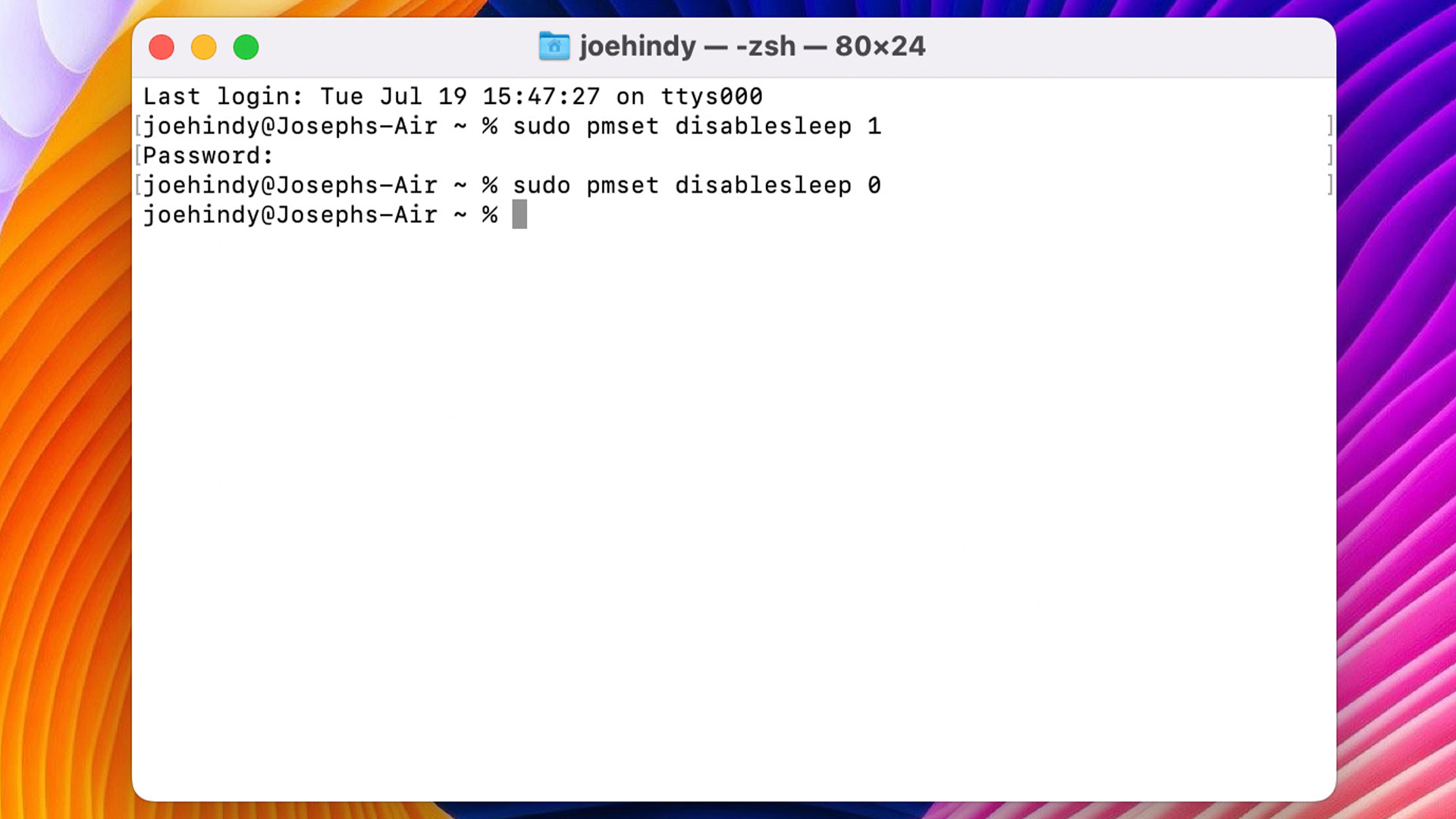
Macbook Terminal Open Command A1278 Motherboard Diagram Coolyup MacBook Ipad MacBook Retina Wikipedia Mac Terminal 10 Awesome Mac Terminal Commands YouTube Apple Macbook Air M1 Chip At Rs 86800 Apple MacBook Air In Gurugram Web Apr 21 2021 nbsp 0183 32 How to Open Terminal Command Prompt on Mac You can use terminal by opening Finder gt Applications gt Utilities gt Terminal A window will open and you will see a command prompt ending with a The command line shown is ComputerName CurrentDirectory Username
Web May 18 2023 nbsp 0183 32 This Mac terminal guide listed all the important commands for navigating the terminal and performing the basic file directory and network management functions The guide also provided a PDF cheat sheet with the same commands on one easy to navigate page for quicker reference Web Feb 26 2022 nbsp 0183 32 Use Terminal to Execute Commands Use Flags to Modify Commands Change Directory cd List Files amp Folders ls Copy cp Move and Rename mv Make a New Directory mkdir Delete Files amp Folders rm Display Disk Usage amp Free Space du amp df Find a File find Open a File open Edit a File nano Run as Super User sudo
Apple Macbook Air M1 Chip At Rs 86800 Apple MacBook Air In Gurugram MacBook Air 15 inch Vs MacBook Pro 14 inch TechRadar How To Close A MacBook Lid Without Entering Sleep Mode How To Open And Use Terminal On A Mac With A Few Basic Commands How To Navigate Files And Folders In Terminal Macworld Apple MacBook Pro MC700GR Getitnow gr Turned On Imac Beside Macbook On Table Free Stock Photo Buy Tomtoc 360 Protective Laptop Sleeve For 14 inch MacBook Pro M2 M1 Macbook Backup For Mac
Macbook Terminal Open Command
Macbook Terminal Open Command
https://forums.macrumors.com/attachments/slide1-jpg.485323/
Web Jan 29 2024 nbsp 0183 32 1 Open Terminal using Spotlight Search The first way to open Terminal is to use Spotlight Search In fact it s one of the easiest ways to open any app on Mac Click the magnifying glass icon from the menu bar Or press Command Space to launch it Start typing Terminal and double click the search result to open it
Templates are pre-designed documents or files that can be utilized for numerous functions. They can conserve time and effort by offering a ready-made format and layout for producing various kinds of material. Templates can be used for personal or professional projects, such as resumes, invitations, leaflets, newsletters, reports, discussions, and more.
Macbook Terminal Open Command

Entwurf Zahnschmerzen Ungl ck Mac Book Kaufen Stehlen Ver nderung

MacBook Air 15 inch Vs MacBook Pro 14 inch TechRadar
How To Close A MacBook Lid Without Entering Sleep Mode

How To Open And Use Terminal On A Mac With A Few Basic Commands
Apple MacBook Pro MC700GR Getitnow gr

Turned On Imac Beside Macbook On Table Free Stock Photo
Web Feb 16 2017 nbsp 0183 32 The macOS open Command You can learn more about using Terminal and the shell on macOS in my my book macOS Terminal and Shell Thank you Most Terminal users will know that open will open the

Web 2 days ago nbsp 0183 32 How to open Terminal from Desktop The easiest way to open Terminal is from Spotlight search Click on the small magnifying glass icon at the top right corner of your Mac or press Command Space keys at the same time to launch Spotlight Then you can type in quot Terminal quot and double click the appeared Terminal app to open it

Web To explore the Terminal User Guide click Table of Contents at the top of the page or enter a word or phrase in the search field Learn how to use Terminal on your Mac to interact with macOS using the command line

Web May 14 2019 nbsp 0183 32 How to open and use the Terminal app on a Mac computer with a few basic commands you can use to take control of your operating system Written by Devon Delfino edited by John Lynch May

Web Execute commands and run tools in Terminal on Mac You can use the command line environment interactively by typing a command and waiting for a result or you can use the shell to compose scripts that run without direct interaction To learn more about commands you can use the Terminal app to read the documentation for low level UNIX tools and
Web Dec 18 2023 nbsp 0183 32 Table of Contents Key Takeaways What Can You Do with Terminal on Mac Method 1 Spotlight Search Method 2 Siri Method 3 Launchpad Method 4 Finder Applications and Utilities Folder In a Specific Folder Method 5 Add to Dock Method 6 In Recovery Mode Apple Silicon M1 M2 or M3 processors Intel based Macs FAQs Web 7 Answers Sorted by 45 osascript e tell app quot Terminal quot do script quot echo hello quot end tell This opens a new terminal and executes the command quot echo hello quot inside it Share
Web Jan 10 2024 nbsp 0183 32 To launch Terminal from Spotlight Search press Command Space search quot Terminal quot then hit Enter or click the result To find Terminal among your installed applications open the Launchpad app and search for quot Terminal quot Keep the Terminal icon in your Dock for faster access in the future Right click Terminal then select Options gt